

Support our independent tech coverage. Chrome Unboxed is written by real people, for real people—not search algorithms. Join Chrome Unboxed Plus for just $2 a month to get an ad-free experience, access to our private Discord, and more. Learn more about membership here.
START FREE TRIAL (MONTHLY)START FREE TRIAL (ANNUAL)
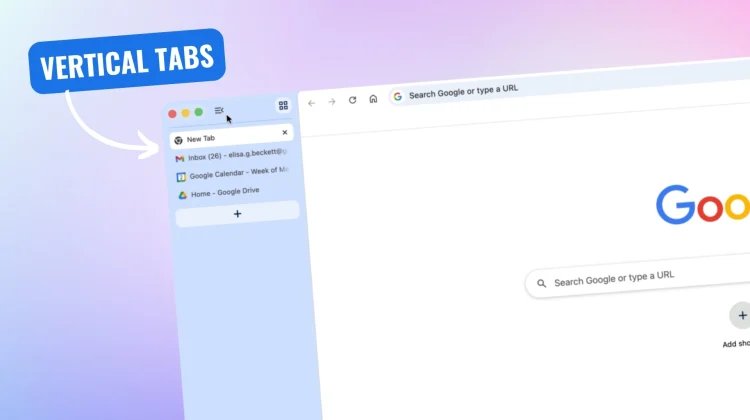
A few months ago, we reported that Google was finally testing one of the most-requested features in the Canary channel: vertical tabs. Well, today is the day we have all been waiting for—Google is officially rolling out native vertical tabs to the stable version of Chrome.
The implementation is incredibly simple. You don’t have to dig through hidden flags or install third-party extensions anymore. To turn it on, all you have to do is right-click on any Chrome window and select “Show Tabs Vertically.” Then your horizontal tab strip disappears, and your tabs instantly stack down the left side of your screen.
Reclaiming your screen real estate
This is so much more than just a minor UI tweak; it is a big productivity shift. Because virtually all modern monitors and laptop displays are widescreen, horizontal space is abundant, while vertical space is precious. Meanwhile, the websites and web apps we use every day are practically always vertical experiences. By moving your tabs to the side of your browser window, you reclaim that precious vertical height for your actual content.
It also solves the headache of having too many tabs open. If you open 20 tabs across the top of your screen, they shrink down until all you can see are tiny, confusing favicons. But with vertical tabs, you can easily read the full page titles and manage your tab groups, no matter how many windows you have open. You can even shrink the sidebar down to just favicons if you want a truly minimalist setup.
Reading Mode gets a full-page upgrade
Vertical tabs aren’t the only thing getting an overhaul. Google is also rolling out an update to Chrome’s native Reading Mode. Previously, Reading Mode functioned primarily as a side panel.
Now, it has been upgraded to a completely immersive, full-page interface. When you right-click on a cluttered webpage and select “Open in reading mode,” Chrome will instantly strip away ads, images, and other visual distractions, transforming the site into a clean, text-focused reading experience.
These updates are a huge win for productivity and focus, and they finally bring Chrome into parity with some of the best features offered by competing browsers. Google says these two new features are beginning to roll out to the desktop version of Chrome starting today. If you haven’t seen them pop up just yet, ensure your browser is fully updated by going to Settings > About Chrome.
Are you going to make the switch to vertical tabs, or are you sticking with the classic horizontal look? Let me know in the comments!

