

Support our independent tech coverage. Chrome Unboxed is written by real people, for real people—not search algorithms. Join Chrome Unboxed Plus for just $2 a month to get an ad-free experience, access to our private Discord, and more. Learn more about membership here.
START FREE TRIAL (MONTHLY)START FREE TRIAL (ANNUAL)
Google I/O 2025 is off and running, and the announcements are painting a clear picture of an AI-driven future; especially for Google Search. While “AI Overviews” (which evolved from SGE in Labs) have already been making waves by providing AI-generated summaries, Google is now taking things a giant leap further with the full roll-out of “AI Mode” in Search. This isn’t just an iteration; it’s a new, more powerful end-to-end AI Search experience designed for deeper exploration, complex reasoning, and getting tasks done.
Google shared that AI Overviews have been a hit, increasing Search usage and continuing to be a core part of the experience; and now they will be powered by a custom version of the Gemini 2.5 model in the U.S. But the biggest news today is that AI Mode (which also leverages Gemini 2.5 and is starting to roll out in the U.S. right now) won’t require a Google Labs sign-up. You’ll now simply see it as a new tab in Search and in the search bar of the Google app.
What is AI Mode?
Think of AI Mode as Google Search on steroids. It uses a “query fan-out technique,” breaking down your questions into subtopics and firing off numerous queries simultaneously. This allows it to dive deeper into the web than a traditional search, uncovering hyper-relevant content. Google says AI Mode is where they’ll first introduce Gemini’s most advanced, frontier capabilities, with many features eventually graduating to the core Search experience after user feedback.
While the base AI Mode is rolling out now, Google also previewed a slate of truly next-level features that will be launching first in Search Labs for AI Mode users in the coming weeks and months. You’ll want to opt into the AI Mode experiment in Labs to be among the first to try these:
- Deep Search: For when you need to go beyond a quick answer, Deep Search takes the query fan-out technique to the extreme. It can issue hundreds of searches, reason across all that information, and generate an expert-level, fully-cited report in minutes to potentially save you hours of research.
- Search Live (Project Astra): Search Live brings the real-time, conversational AI capabilities of Project Astra into Search. You’ll be able to tap a “Live” icon in AI Mode (or Lens), point your camera at something, and have a back-and-forth conversation with Search about what you’re seeing. Imagine getting help with a tricky project or having complex concepts explained visually.
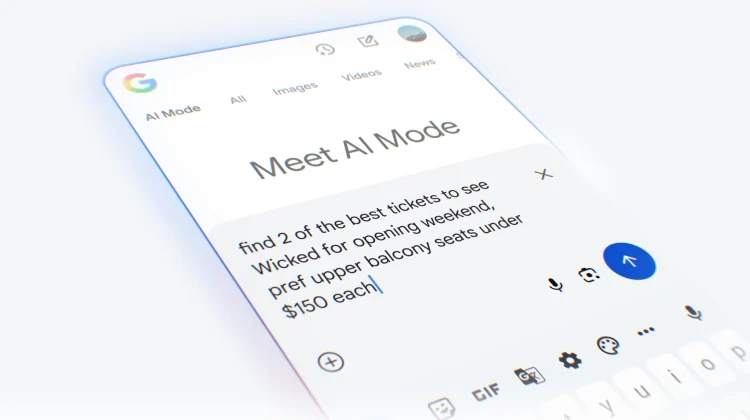
- Agentic Capabilities (Getting Things Done): Powered by “Project Mariner,” AI Mode will soon be able to help you complete tasks. The example given was asking it to “Find 2 affordable tickets for this Saturday’s Reds game in the lower level.” AI Mode would then analyze options across sites, handle form-filling, and present you with choices to complete the purchase, keeping you in control. This will start with event tickets, restaurant reservations, and local appointments, with partners like Ticketmaster, StubHub, and Resy on board.
- Your AI Shopping Partner: The new AI Mode shopping experience will combine Gemini with Google’s Shopping Graph. It aims to help you browse for inspiration, consider options, and narrow down products. A standout feature will be the ability to virtually try on billions of apparel listings using just a single image of yourself, and an agentic checkout feature to buy items with Google Pay when the price is right, under your guidance.
- Personal Context: AI Mode will soon offer personalized suggestions based on your past searches. You’ll also be able to opt-in to connect other Google apps, starting with Gmail, to bring in more personal context for even more tailored results – like planning a trip based on your flight and hotel confirmations from Gmail. This will always be under your control.
- Custom Charts and Graphs: Need to visualize data? AI Mode will be able to analyze complex datasets and create custom graphics on the fly, particularly for sports and finance queries. Imagine asking it to compare the home-field advantage for two baseball teams and getting an interactive graph in response.
Availability
Again, the foundational AI Mode tab starts rolling out in the U.S. today. The advanced features detailed above (Deep Search, Live, Agentic capabilities, etc.) will be available for those who opt into the AI Mode experiment in Search Labs over the coming weeks and months.
This is a profound shift for Google Search, moving it far beyond just a list of links into a truly interactive, intelligent assistant that can understand deeply, perform complex tasks, and even act on your behalf. The future of search is looking incredibly dynamic, and we’re eager to see how these AI Mode capabilities reshape how we all find information and get things done online.
SUBSCRIBE TO UPSTREAM
Get Chrome Unboxed delivered straight to your inbox
Upstream is our flagship, curated newsletter with the top stories, most click-worthy deals, giveaways, and trending articles from Chrome Unboxed sent directly to your inbox a few times a week. Join 31,000+ subscribers.

