
• Skip to main content
  • Skip to primary sidebar
  • Deals
  • Features
  • Guides
  • Chromebooks
  • Videos
  • Podcast
  • More +
    • Reviews
    • Unboxing
    • Upcoming Devices
    • Chromebook Plus
    • Chrome
    • ChromeOS
    • Chrome OS Flex
  • Search
  • Sign Up
  • Log In
Chrome Unboxed – The Latest Chrome OS News

Chrome Unboxed - The Latest Chrome OS News

A Space for All Things Chrome, Google, and More!

  • Deals
  • Features
  • Guides
  • Chromebooks
  • Videos
  • Podcast
  • More +
    • Reviews
    • Unboxing
    • Upcoming Devices
    • Chromebook Plus
    • Chrome
    • ChromeOS
    • Chrome OS Flex
  • Search
  • Sign Up
  • Log In

Google Home Has Hidden Pogo Pins In The Base – For Docking & Mods?

July 17, 2017 By Robby Payne View Comments

Support our independent tech coverage. Chrome Unboxed is written by real people, for real people—not search algorithms. Join Chrome Unboxed Plus for just $2 a month to get an ad-free experience, access to our private Discord, and more. Learn more about membership here.
START FREE TRIAL (MONTHLY)START FREE TRIAL (ANNUAL)

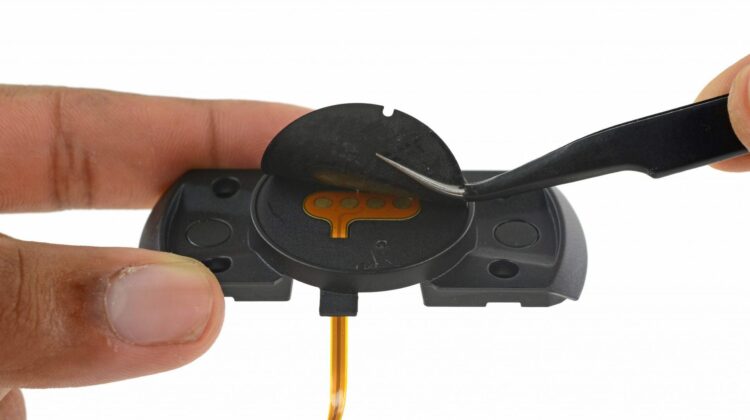
Photo Credit: ifixit.com – Sam Lionheart
I don’t know about you, but looking through a post on ifixit.com is always a fun experience.

The group routinely digs up all kinds of interesting nuggets about all kinds of tech. Reading their posts is like seeing behind a curtain you don’t normally get to slide out of the way.

Xremove ads

Back in November, they tore down Google Home to all its bits and pieces. What they found, in general, wasn’t really astonishing. Most of the pieces are what you’d expect in a smart speaker and even the Chromecast-like motherboard wasn’t really surprising as we knew Google Home was going to be simply a Chromecast in different clothes.

There was, however, one very interesting thing they uncovered. In the base of existing Google Home devices, under the padding on the base, there is a set of 4 pogo pins connected to the motherboard. For those wondering, pogo pins are simply connectors that can carry a variety of things from power to data. The Surface and iPad Pro tablets utilize them, for instance.

Featured Videos

Xremove ads

Currently, there is no use for these pins, and we can only wonder at what they might be for.

My Theory

The overriding theory I keep coming back to is this: with the strong magnets in place on the bottom of the unit, multiple modifications could be easily added.

With the combo of pogo pins and magnets, Google could simply roll out mods for the Google Home to enhance the experience without forcing more and more hardware down consumer’s throats each year.

Xremove ads

After all, a smart speaker isn’t exactly something I’m thinking of replacing every year like a phone, so the need for a brand new Google Home isn’t as pressing as a new Pixel Phone.

Those mods could expand as far as Google’s imagination, but there are a couple I’d love to see right now.

First up, a battery base. Think about it for a second: an inch-thick battery enclosed in a similarly clothed base (like the unit already has) that could simply click on to the bottom would be amazing.

Xremove ads

I wrote a piece last week lamenting the lack of battery in my Google Home and, much to my excitement, it appears an easy add-on could be in the cards.

Second, I could see a dock with a small touch screen attached similar to a setup like the Amazon Echo Show. Just drop in your Google Home and you get a screen and web cam to take Allo and Duo communications right from the device.

Lastly, something like a hifi speaker setup would be feasible as well. Imagine a fancy speaker setup that you can just drop your Google Home into to get much more massive sound out of it. Would people buy it? No idea, but I’m just throwing out ideas so you get the point that this unused I/O could end up doing lots of things.

Xremove ads

Perhaps we’ll see something about this at Google’s next hardware event. Maybe we won’t. It seems rather strange that Google would put something like this in place and then do absolutely nothing with it.

Considering how they built Bluetooth in and didn’t really mention it until recently, it stands to reason that Google Home has a few more tricks up its sleeve yet. We’ll be searching for clues for sure!

Thanks to Nicholas Conrad for the tip!

Filed Under: Google Assistant, News

About Robby Payne

As the founder of Chrome Unboxed, Robby has been reviewing Chromebooks for over a decade. His passion for ChromeOS and the devices it runs on drives his relentless pursuit to find the best Chromebooks, best services, and best tips for those looking to adopt ChromeOS and those who've already made the switch.

Primary Sidebar

Xremove ads

Deals

The Acer Chromebook Plus Spin 714 hits a new all-time low at $270 off

By Robby Payne
March 25, 2026

The best Chromebook deals today

By Robby Payne
March 24, 2026

You can score $40 off Google’s battery-powered Nest Doorbell right now

By Joseph Humphrey
March 20, 2026

The touchscreen Lenovo Chromebook Slim 3 is a steal at under $200

By Robby Payne
March 16, 2026

Google TV Streamer and Remote held in front of a wall-mounted TV

The premium Google TV Streamer 4K is back down to $80

By Joseph Humphrey
March 16, 2026

More Deals

Xremove ads

Reviews

Acer Chromebook Plus Spin 514 Review: Kompanio Ultra power in a convertible

By Robby Payne
December 24, 2025

My review after 6 weeks with the Lenovo Chromebook Plus 14 [VIDEO]

By Robby Payne
August 11, 2025

One week with the best small Android tablet you can buy, and I’m sold

By Robby Payne
May 9, 2025

Best Chromebooks of 2024 [VIDEO]

By Robby Payne
November 28, 2024

Samsung Galaxy Chromebook Plus Review: Samsung is back! [VIDEO]

By Robby Payne
October 28, 2024

More Reviews

Xremove ads

Guides

This Chromebook trackpad shortcut is definitely not new, but is blowing my mind

By Robby Payne
March 11, 2024

How to reduce broadcast delay on YouTube TV to stop live spoilers

By Robby Payne
December 8, 2023

Windows PC keyboard and Chromebook

How to use a Windows keyboard with a Chromebook

By Joseph Humphrey
December 8, 2023

How reset and revert your Chromebook to the previous version of Chrome OS

By Robby Payne
November 29, 2023

My Chromebook Plus features disappeared: here’s how I fixed it

By Robby Payne
November 24, 2023

More Guides

TWITTER · FACEBOOK · INSTAGRAM · YOUTUBE · EMAIL · ABOUT

Copyright © 2026 · Chrome Unboxed · Chrome is a registered trademark of Google Inc.
We are participants in various affiliate advertising programs designed to provide a means for us to earn fees by linking to affiliated sites.

PRIVACY POLICY