


Support our independent tech coverage. Chrome Unboxed is written by real people, for real people—not search algorithms. Join Chrome Unboxed Plus for just $2 a month to get an ad-free experience, access to our private Discord, and more. Learn more about membership here.
START FREE TRIAL (MONTHLY)START FREE TRIAL (ANNUAL)
Yesterday, a random series of events led to Google up and spilling the beans on a new project they were planning to unveil in the coming weeks as a part of their virtualized Cloud Next ’20 conference that is currently underway. Likely slated for next week’s Productivity & Collaboration talks, the slide deck for Google’s new collaborative effort leaked out on Twitter and seemingly without hesitation, Google just up and decided to make the whole thing much more official.

If you’ve ever been involved with a team in a professional or educational setting, you likely watched that video up there and loved every second of it. It is also highly likely that you related deeply to these issues and problems on a very personal level. I know I did as I watched. If one thing is very clear in what Google is doing with this new integrated Gmail workspace, it is the fact that they have been listening closely to what real people have issue with in collaborative, digital settings.
The general, underlying problem with other collaborative software that I’ve been a part of trying in office settings is the fact that most people realize and understand the basic necessity of starting your day in email. As much as we’ve tried to tame it and run from that fact, it still stands true. The vast majority of us live and die by our inbox when it comes to being productive at work and most collaborative team-based tools don’t start there with you. Instead, they ask you to adopt new habits and ways of working to mold yourself to their systems. I know it works for some groups, but for all the teams I’ve been on, these types of setups have always failed because people go back to what they know. And what they know is email.
In what looks to be a stroke of sheer brilliance, Google is finally launching a true productivity solution that fits nicely together across emails, chats, documents, calls, video chats, and tasks, but they aren’t introducing a whole new app or service to tie everything together. Instead, they are moving all these pieces under the Gmail roof for G Suite users in the coming weeks. No new app to install, no new workflow to adopt, no new habits to form. Google is clearly seeing the writing on the wall that people are – for better or worse – tied to email at work. So why not leverage the central app that people are already using and build from there?
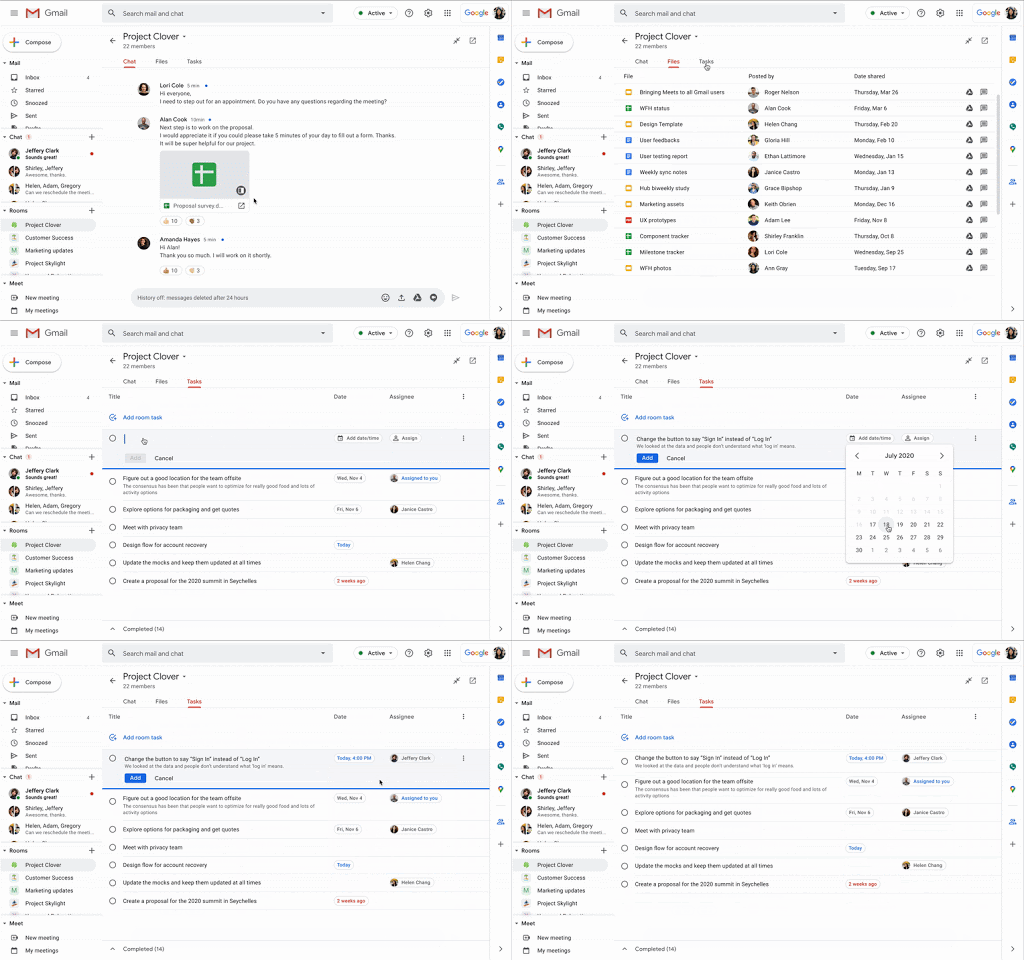
Just like Microsoft is flexing its dominance in Office products to get people on board with Teams, Google is now flexing its muscle in the email space with Gmail to entice users to adopt their collaborative tools in a much more unified, synchronized way. Emails will move seamlessly in and out of chats, Google Docs will be accessible and editable, calendar events or video chats can be scheduled while task lists can be made and cleared all without leaving your Gmail tab. Yes, I said tab – as in singular tab. This entire toolbox will be available both in the Gmail app and in the Gmail web app via the browser.
Google expects this all to begin rolling out for G Suite users in the coming weeks and I can tell you that we will be leveraging this to the fullest extent here at Chrome Unboxed. I even reached out to the marketing firm we used to work for to alert them of this new tool as well the minute I saw the video. I think anyone who uses Google products to get work done should be sitting up and taking notice of what Google has put together, here. It could be one of the biggest and most important shifts in Gmail we’ve ever seen across the board.
The right tool at the right time
At a time when work must continue regardless of our inability to physically get together, teams need more tools to simply keep in touch and get the job done in the most productive ways possible. We’ve obviously not used this new evolution of Gmail from Google just yet, but I can already see where this suite of services could win versus other competitors. Starting with Gmail first is a stroke of genius and the fact that this new setup will allow users to move between email, internal chats, tasks, collaborative document and file editing without ever leaving a single tab on their desktop is mind-boggling to say the least.
There’s a slide at the very end of the preview video that just says, “It’s super helpful to have it all together. This is what we’ve been asking for.” And I would 100% agree with that. As long as I’ve been in the workforce and dealt with any sort of team in a digital format, I’ve been frustrated with inability to find the right tool that would not only work, but would encourage the entire team to get on board as well. I think Google has taken a step back, listened to the frustration, and solved a problem in the most Google way possible. I think this new Gmail for teams could end up being one of their most important software updates in a long time, and I can’t wait to begin using it.
Shop Best Chromebooks of 2020 So Far on Chrome Shop
SUBSCRIBE TO UPSTREAM
Get Chrome Unboxed delivered straight to your inbox
Upstream is our flagship, curated newsletter with the top stories, most click-worthy deals, giveaways, and trending articles from Chrome Unboxed sent directly to your inbox a few times a week. Join 31,000+ subscribers.

