
• Skip to main content
  • Skip to primary sidebar
  • Deals
  • Features
  • Guides
  • Chromebooks
  • Videos
  • Podcast
  • More +
    • Reviews
    • Unboxing
    • Upcoming Devices
    • Chromebook Plus
    • Chrome
    • ChromeOS
    • Chrome OS Flex
  • Search
  • Sign Up
  • Log In
Chrome Unboxed – The Latest Chrome OS News

Chrome Unboxed - The Latest Chrome OS News

A Space for All Things Chrome, Google, and More!

  • Deals
  • Features
  • Guides
  • Chromebooks
  • Videos
  • Podcast
  • More +
    • Reviews
    • Unboxing
    • Upcoming Devices
    • Chromebook Plus
    • Chrome
    • ChromeOS
    • Chrome OS Flex
  • Search
  • Sign Up
  • Log In

Google Drive is getting a Spam folder

May 11, 2023 By Gabriel Brangers View Comments

Support our independent tech coverage. Chrome Unboxed is written by real people, for real people—not search algorithms. Join Chrome Unboxed Plus for just $2 a month to get an ad-free experience, access to our private Discord, and more. Learn more about membership here.
START FREE TRIAL (MONTHLY)START FREE TRIAL (ANNUAL)

Google has gotten pretty good at helping users avoid spam emails and Drive files over the years. If you use Gmail, you might say that the spam filter is too good as you dig through the spam folder to find that email that you overlooked from your boss. Still, the automated nature of the Gmail spam filter makes it a great tool for keeping malicious and scammy emails our of your primary inbox.

Google Drive, where many of us spend a lot of our time, has its own preventative measures to combat spam and scam documents but in its current state, those measures require action on the users’ part. Perhaps you’ve experienced one of these scams where an unknown person shares a document with your Google Drive account an you unwittingly open it just to find that you’ve received $75K worth of Bitcoin or whatever. All you have to do is send them some money or share some confidential account details in order to claim your windfall. Whatever the scam, the number of uninvited Google Drive files with nefarious intentions is on the rise. Google is hoping to help you keep them at bay with a new feature for all Google Drive users.

Xremove ads

Starting May 24th and rolling out over the coming weeks, all Google Drive users will soon see a “Spam” folder added to their Google Drive accounts directly above the Trash folder. You already have the ability to mark a suspicious item as spam and block the sender but this new spam feature will add the ability for Drive to detect and automatically quarantine suspicious files. Alternatively, you can drag and drop suspect files into the spam folder where they will be deleted after 30 days if you do not restore them.
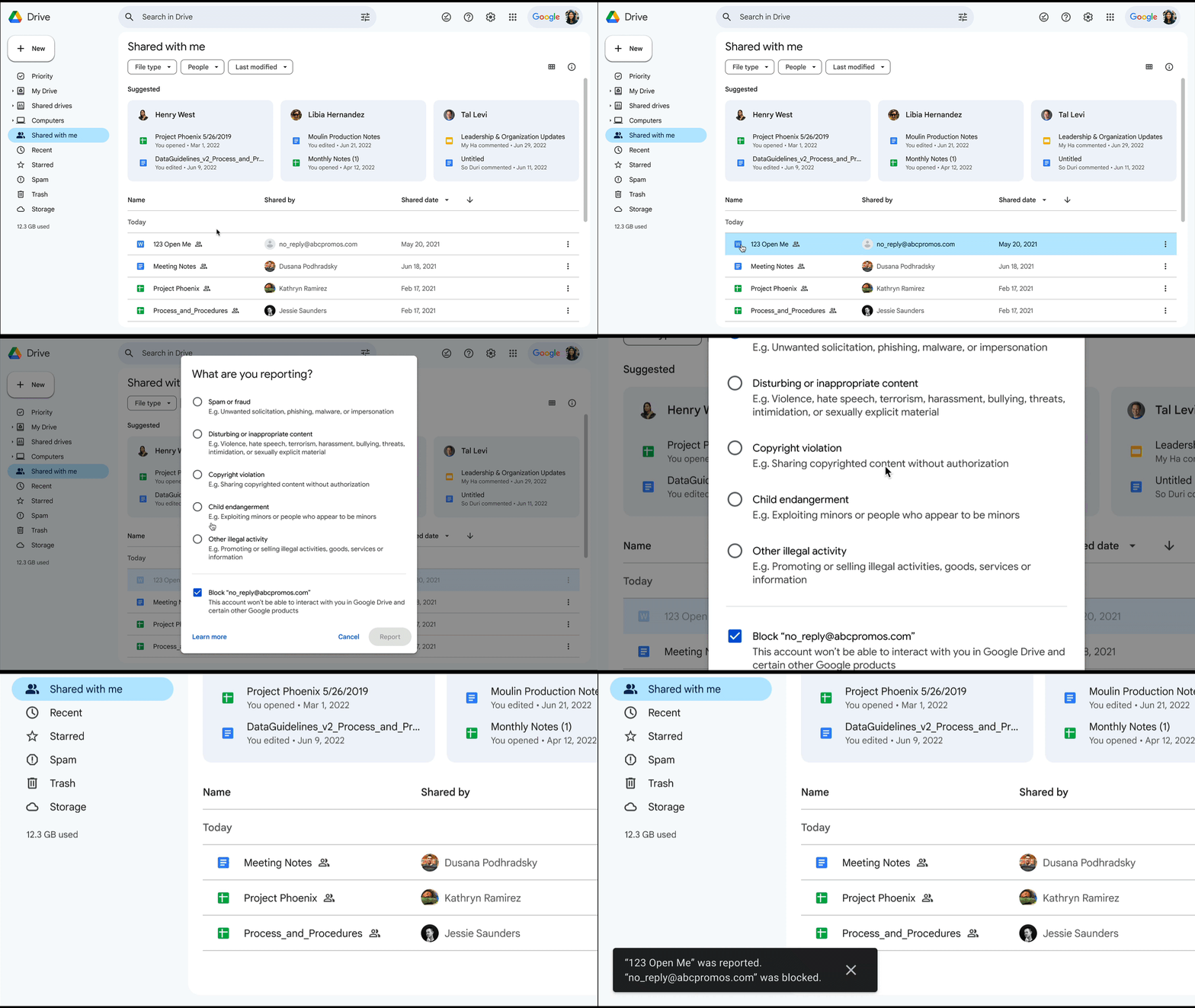
Not only will the file be isolated, you will automatically be unsubscribed which is a God send because many of these malicious files have multiple recipients and every time someone interacts with the file, you get an annoying update. Not now. Out of sight, out of mind. Additionally, the file will not show up in Google Drive at all unless you navigate directly to the spam folder. Awesome. To manually move an item to the spam folder, click the context menu and select “report spam.” IT admins do not need to implement this update as it will be added to all Drive users automatically as it rolls out.

Featured Videos

Xremove ads

Availability

  • Available to all Google Workspace customers, as well as legacy G Suite Basic and Business customers 
  • Available to users with personal Google Accounts 

Find the full announcement here.

Filed Under: Privacy and Security, Workspace

About Gabriel Brangers

Lover of all things coffee. Foodie for life. Passionate drummer, hobby guitar player, Web designer and proud Army Veteran. I have come to drink coffee and tell the world of all things Chrome. "Whatever you do, Carpe the heck out of that Diem" - Roman poet, Horace. Slightly paraphrased.

Primary Sidebar

Xremove ads

Deals

You can score $40 off Google’s battery-powered Nest Doorbell right now

By Joseph Humphrey
March 20, 2026

The touchscreen Lenovo Chromebook Slim 3 is a steal at under $200

By Robby Payne
March 16, 2026

Google TV Streamer and Remote held in front of a wall-mounted TV

The premium Google TV Streamer 4K is back down to $80

By Joseph Humphrey
March 16, 2026

The best Chromebook deals today

By Robby Payne
March 16, 2026

Pixel Buds Pro 2 running

I still love the Pixel Buds Pro 2 and they are $60 off right now

By Joseph Humphrey
March 13, 2026

More Deals

Xremove ads

Reviews

Acer Chromebook Plus Spin 514 Review: Kompanio Ultra power in a convertible

By Robby Payne
December 24, 2025

My review after 6 weeks with the Lenovo Chromebook Plus 14 [VIDEO]

By Robby Payne
August 11, 2025

One week with the best small Android tablet you can buy, and I’m sold

By Robby Payne
May 9, 2025

Best Chromebooks of 2024 [VIDEO]

By Robby Payne
November 28, 2024

Samsung Galaxy Chromebook Plus Review: Samsung is back! [VIDEO]

By Robby Payne
October 28, 2024

More Reviews

Xremove ads

Guides

This Chromebook trackpad shortcut is definitely not new, but is blowing my mind

By Robby Payne
March 11, 2024

How to reduce broadcast delay on YouTube TV to stop live spoilers

By Robby Payne
December 8, 2023

Windows PC keyboard and Chromebook

How to use a Windows keyboard with a Chromebook

By Joseph Humphrey
December 8, 2023

How reset and revert your Chromebook to the previous version of Chrome OS

By Robby Payne
November 29, 2023

My Chromebook Plus features disappeared: here’s how I fixed it

By Robby Payne
November 24, 2023

More Guides

TWITTER · FACEBOOK · INSTAGRAM · YOUTUBE · EMAIL · ABOUT

Copyright © 2026 · Chrome Unboxed · Chrome is a registered trademark of Google Inc.
We are participants in various affiliate advertising programs designed to provide a means for us to earn fees by linking to affiliated sites.

PRIVACY POLICY