

Support our independent tech coverage. Chrome Unboxed is written by real people, for real people—not search algorithms. Join Chrome Unboxed Plus for just $2 a month to get an ad-free experience, access to our private Discord, and more. Learn more about membership here.
START FREE TRIAL (MONTHLY)START FREE TRIAL (ANNUAL)
Remember the Google Assistant’s “Read It” feature that basically turned the internet into an audio book? Maybe you do, maybe you don’t, but the concept is not only solid; it actually works extremely well. With great voices and an attention to cadence and pauses, the Assistant’s “Read It” feature brings web pages to life and includes translation in 42 different languages as well. I fired it up again for the first time in a while today and am still pretty amazed by how polished the experience is.
Assitant-free “Read Aloud” in Chrome Canary
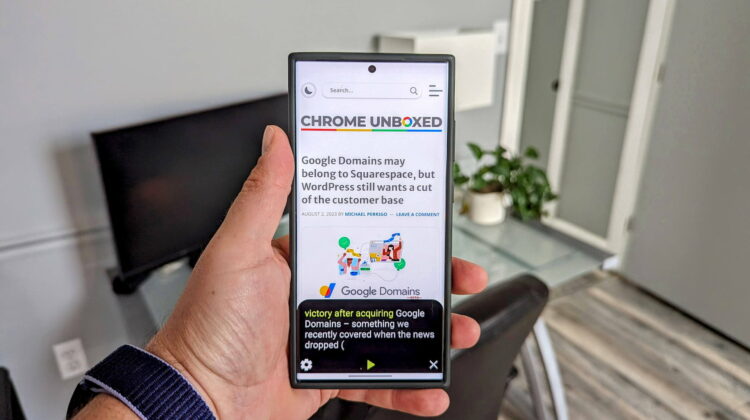
Oddly enough, though Google has a perfectly-good solution for this sort of activity, work is being done to bring a very similar feature to Chrome on Android via a new “Read Aloud” flag found by Chrome Story. As the name implies, “Read Aloud” takes a similar concept as the “Read It” feature, but doesn’t require Google Assistant. It’s clearly not polished and nowhere near as good as the Google Assistant version, but let’s remember that it exists in the Canary Channel right now, so work still needs to be done. If you want to see it in action, you can try it with the following steps once you download and install Chrome Canary from Google Play Store.
- Turn on the flag for “Read Aloud”
- Open
chrome://flagsin a new tab. - Search “Read Aloud.”
- Select “Enable” from the drop-down.
- Restart Chrome.
- Open
- Using Read Aloud:
- Select some text on a web page.
- Select the three-dots menu icon next to the text.
- Select “Read Aloud.”
- Google Chrome will now read the article aloud using Text to Speech.
- You can increase the text size and speed using the plus and minus icons.

Who is this for?
While it’s obvious that “Read Aloud” mirrors the functionality of Google Assistant’s “Read It” feature, the purpose of building this into Chrome is not entirely clear. It may signal an intention to make the web more accessible without needing additional tools or apps, or perhaps it’s yet another move by Google to distance itself from the Assistant for right now. With what looks to be a rejuvenated effort to bring AI to the Google Assistant, I can’t imagine that is the case, but the redundancy of this feature is strange either way. As it develops, it will be interesting to see how Google positions this new feature and we’ll keep an eye on it over the coming weeks.
SUBSCRIBE TO UPSTREAM
Get Chrome Unboxed delivered straight to your inbox
Upstream is our flagship, curated newsletter with the top stories, most click-worthy deals, giveaways, and trending articles from Chrome Unboxed sent directly to your inbox a few times a week. Join 31,000+ subscribers.

