
• Skip to main content
  • Skip to primary sidebar
  • Deals
  • Features
  • Guides
  • Chromebooks
  • Videos
  • Podcast
  • More +
    • Reviews
    • Unboxing
    • Upcoming Devices
    • Chromebook Plus
    • Chrome
    • ChromeOS
    • Chrome OS Flex
  • Search
  • Sign Up
  • Log In
Chrome Unboxed – The Latest Chrome OS News

Chrome Unboxed - The Latest Chrome OS News

A Space for All Things Chrome, Google, and More!

  • Deals
  • Features
  • Guides
  • Chromebooks
  • Videos
  • Podcast
  • More +
    • Reviews
    • Unboxing
    • Upcoming Devices
    • Chromebook Plus
    • Chrome
    • ChromeOS
    • Chrome OS Flex
  • Search
  • Sign Up
  • Log In

Turn the web into an audio book on iPhone with this new Google App feature

September 17, 2020 By Robby Payne View Comments

Support our independent tech coverage. Chrome Unboxed is written by real people, for real people—not search algorithms. Join Chrome Unboxed Plus for just $2 a month to get an ad-free experience, access to our private Discord, and more. Learn more about membership here.
START FREE TRIAL (MONTHLY)START FREE TRIAL (ANNUAL)

Back in March of this year, Google unveiled one of the coolest software features for Android that we’ve seen in quite some time. This new feature gave users the ability to listen back to website content with a simple request to the Google Assistant. After requesting, “Hey, Google. Read this page,” a full-blown media player interface would take over the screen and begin to read aloud the entire contents of the website. With meta data in the proper place, it could even properly parse the author’s name and the date of the publication. Nevermind the fact that the vocals on the audio are some of the most human-sounding I’ve ever heard as well.

While I admit I’ve not used it terribly often, I also don’t have a regular commute or walk each day for work or school. I imagine if I did, I’d have quite a few longer articles queued up for audio playback during those trips. As I titled the original post back in March, this feature quite literally turns the entire internet into your personal audio book and it is pretty fantastic.

Xremove ads

Now arriving on iOS

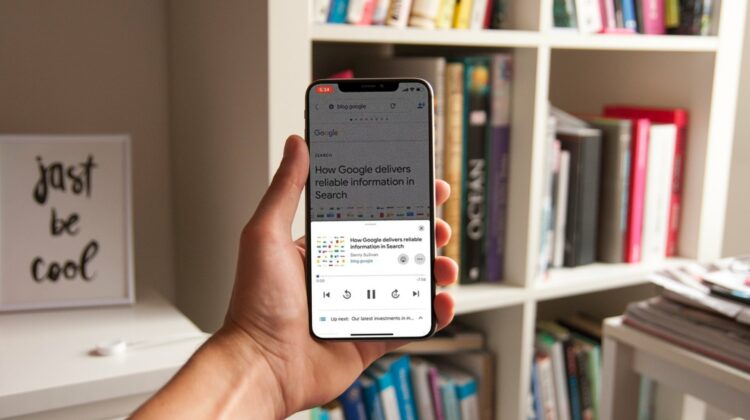
In a tweet yesterday, Google announced that it is bringing the same feature over to iOS – albeit without the flare or flexibility you get on Android. In this iteration, the feature is contained to the Google app on iPhones and isn’t controlled by your voice or any digital assistant. Instead, there’s a simple icon up top when you are browsing content in the Google feed that gives way to the same type of interface we’ve been enjoying over here on the Android side of things for about 6 months now. Check it out!

Now anyone who wants a little help reading text on their phone can listen to web pages out loud on the Google app on iOS. Just tap the speaker icon to listen now or add the story to your queue. Download the app here → https://t.co/1EtsIPUERn pic.twitter.com/ABqfoJvDgF

— Google (@Google) September 16, 2020

It needs to be said again that, unlike Android, this feature only exists inside the Google app and not on any web browsers like Google Chrome on iOS. It’s an inferior version of what we have on Android, sure, but it is still awesome to see Google bringing amazing features like this to other platforms in creative ways. The day will likely never come that we see full Google Assistant integration on iPhones, but little moves like this continue to make the Google app a must-have on iOS if you are in any way intertwined in Google’s ecosystem.

Featured Videos

Xremove ads

SUBSCRIBE TO UPSTREAM

Get Chrome Unboxed delivered straight to your inbox

Upstream is our flagship, curated newsletter with the top stories, most click-worthy deals, giveaways, and trending articles from Chrome Unboxed sent directly to your inbox a few times a week. Join 31,000+ subscribers.

SUBSCRIBE HERE!

Filed Under: Google Assistant, News

About Robby Payne

As the founder of Chrome Unboxed, Robby has been reviewing Chromebooks for over a decade. His passion for ChromeOS and the devices it runs on drives his relentless pursuit to find the best Chromebooks, best services, and best tips for those looking to adopt ChromeOS and those who've already made the switch.

Primary Sidebar

Xremove ads

Deals

Massive Deal Alert: The Acer Chromebook Plus Spin 714 just hit an all-time low $499

By Robby Payne
April 1, 2026

The best Chromebook deals today

By Robby Payne
March 30, 2026

The Acer Chromebook Plus Spin 714 hits a new all-time low at $270 off

By Robby Payne
March 25, 2026

You can score $40 off Google’s battery-powered Nest Doorbell right now

By Joseph Humphrey
March 20, 2026

The touchscreen Lenovo Chromebook Slim 3 is a steal at under $200

By Robby Payne
March 16, 2026

More Deals

Xremove ads

Reviews

Acer Chromebook Plus Spin 514 Review: Kompanio Ultra power in a convertible

By Robby Payne
December 24, 2025

My review after 6 weeks with the Lenovo Chromebook Plus 14 [VIDEO]

By Robby Payne
August 11, 2025

One week with the best small Android tablet you can buy, and I’m sold

By Robby Payne
May 9, 2025

Best Chromebooks of 2024 [VIDEO]

By Robby Payne
November 28, 2024

Samsung Galaxy Chromebook Plus Review: Samsung is back! [VIDEO]

By Robby Payne
October 28, 2024

More Reviews

Xremove ads

Guides

This Chromebook trackpad shortcut is definitely not new, but is blowing my mind

By Robby Payne
March 11, 2024

How to reduce broadcast delay on YouTube TV to stop live spoilers

By Robby Payne
December 8, 2023

Windows PC keyboard and Chromebook

How to use a Windows keyboard with a Chromebook

By Joseph Humphrey
December 8, 2023

How reset and revert your Chromebook to the previous version of Chrome OS

By Robby Payne
November 29, 2023

My Chromebook Plus features disappeared: here’s how I fixed it

By Robby Payne
November 24, 2023

More Guides

TWITTER · FACEBOOK · INSTAGRAM · YOUTUBE · EMAIL · ABOUT

Copyright © 2026 · Chrome Unboxed · Chrome is a registered trademark of Google Inc.
We are participants in various affiliate advertising programs designed to provide a means for us to earn fees by linking to affiliated sites.

PRIVACY POLICY