

Support our independent tech coverage. Chrome Unboxed is written by real people, for real people—not search algorithms. Join Chrome Unboxed Plus for just $2 a month to get an ad-free experience, access to our private Discord, and more. Learn more about membership here.
START FREE TRIAL (MONTHLY)START FREE TRIAL (ANNUAL)
Following some description changes last week, Google is now rolling out an updated model picker in the Gemini web interface specifically for Gemini Advanced subscribers, providing a cleaner and more intuitive way to access its various capabilities. As time has gone and Gemini development has been moving incredibly fast, the model picker has become crammed with options that can be pretty confusing for most users. If you ask me, a cleanup was absolutely in order, and this new model selection at least pares things down to 4 options versus the current six.
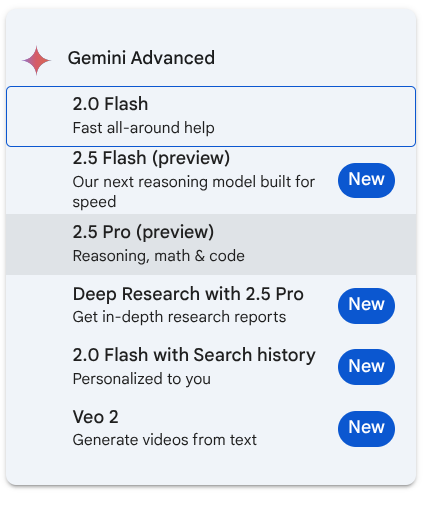
For those subscribed to Gemini Advanced, the model picker dropdown on the web will soon be streamlined to feature the following four primary offerings:
- 2.0 Flash: For fast, all-around help.
- 2.5 Flash (preview): Described as “Our next reasoning model built for speed.”
- 2.5 Pro (preview): Tailored for reasoning, math, and code.
- 2.0 Flash with Search history: For a more personalized experience.
Notably, this means options like “Deep Research with 2.5 Pro” and the “Veo 2” model are no longer part of this main dropdown list. Google seems to be drawing a clearer line here, as these were never really general-purpose models in the same vein as the Flash or Pro tiers.
You can rest easy knowing that those tools aren’t gone – just placed elsewhere. Users can now access these capabilities directly from the prompt bar. “Deep Research” (which leverages 2.5 Pro) is still there, and “Veo 2” now appears as a new “Video” option in the prompt bar – a feature Google has reportedly been testing since late April. “Canvas,” which also received a new icon recently, rounds out these direct-access tools. Users can hover over each of these icons in the prompt bar to get a brief description of what they do.
On wider desktop screens, these three prompt bar options (Deep Research, Video, and Canvas) are all visible. On the mobile web interface, they are tucked behind a three-dot overflow menu to save space. For now, these changes appear to be exclusive to the web version of Gemini Advanced; the Android and iOS Gemini apps remain unchanged, and this new layout isn’t yet appearing on free Gemini accounts.
Looking ahead, it’s reasonable to expect that once the preview versions of 2.5 Flash and 2.5 Pro are fully launched, the older models should be dropped off. I’d hope we eventually land in a spot where Gemini is smart enough to choose the model that best suits the task at hand without the user needing to select it. For now, I’d wager these different model selections aid in curbing resources, but I could see a future where Gemini is Gemini all the time, everywhere, and it leans on the part of its underlying structure simply based on the tools needed to do the job.
VIA: 9to5 Google
SUBSCRIBE TO UPSTREAM
Get Chrome Unboxed delivered straight to your inbox
Upstream is our flagship, curated newsletter with the top stories, most click-worthy deals, giveaways, and trending articles from Chrome Unboxed sent directly to your inbox a few times a week. Join 31,000+ subscribers.

