
• Skip to main content
  • Skip to primary sidebar
  • Deals
  • Features
  • Guides
  • Chromebooks
  • Videos
  • Podcast
  • More +
    • Reviews
    • Unboxing
    • Upcoming Devices
    • Chromebook Plus
    • Chrome
    • ChromeOS
    • Chrome OS Flex
  • Search
  • Sign Up
  • Log In
Chrome Unboxed – The Latest Chrome OS News

Chrome Unboxed - The Latest Chrome OS News

A Space for All Things Chrome, Google, and More!

  • Deals
  • Features
  • Guides
  • Chromebooks
  • Videos
  • Podcast
  • More +
    • Reviews
    • Unboxing
    • Upcoming Devices
    • Chromebook Plus
    • Chrome
    • ChromeOS
    • Chrome OS Flex
  • Search
  • Sign Up
  • Log In

Gemini is about to start checking off your to-do list by actually using your apps

February 25, 2026 By Robby Payne View Comments

Support our independent tech coverage. Chrome Unboxed is written by real people, for real people—not search algorithms. Join Chrome Unboxed Plus for just $2 a month to get an ad-free experience, access to our private Discord, and more. Learn more about membership here.
START FREE TRIAL (MONTHLY)START FREE TRIAL (ANNUAL)

For a long time, the true AI Assistant dream has been a bit of a tease. We can ask Gemini to write an email or summarize a doc, but when it comes to actually doing something—like booking a ride or ordering dinner—we’ve still had to do the heavy lifting of opening apps and clicking through menus ourselves.

That is officially starting to change. Google just announced an early preview of a feature that allows Gemini to handle multi-step, real-world tasks directly on your Android phone.

Xremove ads

Real Automation for Daily Tasks

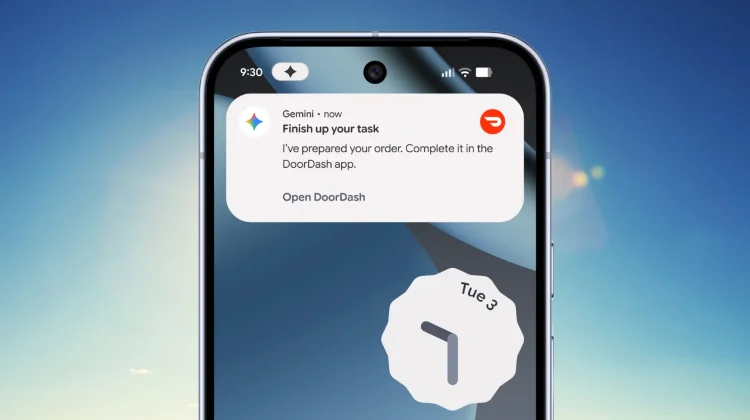
Starting soon as a beta for the Pixel 10, Pixel 10 Pro, and newly-announced Samsung Galaxy S26 series, you’ll be able to long-press your power button and give Gemini a complex command like, “Book me a ride home” or “Reorder my last meal on DoorDash.”

Instead of just giving you a link or a suggestion, Gemini will actually work in the background to execute those steps for you. It’s starting with select apps in the food, grocery, and rideshare categories, and initially, it’ll be available for users in the U.S. and Korea.

Featured Videos

Xremove ads

How It works and stays private

I know what you’re likely thinking: Do I really want an AI clicking around inside my apps? Google seems to have anticipated the privacy concerns here with a pretty clever technical approach:

  • Virtual Windows: Gemini doesn’t just get free rein of your phone. It runs the necessary app in a secure, virtual window. This limits the AI’s access to only the app it needs to complete the task, keeping the rest of your device off-limits.
  • Live Transparency: You aren’t left wondering what the AI is doing. You can monitor the progress live via notifications. If something looks wrong, you can jump in or kill the task instantly.
  • User Command Only: These automations only trigger when you specifically ask for them and stop the moment the task is finished.

Why This Matters

This is a massive leap forward for the Pixel 10 and the latest Galaxy flagships. It’s the first real look at “Agentic AI”—where the assistant becomes a doer rather than just a talker. Being able to offload those repetitive, “muscle memory” tasks while you keep using your phone for other things is exactly where the mobile experience needs to go.

It’s early days, and being a beta, I’m sure there will be some kinks to iron out. But the prospect of never having to manually navigate a food delivery app again? Sign me up.

Xremove ads

SUBSCRIBE TO UPSTREAM

Get Chrome Unboxed delivered straight to your inbox

Upstream is our flagship, curated newsletter with the top stories, most click-worthy deals, giveaways, and trending articles from Chrome Unboxed sent directly to your inbox a few times a week. Join 31,000+ subscribers.

SUBSCRIBE HERE!

Filed Under: News

About Robby Payne

As the founder of Chrome Unboxed, Robby has been reviewing Chromebooks for over a decade. His passion for ChromeOS and the devices it runs on drives his relentless pursuit to find the best Chromebooks, best services, and best tips for those looking to adopt ChromeOS and those who've already made the switch.

Primary Sidebar

Xremove ads

Deals

You can score $40 off Google’s battery-powered Nest Doorbell right now

By Joseph Humphrey
March 20, 2026

The touchscreen Lenovo Chromebook Slim 3 is a steal at under $200

By Robby Payne
March 16, 2026

Google TV Streamer and Remote held in front of a wall-mounted TV

The premium Google TV Streamer 4K is back down to $80

By Joseph Humphrey
March 16, 2026

The best Chromebook deals today

By Robby Payne
March 16, 2026

Pixel Buds Pro 2 running

I still love the Pixel Buds Pro 2 and they are $60 off right now

By Joseph Humphrey
March 13, 2026

More Deals

Xremove ads

Reviews

Acer Chromebook Plus Spin 514 Review: Kompanio Ultra power in a convertible

By Robby Payne
December 24, 2025

My review after 6 weeks with the Lenovo Chromebook Plus 14 [VIDEO]

By Robby Payne
August 11, 2025

One week with the best small Android tablet you can buy, and I’m sold

By Robby Payne
May 9, 2025

Best Chromebooks of 2024 [VIDEO]

By Robby Payne
November 28, 2024

Samsung Galaxy Chromebook Plus Review: Samsung is back! [VIDEO]

By Robby Payne
October 28, 2024

More Reviews

Xremove ads

Guides

This Chromebook trackpad shortcut is definitely not new, but is blowing my mind

By Robby Payne
March 11, 2024

How to reduce broadcast delay on YouTube TV to stop live spoilers

By Robby Payne
December 8, 2023

Windows PC keyboard and Chromebook

How to use a Windows keyboard with a Chromebook

By Joseph Humphrey
December 8, 2023

How reset and revert your Chromebook to the previous version of Chrome OS

By Robby Payne
November 29, 2023

My Chromebook Plus features disappeared: here’s how I fixed it

By Robby Payne
November 24, 2023

More Guides

TWITTER · FACEBOOK · INSTAGRAM · YOUTUBE · EMAIL · ABOUT

Copyright © 2026 · Chrome Unboxed · Chrome is a registered trademark of Google Inc.
We are participants in various affiliate advertising programs designed to provide a means for us to earn fees by linking to affiliated sites.

PRIVACY POLICY