


Support our independent tech coverage. Chrome Unboxed is written by real people, for real people—not search algorithms. Join Chrome Unboxed Plus for just $2 a month to get an ad-free experience, access to our private Discord, and more. Learn more about membership here.
START FREE TRIAL (MONTHLY)START FREE TRIAL (ANNUAL)
For the past few years, my daily workflow has been anchored by a Chromebook Plus, and that should come as no surprise to anyone. Specifically, I’ve been back on the Lenovo Chromebook Plus 14 for the past couple months and I still love this Chromebook as much as I did during the initial honeymoon phase. It is simply the best Chromebook experience you can buy right now.
However, this week, I shifted gears to spend some time with the Lenovo Duet 11″ to remind myself how capable the MediaTek Kompanio 838 is; and by extension, get a feel for what to expect from the upcoming Kompanio 540. The Duet is a fantastic little machine and I was reminded how solid the Kompanio 838 is during my re-testing; but as I settled into my usual rhythm of activities I’m now used to on a Chromebook, I realized a painful truth: Gemini in Chrome is a Chromebook Plus-only feature.
I had completely forgotten this, and now the tool I had come to rely on dozens of times a day was simply gone.
My favorite way to use Gemini
I’ll be honest: I use Gemini in a lot of ways. I use the web app, I use it on my phone, and I use the Workspace integrations. But the specific implementation of Gemini in Chrome has quickly become my absolute favorite way to interact with Google’s AI.
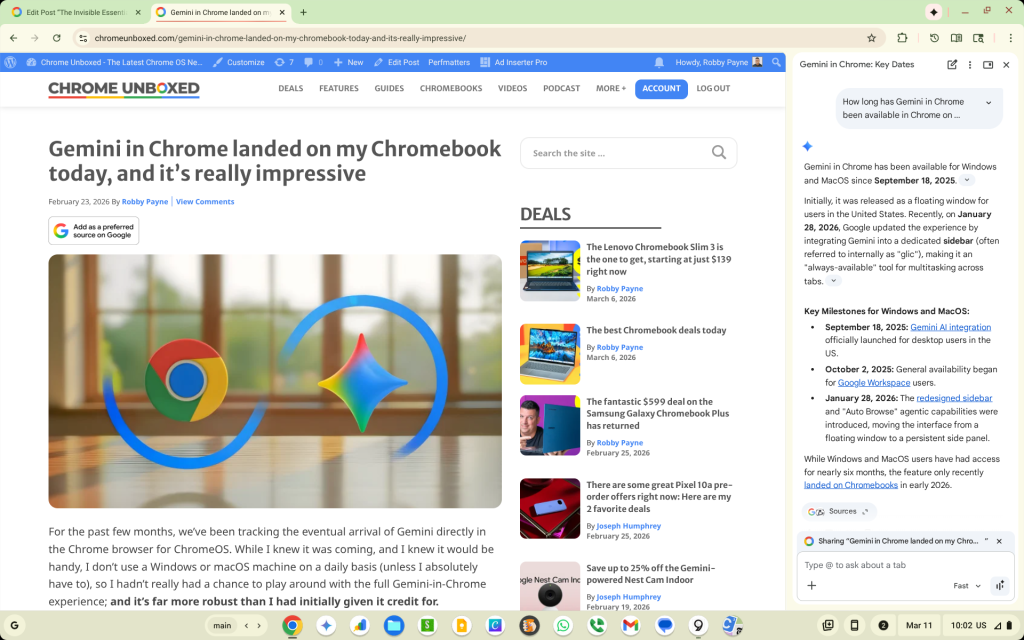
There is something uniquely seamless about having Gemini right there in the browser, ready to pop open without changing tabs or breaking my focus. Whether I’m asking for a quick summary of a long-form article, fact-checking a spec while writing a review, or brainstorming a headline, it has become a knee-jerk sort of tool that I reach for often
On the Duet, I quickly realized just how fond of Gemini in Chrome I had become. All of the sudden, having to switch over to the Gemini web app felt like taking the stairs because the elevator was out. It’s a small extra step, but when you’ve become so attached to the immediacy of the integrated version, that extra step feels like a mile.
We often talk about “killer features” in terms of flashy hardware or brand-new apps. But sometimes, the most effective features are the ones that become so integrated into your muscle memory that you forget they are features at all until you move to a device without them.
I didn’t realize how much I’ve come to lean on Gemini in Chrome, but now that I’ve felt its absence, I don’t think I want to go back to a browser without it. It’s 100% a feature that Google has in Chrome that is unmatched by the competition, and I don’t know any other browser that could so seamlessly integrate their own AI in the sidebar. As far as I’m concerned, it’s just another reason I won’t be looking outside the Chrome browser for my daily web use: both at work and at home.
SUBSCRIBE TO UPSTREAM
Get Chrome Unboxed delivered straight to your inbox
Upstream is our flagship, curated newsletter with the top stories, most click-worthy deals, giveaways, and trending articles from Chrome Unboxed sent directly to your inbox a few times a week. Join 31,000+ subscribers.

