


Support our independent tech coverage. Chrome Unboxed is written by real people, for real people—not search algorithms. Join Chrome Unboxed Plus for just $2 a month to get an ad-free experience, access to our private Discord, and more. Learn more about membership here.
START FREE TRIAL (MONTHLY)START FREE TRIAL (ANNUAL)
Following its introduction for iPhone users, Google is now bringing a handy Gemini homescreen widget to Android devices that fully embraces the Material You design language. This isn’t just a simple shortcut; it’s a functional and very usable tool designed to make access to Google’s AI faster and more intuitive.
The new widget comes with the now-familiar Material 3 style and Dynamic Color theming that adapts to your wallpaper; and it’s also very resizable. It can be as compact as a 1×1 icon or expand significantly to a 5×3 layout with two main configurations available.
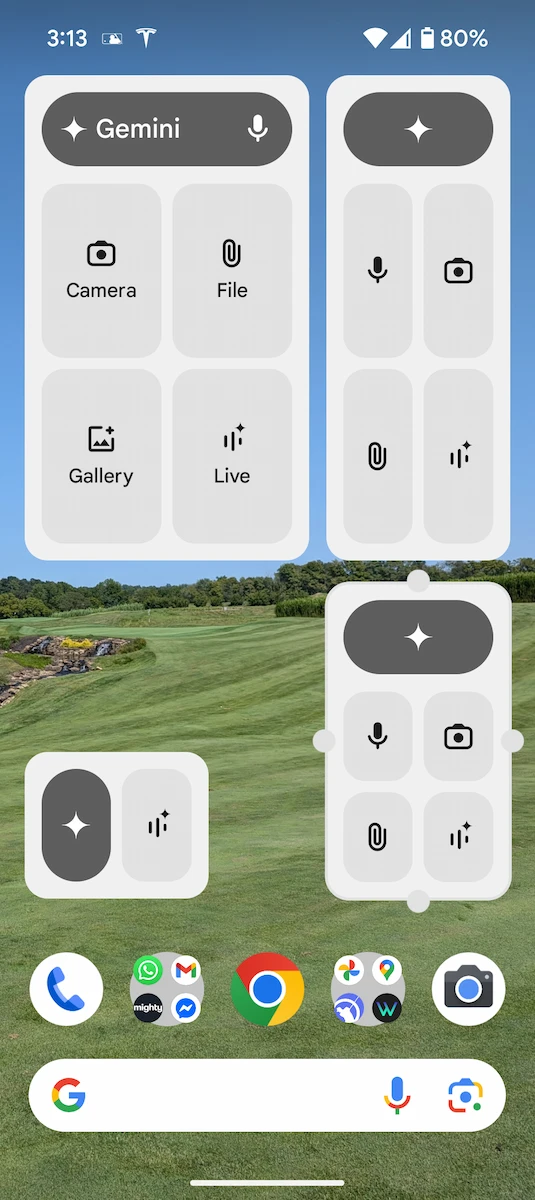

The first layout is a bar-style widget, reminiscent of the recent Google Keep widget redesign. In this layout, a prominent vertical pill houses the sparkle icon, which directly launches the Gemini app with the keyboard ready for input. To the right of that button you get rounded rectangle shortcuts for voice input (microphone), the camera viewfinder (camera) to add images to prompts, the file picker for document uploads and a dedicated button for Gemini Live.
Alternatively, you can opt for a square or rectangular configuration. This layout arranges the shortcuts in a grid below a Gemini search bar at the top. The smallest size for this grid style is 2×2. When expanded to its largest configurations, the icons are accompanied by clear text labels for easier identification.
This new widget functionality is rolling out with version 1.0.751104895 of the dedicated Gemini app (it’s important to note this is separate from the main Google app) via the Google Play Store. Once you have the updated app installed, simply long-press any open area on your homescreen, select ‘Widgets’ from the list, scroll down to Gemini, and resize it to fit the space you have available.
SUBSCRIBE TO UPSTREAM
Get Chrome Unboxed delivered straight to your inbox
Upstream is our flagship, curated newsletter with the top stories, most click-worthy deals, giveaways, and trending articles from Chrome Unboxed sent directly to your inbox a few times a week. Join 31,000+ subscribers.

