
• Skip to main content
  • Skip to primary sidebar
  • Deals
  • Features
  • Guides
  • Chromebooks
  • Videos
  • Podcast
  • More +
    • Reviews
    • Unboxing
    • Upcoming Devices
    • Chromebook Plus
    • Chrome
    • ChromeOS
    • Chrome OS Flex
  • Search
  • Sign Up
  • Log In
Chrome Unboxed – The Latest Chrome OS News

Chrome Unboxed - The Latest Chrome OS News

A Space for All Things Chrome, Google, and More!

  • Deals
  • Features
  • Guides
  • Chromebooks
  • Videos
  • Podcast
  • More +
    • Reviews
    • Unboxing
    • Upcoming Devices
    • Chromebook Plus
    • Chrome
    • ChromeOS
    • Chrome OS Flex
  • Search
  • Sign Up
  • Log In

Chromebooks Getting Local Printing Options

December 2, 2016 By Gabriel Brangers View Comments

Support our independent tech coverage. Chrome Unboxed is written by real people, for real people—not search algorithms. Join Chrome Unboxed Plus for just $2 a month to get an ad-free experience, access to our private Discord, and more. Learn more about membership here.
START FREE TRIAL (MONTHLY)START FREE TRIAL (ANNUAL)
canaryprinting

In a move that has been long overdue, the latest version of Chrome OS Canary has added some new printing options. Last week, the Chromium open-source project graduated the Canary channel to version 57 as developers begin work on the newest enhancements to Google’s operating system.

Xremove ads

Until recently, printing options for Chromebooks and Chrome OS devices were very limited. Google Cloud Print was the only viable option and required a cloud-ready printer. Even then, depending on the manufacturer, navigating and using a printer could be a thorough pain.


Thankfully, OEMs like HP have been proactive in creating web apps for Chrome OS that allow USB printing as well as WiFi printing that bypasses the whole cloud-print setup.

Featured Videos

Xremove ads

The catch?

It has to be an HP printer and not all HP printers work. That’s not a jab at Hewlett Packard. If I manufactured printers, I probably wouldn’t make an app that works on other device either. Honestly, I am surprised other manufacturers haven’t followed suit.

The method isn’t difficult.

The fundamentals needed for CUPS (Common Unix Printing System) are inherent to the Linux-based kernel that Chrome OS is built upon. Now, to much applause, developers are taking the steps to make local and network printing native to the Chrome environment and that is a beautiful thing

Xremove ads

 The process

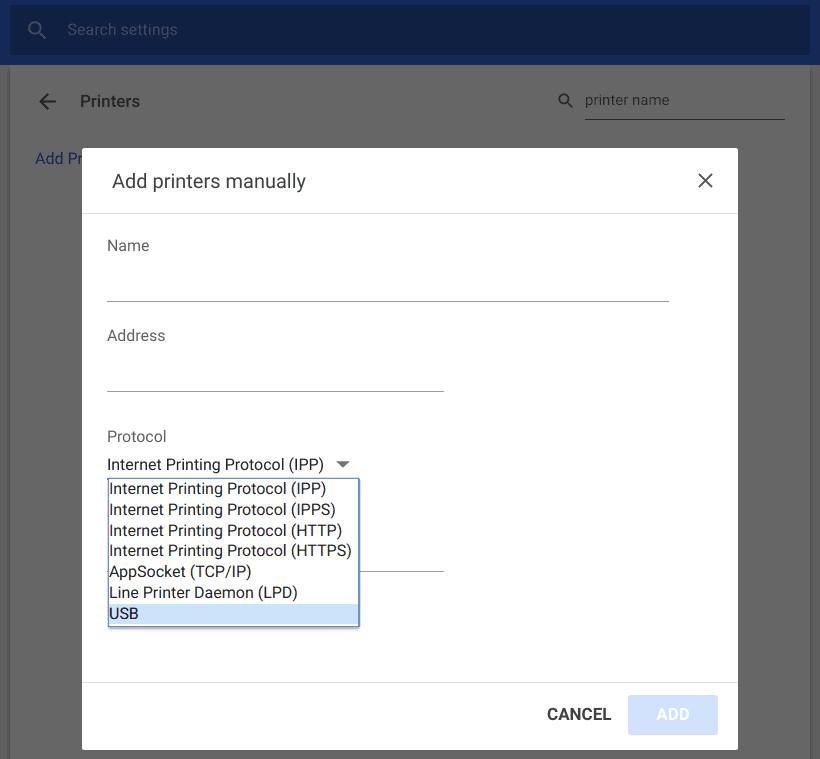
The feature is currently disabled by default in the Canary channel. Enabling requires just a simple flip of the switch in the chrome://flags  screen of your Chromebook browser. From there, press ctrl+f and search for print. You will see a flag labeled Native CUPS.

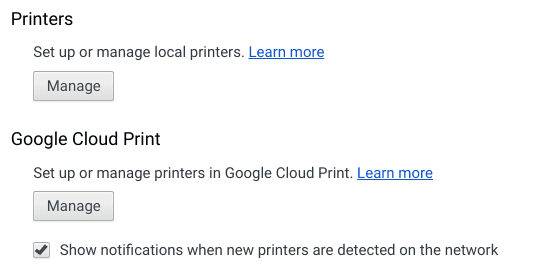
Once enabled you will find a new option for printers in your settings menu that should look like this.
screenshot-2016-12-01-at-11-12-51-pm

Xremove ads

Theoretically, this would allow for traditional and USB printing from your Chrome device regardless of your printers manufacturer.

Keep in mind, this does require moving to the Canary channel of Chrome OS. This is not for the faint at heart. If you do not have a full grasp of the process and understand the risks involve, please do not attempt installing the Canary build. If you do make the switch, have fun on the “bleeding edge” of Chrome OS.


The future

This is a huge step forward for Chrome devices. Developers are pressing forward in making the operating system an all-inclusive ecosystem that is richly functional for users at both ends of the computing spectrum.

Xremove ads

Filed Under: All Stories, Chromebooks, ChromeOS, News, Preview

About Gabriel Brangers

Lover of all things coffee. Foodie for life. Passionate drummer, hobby guitar player, Web designer and proud Army Veteran. I have come to drink coffee and tell the world of all things Chrome. "Whatever you do, Carpe the heck out of that Diem" - Roman poet, Horace. Slightly paraphrased.

Primary Sidebar

Xremove ads

Deals

Massive Deal Alert: The Acer Chromebook Plus Spin 714 just hit an all-time low $499

By Robby Payne
April 1, 2026

The best Chromebook deals today

By Robby Payne
March 30, 2026

The Acer Chromebook Plus Spin 714 hits a new all-time low at $270 off

By Robby Payne
March 25, 2026

You can score $40 off Google’s battery-powered Nest Doorbell right now

By Joseph Humphrey
March 20, 2026

The touchscreen Lenovo Chromebook Slim 3 is a steal at under $200

By Robby Payne
March 16, 2026

More Deals

Xremove ads

Reviews

Acer Chromebook Plus Spin 514 Review: Kompanio Ultra power in a convertible

By Robby Payne
December 24, 2025

My review after 6 weeks with the Lenovo Chromebook Plus 14 [VIDEO]

By Robby Payne
August 11, 2025

One week with the best small Android tablet you can buy, and I’m sold

By Robby Payne
May 9, 2025

Best Chromebooks of 2024 [VIDEO]

By Robby Payne
November 28, 2024

Samsung Galaxy Chromebook Plus Review: Samsung is back! [VIDEO]

By Robby Payne
October 28, 2024

More Reviews

Xremove ads

Guides

This Chromebook trackpad shortcut is definitely not new, but is blowing my mind

By Robby Payne
March 11, 2024

How to reduce broadcast delay on YouTube TV to stop live spoilers

By Robby Payne
December 8, 2023

Windows PC keyboard and Chromebook

How to use a Windows keyboard with a Chromebook

By Joseph Humphrey
December 8, 2023

How reset and revert your Chromebook to the previous version of Chrome OS

By Robby Payne
November 29, 2023

My Chromebook Plus features disappeared: here’s how I fixed it

By Robby Payne
November 24, 2023

More Guides

TWITTER · FACEBOOK · INSTAGRAM · YOUTUBE · EMAIL · ABOUT

Copyright © 2026 · Chrome Unboxed · Chrome is a registered trademark of Google Inc.
We are participants in various affiliate advertising programs designed to provide a means for us to earn fees by linking to affiliated sites.

PRIVACY POLICY