

Support our independent tech coverage. Chrome Unboxed is written by real people, for real people—not search algorithms. Join Chrome Unboxed Plus for just $2 a month to get an ad-free experience, access to our private Discord, and more. Learn more about membership here.
START FREE TRIAL (MONTHLY)START FREE TRIAL (ANNUAL)
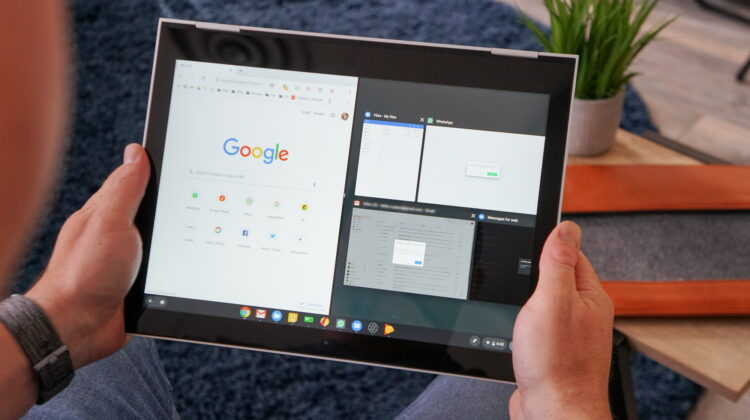
Back in February of 2019, I wrote a post that I’m not entirely proud of. Looking back, I used our audience to manipulate the system a bit and after the dust settled, I decided to not do that ever again. I was simply advocating for a better, smoother split-screen resizing for Chromebooks in tablet mode. You know it and I know it too: dragging that window divider around in tablet mode can be full of lag and the constant element resizing not only hurts performance, but looks a bit janky as well. Even on high-end Chromebooks, this process isn’t what we would call well-rounded or smooth at all. While some of you disagree with me that the iOS implementation of split-screen dragging is a cleaner, less resource-intensive method, I was hopeful that something similar could be done for Chrome OS to clean things up a bit for tablets.
After a little backlash and basically no developer activity on the bug report I created, I assumed my efforts were in vain and that split-screen resizing on Chromebooks would largely remain unchanged. And that has absolutely been the case for the past few years. While the OS has grown and changed in a ton of ways, manipulating multiple windows in tablet mode remains a purely functional ability without much finesse or smoothness to speak of.
Work is being done to improve performance
Ah, but the winds are changing. A few months back, I noticed my little bug report finally got assigned to a developer in May of 2020 and though nothing came of it at the time, I realized some work might actually happen on this front. I’ve kept an eye on it, realizing there was some attention being given to the feature, but I’ve not had anything I could report on until today. As of yesterday evening, a change has hit the Chromium Gerrit and it looks like movement is happening to clean up the split-screen resize feature and make it perform better.
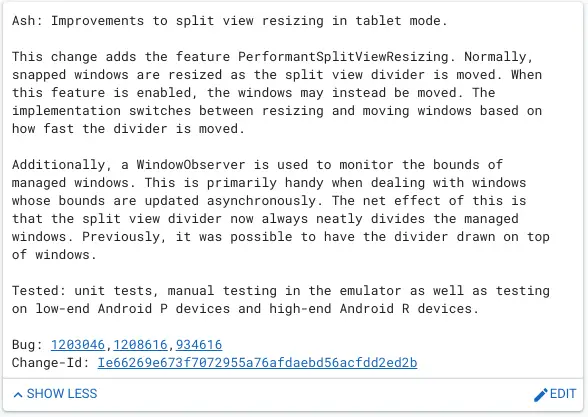
In that change, you can see 3 bug reports listed. While the first two are private, the third is the original bug report I filed back in February of 2019 and it would seem that whatever this change is alluding to is the response to the poor performance of split-screen app resizing on Chromebooks. While I’m unsure what exactly they are trying to accomplish with this change, if it makes split-screen apps behave better and tax the system less, I’m all for it. I don’t suppose we’ll see what I was originally hoping for (a borrowing of the iOS split-screen resizing animation), but I’m hopeful that this work will bring about a smoother, less-janky tablet experience for users.
At the end of the day, I was never attempting to push Chrome OS into being more like iOS. Instead, I’m always more of a fan of Chrome OS doing things in ways that users are used to. Let’s face it, iPads are the standard we all know and love/hate when it comes to tablets. In all reality, the Chrome OS team mimicked the gestures, navigation, and multitasking from iOS, so why not this window resizing as well?
Whatever we end up with, as long as it is smooth, easy to use, and engaging for the end user, I’m happy. Chrome OS is not only growing up as an operating system: it is more public-facing than ever before. New users are rolling in every day and existing users are choosing to make Chromebooks their daily, go-to machines. Small fixes like this make that decision easier and the quality of life better for everyone that chooses to stick around. As always, we’re keeping an eye on this and will report when it goes live to show you what has changed and if it really does end up making a difference.
SUBSCRIBE TO UPSTREAM
Get Chrome Unboxed delivered straight to your inbox
Upstream is our flagship, curated newsletter with the top stories, most click-worthy deals, giveaways, and trending articles from Chrome Unboxed sent directly to your inbox a few times a week. Join 31,000+ subscribers.

