


Support our independent tech coverage. Chrome Unboxed is written by real people, for real people—not search algorithms. Join Chrome Unboxed Plus for just $2 a month to get an ad-free experience, access to our private Discord, and more. Learn more about membership here.
START FREE TRIAL (MONTHLY)START FREE TRIAL (ANNUAL)
Compared with a just over a year ago, the built-in Chromebook screen capture/recorder utility has come a very, very long way. In fact, I have a hard time remembering the rudimentary nature of it prior to the way it functions now. The feature has become so good that it even has it’s own, dedicated key on quite a few Chromebook keyboards at this point. With the ability to capture full screen, partial screen, and select windows in either stills or video, this built-in tool is so much better than any other native screen capture you get on any other OS in my opinion.
One big, missing feature
When compared with a few of the real screen recording competitors out there, however, the Chromebook screen capture tool falls very short in one key area: webcam capture. Think about how many tutorial videos you’ve watched where the instructor’s face in the corner of the video helps you connect with the content on the screen. While it’s not necessary in every situation, I can assure you there have been plenty of times I really wanted to record my face when sending an instructional screen recording video to someone.
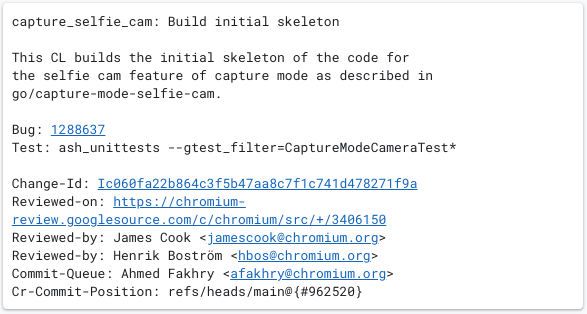
Thankfully, that exact feature is on the way. Thanks to a hint from the Chromium Gerrit, we now know that the selfie (or web) cam is being added to the capture mode feature in Chrome OS. How it will end up being implemented at this point is still a mystery, but I’m sure glad it is on the way. Slowly but surely the screen capture tool on Chromebooks is continuing to grow and expand, making the need for 3rd party software for this sort of thing less and less necessary.
I don’t want to take anything away from services like Loom or Screencastify that do a great job capturing video and audio from all sorts of devices, and for those needing cross-platform support for this sort of thing, those services will continue being your way forward. But if you only need screen recordings from time to time and would like your face in the mix to help relay what it is you are trying to show someone, it looks like your Chromebook will natively have this feature pretty soon.
For now, this is clearly in early stages and just being tested. At the end of the day, however, it’s not out of reach to think we could see this feature at least in the Dev Channel within just a few releases as the basic structure has already been merged. The camera and the screen capture tools are both well-established for Chrome OS, so this is more of a matter of embedding that camera feed and cleaning up the UI before, during and after recording. I don’t want to make light of what the Chrome OS team does, but this one feels like a lighter lift than many of the new options we continue to see rolling out. Fingers crossed we get this sooner than later.
SUBSCRIBE TO UPSTREAM
Get Chrome Unboxed delivered straight to your inbox
Upstream is our flagship, curated newsletter with the top stories, most click-worthy deals, giveaways, and trending articles from Chrome Unboxed sent directly to your inbox a few times a week. Join 31,000+ subscribers.

