


Support our independent tech coverage. Chrome Unboxed is written by real people, for real people—not search algorithms. Join Chrome Unboxed Plus for just $2 a month to get an ad-free experience, access to our private Discord, and more. Learn more about membership here.
START FREE TRIAL (MONTHLY)START FREE TRIAL (ANNUAL)
While I love new features coming to Chromebooks, I’ll have to go on record as being a tad bit bummed out by what this particular one is turning out to be. I’m not saying it won’t be a solid addition to ChromeOS or that many users won’t find it incredibly helpful: it’s just not what I was hoping it was going to be. The feature in question is of course the ‘Glanceable’ widgets we’ve talked about a few times up to this point, and the letdown is the fact that they aren’t exactly desktop widgets the way we’ve come to know them in Android.
Say hello to the new ‘Welcome Screen’
As it turns out, the new widgets we’ve been seeing referenced in the Chromium Repositories are widgets and they do what we thought, but they won’t be living where we expected them to. Instead, they will be part of a new ‘Welcome Screen’ that should show up in the next few versions of ChromeOS. You can enable the flag in the Canary Channel if you are so inclined, but with the pace of development on this one, I’d advise you to just wait a bit longer for it to arrive in Stable.

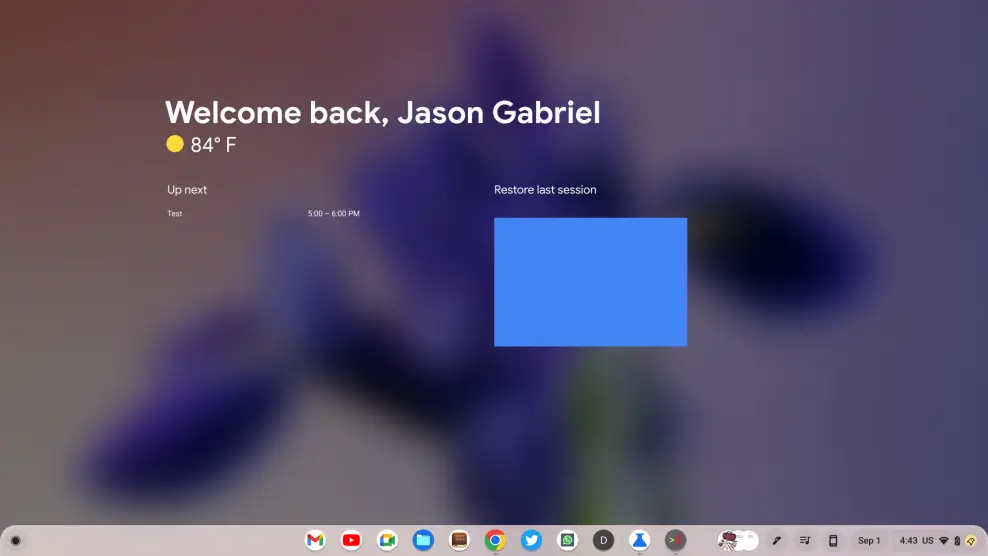
This welcome screen will greet users for the beginning of a new session or can be toggled on and off via a button up top in the overview screen as well. All the widgets we’ve been talking about are there, including an agenda that pulls from your calendar, a weather icon, a welcome message, and a screenshot of your last session that can be restored with just a single click.
All of it works right now (we mocked up the screenshot of your last session for the featured image up top) and it feels a bit crazy that this new feature has come this far this quickly. Generally speaking, the whole thing is only about a month old. The option for restoration of your last session dates back a few months to another feature we’ve been following called ‘Floating Workspaces.’ That feature is meant to allow you to restore your sessions between Chromebooks, and it may be that this new welcome screen is where Google chose to leverage it.
As a person who generally leaves my Chromebook on and simply closes the lid when I’m finished, I’m unsure at this point how often I’ll be greeted with this new ‘Welcome Screen,’ but I see the appeal. While I wouldn’t want this popping up every time I walk away and re-approach my Chromebook, I like the idea of being met with it first thing in the morning to see the weather, my schedule, and have the opportunity to restore where I was when I last left my Chromebook.
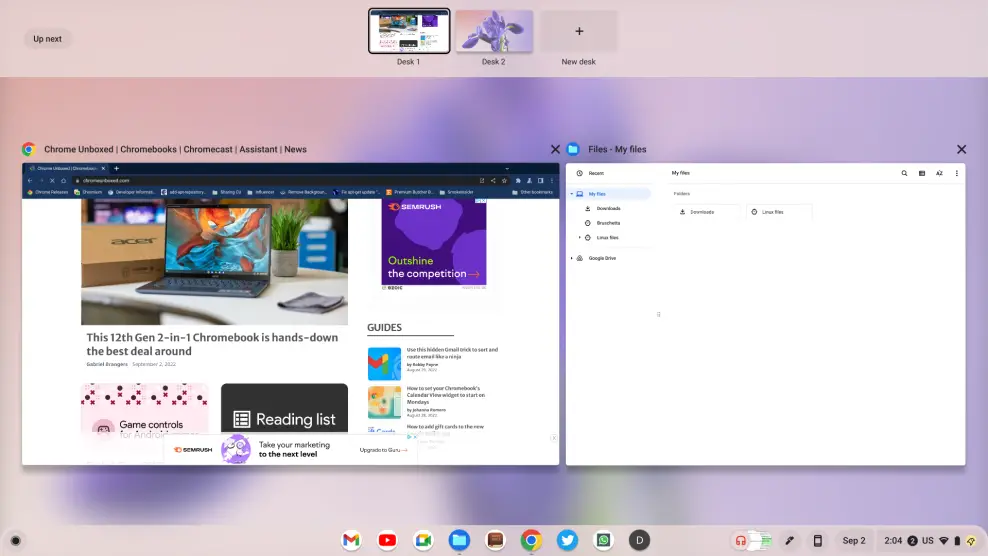
For those of you like me that would want more frequent access to this, however, there will be the button in the overview bar as well that allows for the new ‘Welcome Screen’ to be brought back into view. As more useful stuff finds itself in this new space, I could see myself utilizing it more and more. Perhaps at some point we’ll have some options of widgets to include as I could see something like a simple Google News or Google Discover feed being great to have in this form.
For now, however, what you see is what you get, and I think for many users this ‘Welcome Screen’ could prove quite useful. I imagine students and employees who snag a Chromebook from a cart being able to log in, orient themselves for the day, and find a lot of value in this feature. We’re likely far from done with the ‘Welcome Screen’, so more functionality could arrive before it launches, and we’ll be keeping an eye on it until it does.
VIA: 9to5 Google
SUBSCRIBE TO UPSTREAM
Get Chrome Unboxed delivered straight to your inbox
Upstream is our flagship, curated newsletter with the top stories, most click-worthy deals, giveaways, and trending articles from Chrome Unboxed sent directly to your inbox a few times a week. Join 31,000+ subscribers.

