

Support our independent tech coverage. Chrome Unboxed is written by real people, for real people—not search algorithms. Join Chrome Unboxed Plus for just $2 a month to get an ad-free experience, access to our private Discord, and more. Learn more about membership here.
START FREE TRIAL (MONTHLY)START FREE TRIAL (ANNUAL)
Back in 2019, Google launched the Nest Hub Max, a larger sibling to the already-popular Nest Hub. While a larger display, better speakers, gesture control and a front-facing camera were all noteworthy additions, there was a trick that the Nest Hub put in play right from the beginning that it seems we might start seeing on some Chromebooks in the future: the ability for the camera to follow your face during video calls.
Follow me with face detection
You can see on the video above an example of this whole thing in action. It is simple and makes a lot of sense, but how does it work? Honestly, the concept is simple in theory and likely much more difficult in execution. With a solid, wide-angle lens, you generally get far more in your video than you want. In a video call, you are the primary subject and all that extra surrounding info can be cropped out if needed.
This is precicely what is going on with the Nest Hub Max. Though it looks like the camera is panning, tilting and zooming, it is actually all software based. The camera on the Nest Hub Max is a fixed, wide-angle camera that captures way more than you need for a video call, giving you all sorts of room to move around in the frame.
Google’s software is simply finding your face and digitally cropping out the excess stuff in real time to make it look like the camera is moving. With a wide-enough camera and a lens/sensor that is collecting a high enough pixel count, cropping in like this actually works quite well. As a matter of fact, this is exactly what phones and cameras do to pull of electronic image stabilization (EIS) when optical image stabilization (OIS) isn’t available.
Face following is coming to Chromebooks, too
Thanks to a few commits found in the Chromium Repositories, it appears this exact thing is on the way for Chromebooks, too. With many devices having decent front-facing, wide-angle cameras, the same cropped, panning/tilting/zooming tricks can be done on Chromebooks with the right software in place.
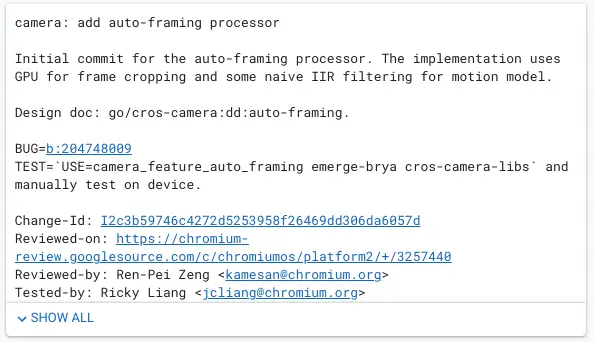
You can likely see why this commit caught my eye. As I looked into what this above-mentioned auto-framing could be, I had a gut-level suspicion that this sort of feature in the camera might be for the exact same thing we see in the Nest Hub Max. As I looked into the files surrounding this commit and for other commits about auto-framing, I kept seeing files that looked like this:

Notice the names of those files? Face tracking and stream manipulation are the standouts, and those sorts of actions are the exact things you would need in order to get the same face-following feature on Chromebooks that you get on the Nest Hub Max.
We don’t know which devices this will eventually work on, but I’d imagine Google may only select Chromebooks with better than 720p webcams. The first commit was being tested on a ‘Brya’ device, so there’s even a chance this ability only comes to next-gen devices as ‘Brya’ is the main baseboard for 12th-gen Alder Lake Chromebooks. As is stated in the commit message, the GPU is a big part of this framing, so there’s a chance only certain Chromebooks will get this in the future.

Finally, I wanted to point out that there is already a flag for this option in the Canary Channel of Chrome OS 99. While the flag doesn’t do anything at this moment, it is a sign that this effort is already in the process of implementation, so it feels like a sure bet that it will get here before too long. I really hope that it gets implemented in a way that includes lots of users, but either way, I’m looking forward to seeing this in action in the future on a Chromebook.
SUBSCRIBE TO UPSTREAM
Get Chrome Unboxed delivered straight to your inbox
Upstream is our flagship, curated newsletter with the top stories, most click-worthy deals, giveaways, and trending articles from Chrome Unboxed sent directly to your inbox a few times a week. Join 31,000+ subscribers.

