

Support our independent tech coverage. Chrome Unboxed is written by real people, for real people—not search algorithms. Join Chrome Unboxed Plus for just $2 a month to get an ad-free experience, access to our private Discord, and more. Learn more about membership here.
START FREE TRIAL (MONTHLY)START FREE TRIAL (ANNUAL)
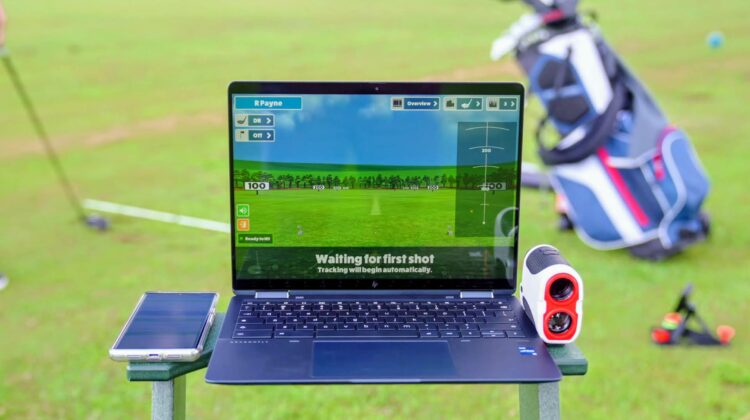
It’s been quite a while since we last talked about our golf simulator setup and the fact that – with the right hardware – you can be up and running with a phone and a Chromebook. It’s still an excellent setup and one that I turn to these days when we have a group that requires both righties and lefties to have a chance to hit. With our bigger, more advanced setup, we can make that work, but it is tedious between shots.
The Garmin R10 (what is used in the Chromebook-based setup), however, is a behind-the-ball radar-based launch monitor that allows for both left-handed and right-handed hitters to take advantage without any need of additional setup steps. It’s a big reason I’ve kept it around even after upgrading our simulator to bigger, better hardware, but the biggest reason I’ll hold onto this unit is an app that makes it worth having: Awesome Golf Simulator.
I won’t go into great detail here since we have a video all about our Chromebook/R10 simulator setup, but Awesome Golf is a great simulator for training (lots of data points and info), fun mini games, interesting challenges, and a few 9-hole virtual golf courses. While it won’t stand in for the hundreds of courses you can get from the excellent GSPro simulator software, I think I can speak for everyone who’s ever used Awesome Golf when I say that it is just flat-out fun.
An update to the graphics
A few months back, this software that was admittedly basic in its graphic presentation got a very nice upgrade that makes everything look better, run smoother, and delivers a better overall experience to all users involved. This cleanup came thanks to a Unity update that allowed the developers at Awesome Golf to spruce things up quite a bit while keeping their focus on building a game that doesn’t require wild specs to run smoothly.
And, I have to say that busting out this game and dusting off the Garmin R10 was a real pleasure today as I was able to quickly and easily get my apps updated and clearly see the difference in what was done. It’s not photo-realistic and you’re not going to now confuse this game with something like GSPro, but it does improve the graphics in a way that makes the entire game a bit more immersive and approachable.
And I love this! As the weather warms a bit, Awesome Golf and the Garmin R10 are my go-to at-home simulator options. Our nice setup here at the office is fantastic and I love it, but it isn’t very portable anymore. With a net, a mat, my R10 and a Chromebook, I can have a fun setup for a bit of practice for both me and my son, and we can play some sweet mini games as well right in the driveway on evenings we don’t have time to get out on the course.
And the best part is, I can play this game on just about any Chromebook out there. Sure, the lowest-end, older devices struggle a bit, but most modern Chromebooks handle Awesome Golf quite well, and now they can keep things smooth with a much better, more pleasing overall aesthetic. It’s a fantastic upgrade that I’d urge you to check out if you are in the golf launch monitor market. It’s an affordable way to get some swings in away from the course, and an app that feels as if the developers behind it truly care about their users’ experiences.
SUBSCRIBE TO UPSTREAM
Get Chrome Unboxed delivered straight to your inbox
Upstream is our flagship, curated newsletter with the top stories, most click-worthy deals, giveaways, and trending articles from Chrome Unboxed sent directly to your inbox a few times a week. Join 31,000+ subscribers.

