

Support our independent tech coverage. Chrome Unboxed is written by real people, for real people—not search algorithms. Join Chrome Unboxed Plus for just $2 a month to get an ad-free experience, access to our private Discord, and more. Learn more about membership here.
START FREE TRIAL (MONTHLY)START FREE TRIAL (ANNUAL)
 Sometimes in our line of work, you want more than anything just to see visual confirmation of what you are suspecting.
For us here at Chrome Unboxed, however, this doesn’t usually happen until a product or feature we’ve been following actually hits the market. Tablets, detachables, Assistant buttons, fingerprint scanners, etc. are all things we know are coming but are yet to see them in the flesh.
This Is A Different Story
Just last night, I came across some interesting info in the Chromium repositories. This commit and the corresponing bug were referencing a swipe action to not only show the shelf (the bottom tray that holds your pinned apps), but also show the ‘new launcher’.
Additionally, in the comments and the bug tracker, this looked to be a tablet-mode change. Likely, the gestures to bring up this new launcher only function when in tablet mode.
Gabriel and I chatted about this for a bit and figured this was looking to be a real thing at some point, so I decided I’d look around a bit more and publish what we knew today. I had all sorts of things imagined in my head for what this would look like and how it might function. With that mental rendering, I wanted to communicate my thoughts on how this could all work.
Then Came François Beaufort’s Post
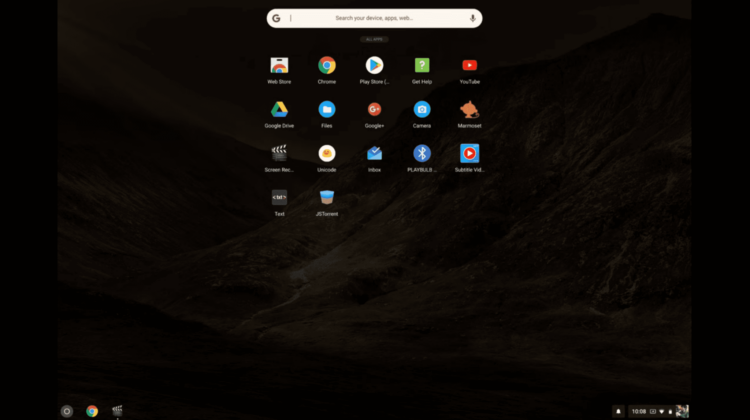
Not long after this chat, Chrome Story published an article detailing EXACTLY what we’d been talking about internally! Not only was there proof of the new launcher, there were pics and a short video!
The insider info came from Chrome evangelist François Beaufort’s post on Google+ and provided some quick insight to this extremely sweet looking feature coming to a Chromebook near you.
Never have I been so excited to get scooped on a story!
This became one of the rare times that we dig and dig to find a new feature coming to Chromebooks and get to see it almost immediately. That honestly never happens!
So, instead of imagining what this may or may not look like, let’s take a peek at what it looks like in its early stages on a Chromebook right now.
What We’re Seeing
As we found in the commits mentioned above, it seems this will be a touch-driven function. Just like you’d experience on a Pixel phone, this swipe up from the tray gesture will be how you’ll switch apps when in tablet mode.
Combined with what Gabriel found about tablet mode window-sizing being worked on, this could really solidify the tablet experience on Chromebooks. What I’d imagine is the ability to swipe in the app launcher at any given time and quick side-by-side apps utilizing the sliding divider similar to what already exists in Android Nougat.
While not the full productivity of windowed apps on a desktop, full-screen/side-by-side apps when in tablet mode makes sense and we’ve seen this approach from Microsoft and Apple already with tablets. If Chrome OS can clean up the tablet mode and retain all the goodness of its desktop mode, we’ll have some really awesome experiences in the near future.
Want To Try It?
For now, this new feature is both hidden behind a flag and only in the Canary channel. We can’t responsibly advise you to switch to that channel as it is not a simple selection and power wash. Feel free to Google it, but be careful.
If you do end up in Canary, slap this in your omnibar, select ‘enable’ and restart: chrome://flags/#enable-fullscreen-app-list
Those of you brave enough to venture into Canary territory can let us know how the experience is. As we see this trickle down to the normal channels, we’ll be keeping everyone informed.

