

Support our independent tech coverage. Chrome Unboxed is written by real people, for real people—not search algorithms. Join Chrome Unboxed Plus for just $2 a month to get an ad-free experience, access to our private Discord, and more. Learn more about membership here.
START FREE TRIAL (MONTHLY)START FREE TRIAL (ANNUAL)
First up, let me warn you that we all need to take this info with a grain of salt. This is all circumstantial and possible, but I have no hard evidence that what I’m about to say is fact. Instead, looking at industry trends, failed past experiments, and a very particular and current flag still being worked on, I think we can all come to some conclusions about the possibility of dual-screen or folding-screen Chromebooks coming in the future.
First, I want to talk about the Chrome OS flag that has been around long enough that I have forgotten exactly when it first appeared. The flag is called Unified Desktop Mode and it’s description is quite clear: enable unified desktop mode which allows a window to span multiple displays. You may think to yourself, as I did when I first saw this, that windows can span multiple displays already. Like I was, you would be wrong. Currently, you can hover a window in such a way where it overlaps multiple screens, but that app can only function on one screen at a time. Go ahead and try it.
Once I realized what this flag was supposed to do (allow one window to be displayed across more than one display in a way where you can see and interact with it on both screens), I gave it a try to no avail. Even with the flag switched to enabled, I can’t hang my Chrome window over the span of both my Chromebook display and the extended monitor. Granted, I’m not certain I’d even want to, and that is precisely why I stopped even caring about this older flag. I honestly saw only a handful of niche use-cases for this feature, but it seems the Chrome developers have been working on it all the while and it has remained as a flag and not been removed. A flag for an unreleased feature doesn’t stick around this long unless there’s a use for it somewhere on the roadmap.
Yesterday, however, I came across an article outlining how Microsoft’s new dual-screen Surface devices will leverage Winows 10X and after months of not caring one bit about that flag up there, I suddenly became very interested again. The Verge’s article about the way Microsoft will be leveraging dual-screen setups with the new Surface devices sounds identical to what this Unified Desktop flag is perfectly suited for. Sure, splitting windows to either side of a dual-display device is an important part of the overall experience as these dual-screen laptops become a normal thing, but so will be the ability to span a single window across both displays at once.
Chrome OS likely needed to figure this out in some ways back when the Chrome developers were working to get the Lenovo Yoga Book out into the Chromebook ecosystem. Unfortunately for that device, it failed pretty hard with Windows and the planned Chromebook equivalent never made it to production. It is highly likely Chrome OS was being tweaked to allow this sort of multi-monitor function back then and the whole thing was simply shelved for a bit.
Fast forward to today, and it seems the industry is quickly moving to begin the adoption of dual-screen laptops. Microsoft unveiled the new Surface Neo and Surface Duo not too long ago back in October of 2019, and we will likely be seeing them hit the market late in 2020. At CES, both Lenovo and Dell showed off prototypes of folding screen laptops and dual-screen setups as well, highlighting the fact that manufacturers are ready to try their hand at this new style of laptop/tablet hybrid.
Shop The Best Chromebooks of 2019 at Chrome Shop
Chromebooks are getting increasingly close to Windows laptops in terms of new tech, new chips, and new form factors. With Project Athena being Chromebook inclusive, it is clear that Google is trying to keep Chromebooks on the cutting edge of laptop tech instead of lagging years behind what Windows manufacturers are trying. While I don’t think we’ll see Chromebook makers chasing random fads like ASUS’ wild (yet clearly productive) dual-screen laptops in the Zenbook Pro Duo, I do see a future where Google is moving forward with form factors that can match things that Microsoft themselves put into the market.
With the Surface Duo not debuting until late 2020, I could see Google and a manufacturer like Lenovo having a similar style device in the works for a debut at CES 2021. Chrome OS already has most of the necessary elements in place to fully take advantage of such a hardware layout, so its just a matter of Google or another manufacturer taking the steps to begin developing a device that actually leverages that hardware. I am not currently sold on the actual usefulness of dual-screen devices, but I’m wide open to having my mind changed. I like the idea of a small notebook like the Lenovo X1 Fold that I can unfold into a larger display for the desktop, but I’m concerned about the real-world usefulness of a device like this. It looks like I’ll have plenty of time to be convinced, though.
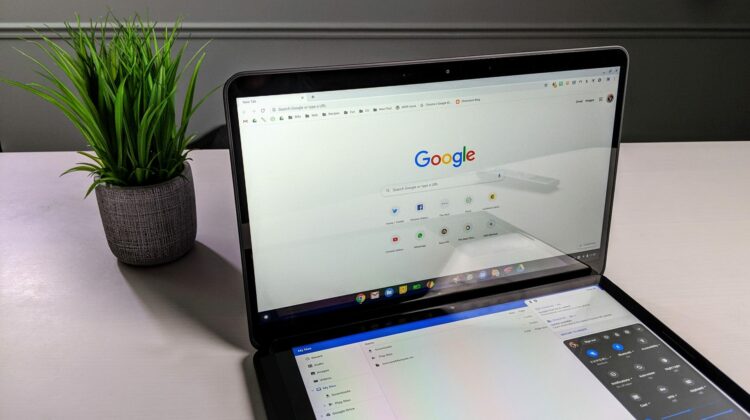
Disclaimer: the featured image in this article is in no way a real device. It is simply a mock-up.
SUBSCRIBE TO UPSTREAM
Get Chrome Unboxed delivered straight to your inbox
Upstream is our flagship, curated newsletter with the top stories, most click-worthy deals, giveaways, and trending articles from Chrome Unboxed sent directly to your inbox a few times a week. Join 31,000+ subscribers.

