

Support our independent tech coverage. Chrome Unboxed is written by real people, for real people—not search algorithms. Join Chrome Unboxed Plus for just $2 a month to get an ad-free experience, access to our private Discord, and more. Learn more about membership here.
START FREE TRIAL (MONTHLY)START FREE TRIAL (ANNUAL)
It has been a little over a year since the Google Assistant officially debuted on non-Google branded Chromebooks. Personally, I never use Google’s little helper on my device because I’m always near my phone or another Google Assistant-enabled device like a smart speaker or display. Additionally, it just feels strange talking to my laptop. It shouldn’t but it does. That’s just me. I’m sure that many users leverage the Google Assistant on their Chromebooks and that’s great. However, there is a new Assistant feature in the works that make it a lot more useful for users including myself.
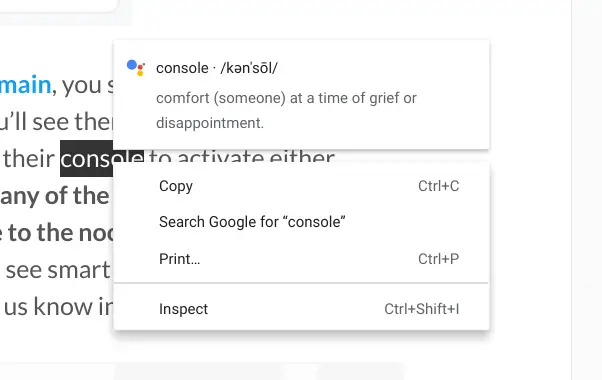
For months, the Canary channel of Chrome OS has held a handful of Assistant-related flags that – when enabled – would give users contextual search results when you highlight and right-click text. Oddly enough, all of those flags disappeared in a recent update to the Canary channel but today, I discovered why. While I was looking through the experimental Chrome flags page, I happened to highlight a word and right-click it. I was quickly greeted by a tooltip that I had never seen prior to today.

Now, the feature you are seeing in this image isn’t exactly new. As a matter of fact, it is exactly what I mentioned above when referencing the flags that had mysteriously disappeared. This popup notification, however, appears to be a new addition to the Assistant’s upcoming upgrade. The feature itself currently gives you a definition provided by the Google Assistant but future updates could include tricks like conversions and translations. The feature is hit or miss at the moment as some words do not offer up the Assistant at all while some definitions miss the mark because, well, context matters. See the example below. The noun “console” is mistaken to be the verb console.
Clearly, this is still a work in progress but the removal of the related flags and the fact that developers have added the first-time tooltip tells me that this is headed for the big stage. You won’t catch me saying “hey, Google” to my Chromebook anytime soon but I guarantee that this will be a very useful feature for me and many others that spend a lot of time writing. I can imagine that this will be useful for students, employees, and users from just about every walk of life. Just the simple task of grabbing a definition without having to open a new tab will be a great resource and I feel this will exponentially increase the Assistant’s reach on Chrome OS. We’ll keep an eye out to see how quickly this one moves up the ranks. Hopefully, we will see it land with Chrome OS 88 and not have to wait 8 more weeks to use it.
SUBSCRIBE TO UPSTREAM
Get Chrome Unboxed delivered straight to your inbox
Upstream is our flagship, curated newsletter with the top stories, most click-worthy deals, giveaways, and trending articles from Chrome Unboxed sent directly to your inbox a few times a week. Join 31,000+ subscribers.

