


Support our independent tech coverage. Chrome Unboxed is written by real people, for real people—not search algorithms. Join Chrome Unboxed Plus for just $2 a month to get an ad-free experience, access to our private Discord, and more. Learn more about membership here.
START FREE TRIAL (MONTHLY)START FREE TRIAL (ANNUAL)
Chrome OS 87 rolled out at the end of last week and it brought some nice updates and upgrades along with it. We have a post highlighting the main, notable changes Google introduced, but as always, there are more small changes lurking behind the scenes with this latest update and the Files app for Chromebooks is on the receiving end of a few of those.
While small tweaks like these may not make it into the larger narrative of a Chrome OS update, they can provide big benefits to users across the board, and I think that’s what we’ll see with these two small-yet-meaningful Files app upgrades.
File transfer time estimates
For the longest time, Chromebooks have simply given a little blue progress circle for users to stare at when a larger file is being moved. Whether from an external drive or to some different internal location, moving larger files takes a bit of time. When you are waiting on a file transfer to complete, a progress circle is OK, I suppose, but it does a very poor job of relaying exactly how long you can expect to wait for your file to be where you want it.

With Chrome OS 87, the Files app now gives you a clear estimate of how long your transfer will take in plain language. While I’d love to see the progress ring and the message work together, if I had to choose, I’d go with the clear “About one minute remaining” type of message versus trying to guess how long it will take for the circular gauge to complete the cycle. For what it’s worth, the blue circle does still show up when you have multiple file transfers working at the same time, but single transfers only show the time estimate text.
Offline file access toggle
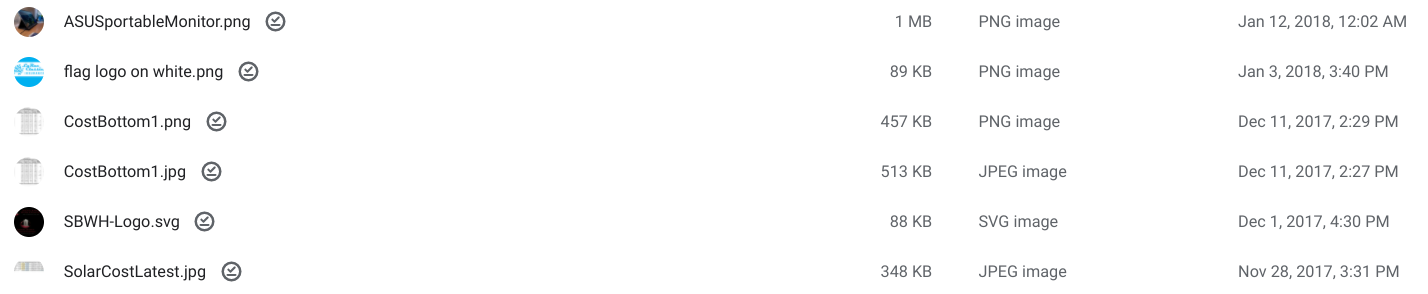
There’s also a nice, new toggle that appears in the top bar of the Files app when you are dealing with Google Drive files. Simply select any file or folder in the Files app that resides in your Google Drive and you’ll see a new toggle appear that allows you to manually decide which files you’d like to make available for access when offline.

Additionally, after you’ve toggled this on for any file or folder, a little check mark appears next to the item to indicate that you’ve successfully made it available for use when you connection to the internet is not available. It’s a nice touch and for any user that finds themselves in a situation where connectivity could get challenging, this new feature will make it far simpler to determine what files have been made ready for an internet-free work period.
Chrome OS 87 is widely rolling out for most users with a few exceptions that should be caught up soon. If you need to check for the update, simply head to Settings > About Chrome OS > Check for updates and you’ll be taken to Chrome OS 87 if you aren’t already. We won’t see another milestone update to Chrome OS 88 until mid-late January, so enjoy this one. We’ll be covering some of our favorite feature flags soon, too, so there’s still more to unearth in this latest Chrome OS version to hold us over until 88 rolls out in 2021.

