

Support our independent tech coverage. Chrome Unboxed is written by real people, for real people—not search algorithms. Join Chrome Unboxed Plus for just $2 a month to get an ad-free experience, access to our private Discord, and more. Learn more about membership here.
START FREE TRIAL (MONTHLY)START FREE TRIAL (ANNUAL)
The timing for a big tablet UI overhaul like the one we’re showing you today makes perfect sense if you’ve been following along with us during our time in Las Vegas for CES 2020 last week. At the show, we saw some insanely compelling new Chromebooks in the form of the Samsung Galaxy Chromebook, ASUS Chromebook Flip C436, and the Lenovo Chromebook Flex 5. A common factor across all of these new devices is the fact that they are convertibles that will leverage Chrome OS’ every-evolving tablet UI.
Most notably, the device that will profit the most from the new UI changes we’re about to discuss will be the Lenovo Chromebook Duet: a dedicated tablet from Lenovo that has already impressed just about every person that has come into contact with it. Sure, Google has decided against making tablets for themselves, but these new tweaks to tablet mode on Chrome OS prove that development is forging onward and Google has not given up on Chrome OS tablets in the least.
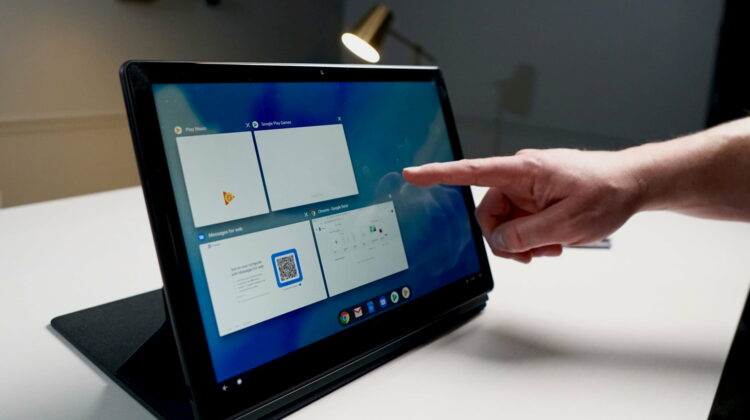
First spotted by Android Police, the new UI looks and feels a lot like Android 10’s gesture navigation, and that is a great thing. Google clearly relented and just straight up copied the iOS/iPadOS method of gesture navigation and we now have some semblance of a standard for the way you move through a given UI without buttons. Just like iOS and/or Android, a swipe up from the bottom goes home, a swipe up and hold gives you an overview/multitask view, and a swipe in from the left side is a system-wide back button. Finally, when engaged in any app, the bottom shelf hides and can be brought back into view with a small flick up from the tray area.
SUBSCRIBE TO UPSTREAM
Get Chrome Unboxed delivered straight to your inbox
Upstream is our flagship, curated newsletter with the top stories, most click-worthy deals, giveaways, and trending articles from Chrome Unboxed sent directly to your inbox a few times a week. Join 31,000+ subscribers.
The gestures work surprisingly well for something in development and I can see myself getting used to this method of navigation very, very quickly. As the final kinks are ironed out, it will be great to see a very familiar method of getting around apps and home screens for users new to Chrome OS. The only bug really left to deal with is the swipe gesture for the back button. When in an Android app that has a swipe-in menu on the left, the menu slides in and the back animation appears, but nothing happens. I’m not sure how this will get mitigated, but I’d assume Google is already working on this in a similar fashion to how it is being handled in Android.
It also seems they’ve worked on these new gestures with most multitasking circumstances in mind, too. For instance, when in split-view you can swipe up from either side of the divider to initiate the overview mode on that particular side. A full swipe up from this screen will also take you back to the home screen. For the time being, a swipe down from the top of the screen still enters the multitask screen, but I have a firm expectation that the Chrome OS team will take this feature away in a future update if it doesn’t happen by Chrome OS 80.
Shop The Best Chromebooks of 2019 at Chrome Shop
This new mode is still behind a flag (chrome://flags/#shelf-hotseat) and only available in Chrome OS 80 (currently in Beta and Dev channels and set to release mid-February 2020), so we’re not 100% sure it will arrive in Chrome OS 80 out of the box. With the launch of the Lenovo Chromebook Duet not scheduled until May 2020, I could see this update not coming out from behind a flag until Chrome OS 81 or 82, but it is quite stable for something slated for release to the public that far from now. If I’m guessing, it will stay behind a flag at least until Chrome OS 81, which will arrive around the same time as the Samsung Galaxy Chromebook and the ASUS Chromebook Flip C436, but the good news is you’ll be able to enable it with a simple flag when Chrome OS 80 rolls out a few weeks from now.

