


Support our independent tech coverage. Chrome Unboxed is written by real people, for real people—not search algorithms. Join Chrome Unboxed Plus for just $2 a month to get an ad-free experience, access to our private Discord, and more. Learn more about membership here.
START FREE TRIAL (MONTHLY)START FREE TRIAL (ANNUAL)
It’s been a big day in the Google world! First, Google unveiled Gemini, a highly capable and versatile AI model available in three versions: Ultra, Pro, and Nano. This innovative technology is designed to operate across various platforms, from data centers to smartphones (and hopefully Chromebooks.) But then, Google decided to go a step further and also released their December 2023 Pixel Feature Drop that is loaded with tons of new AI features and updates. There’s a lot here so let’s dive right in!
Gemini Nano on Pixel 8 Pro
Starting today, the Pixel 8 Pro is the first smartphone to incorporate Gemini Nano, the most efficient of the new AI models that is designed for on-device tasks. With Google Tensor G3 powering these new features on the back end, the Pixel 8 Pro now has two new, on-device AI features: Summarize in Recorder and Smart Reply in Gboard.
First up, let’s talk about the new Summarize feature in the Recorder app of the Pixel 8 Pro. This feature provides summaries of recorded content like conversations and presentations, even without an internet connection. Gemini Nano is also powering Smart Reply in Gboard on the Pixel 8 Pro, which suggests contextually aware responses, basically writing replies for you. It’s working with WhatsApp right now and is slated to extend to more apps next year.
Google is also releasing new AI-powered photo and video tools. The first of which is called Video Boost and will take the Pixel 8 Pro’s video capabilities to a new level. Video Boost uploads videos to the cloud for enhancements in color, lighting, stabilization, and graininess and the examples they’ve provided are stunning. I cannot wait to fully test this new feature! Night Sight video is also now available on Pixel 8 Pro, which utilizes the same AI smarts to reduce noise in low-light video recordings, ensuring rich details and colors.
New features for Pixel 8, too
Google is releasing a few new features for both the Pixel 8 and the 8 Pro, as well. The first is called Night Sight in Timelapse, which enables users to capture vibrant timelapse videos at night. Additionally, Google has improved Portrait light in Google Photos, which balances light to perfect portraits regardless of the lighting conditions. And last up, Photo Unblur has been upgraded, particularly for capturing clearer images of your pets.
Productivity tools for the Pixel ecosystem
Google has also introduced several productivity-enhancing features for Pixel users. The Dual Screen Preview on Pixel Fold has officially arrived to make it easier to snap the perfect shot with the main cameras, while high-quality video calls can now finally be made using Pixel phones connected to computers. The Camera app’s new Clean feature effortlessly cleans up scanned documents, and Google Password Manager now supports the addition of passkeys for enhanced security. And the new Repair Mode ensures the safety of personal data during device repairs.
If you love the Call Screen feature like me, there are now smarter, more contextual replies so you can easily respond without having to take the call. Call Screen is also now available on Pixel Watch. Speaking of the Pixel Watch, Google is also making it easier to unlock your Pixel phone with your Watch when it’s nearby. There are some new features for the Pixel Tablet, too. Clear Calling on Pixel Tablet reduces background noise during video calls, and the tablet now supports spatial audio for an immersive sound experience.
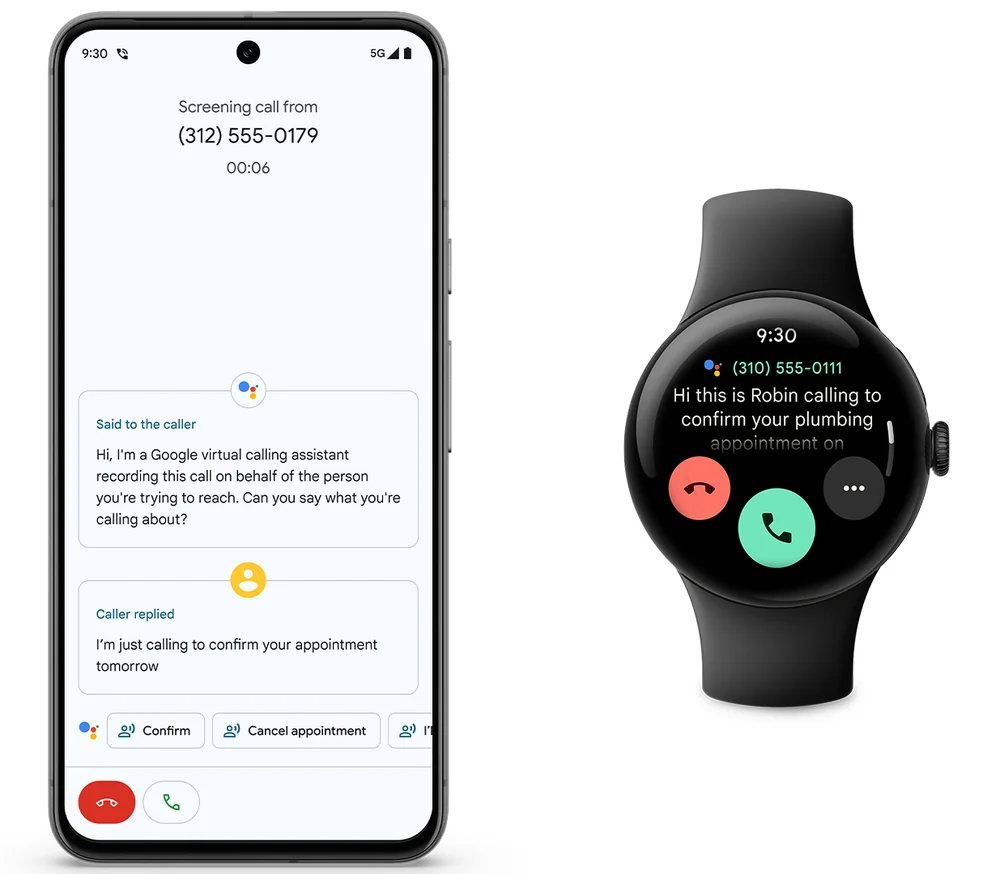
Google is also expanding its existing features to more regions and languages. The Recorder app now supports transcription in 28 additional languages, and Direct My Call and Hold for Me features are expanding to business numbers without toll-free prefixes, and both features are now available in the UK.
Lastly, in terms of customization for your Pixel products, the Clock app on your phone now includes weather conditions and forecasts, which I love. And the first-gen Pixel Watch can now sync your Do Not Disturb and Bedtime Mode, like you can with the Pixel Watch 2. There are also some new watch faces and complications available.
If you’re thinking to yourself that was a lot, we’re with you! The announcement flurry from Google was almost overwhelming, and although most of these new features announced today aren’t specifically for Chromebooks, they are a sign that Google is leveraging AI on more than just Pixel phones. We are hopeful Gemini Nano will be the on-device AI model that will come to Chromebook Plus in early 2024, and we’ll be testing out many of these new Pixel features as well.
SUBSCRIBE TO UPSTREAM
Get Chrome Unboxed delivered straight to your inbox
Upstream is our flagship, curated newsletter with the top stories, most click-worthy deals, giveaways, and trending articles from Chrome Unboxed sent directly to your inbox a few times a week. Join 31,000+ subscribers.

