

Support our independent tech coverage. Chrome Unboxed is written by real people, for real people—not search algorithms. Join Chrome Unboxed Plus for just $2 a month to get an ad-free experience, access to our private Discord, and more. Learn more about membership here.
START FREE TRIAL (MONTHLY)START FREE TRIAL (ANNUAL)
Since the launch of the Samsung Galaxy XR late last year, people have spent the last few months exploring immersive apps with Gemini built right in. But starting today, the headset experience is getting a big upgrade. Google is officially rolling out a handful of new features designed to deepen immersion and make navigating the operating system feel much more natural within your physical space.
Pin your apps anywhere you want
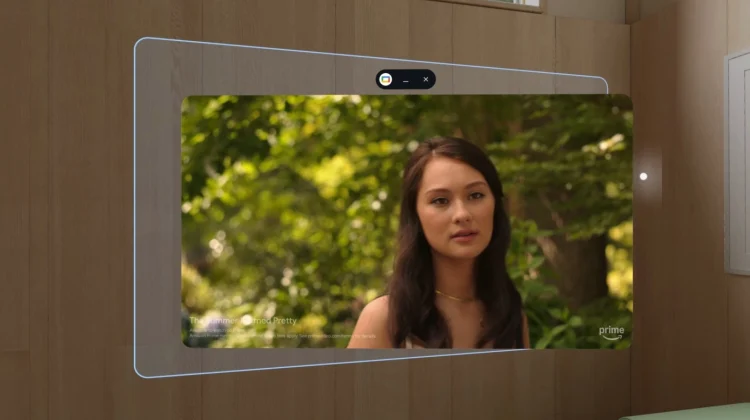
To me, the most exciting part of this update is how Android XR is handling window management. You can now pin apps directly to your physical walls, and they will stay securely anchored exactly where you left them. This means you can keep a calendar permanently floating next to your real-world office desk, or dedicate a specific wall in your living room to a massive virtual streaming screen.
Google is also fixing a major pain point for anyone who takes their headset off frequently. Now, when you put the Galaxy XR back on, your previous session is automatically restored. You can pick up exactly where you left off without having to reopen and rearrange all your floating windows, making it much easier to step away for a moment and jump right back in.
Bringing 2D apps into the 3D world
Another big addition in this update is a new experimental feature called auto-spatialization. By enabling this feature in the Labs section of your settings, you can press a single button to add depth to almost any traditional 2D app, game, website, or YouTube video. It essentially forces traditional flat media into a 3D spatial experience on the fly. This is a brilliant way to bridge the gap while developers continue building native XR experiences.
Speaking of native apps, Google notes that the library of software built specifically for Android XR has more than doubled. There are now over 100 fully immersive apps available, including new additions like Trombone Champ: Unflattened and a Paris St. Germain app that lets you watch live soccer games from a tabletop view.
Better hand tracking and enterprise support
The rest of the update focuses on quality-of-life improvements and expanding the platform’s reach. They are adding a new Labs feature that lets you see your actual physical hands while interacting with virtual content in the home space, replacing the old white outlines.
Google is also officially bringing Android Enterprise support to XR, allowing organizations to deploy these headsets for training and collaboration using management partners like Microsoft Intune and Samsung Knox Manage.
This update is rolling out starting today for the Samsung Galaxy XR.
SUBSCRIBE TO UPSTREAM
Get Chrome Unboxed delivered straight to your inbox
Upstream is our flagship, curated newsletter with the top stories, most click-worthy deals, giveaways, and trending articles from Chrome Unboxed sent directly to your inbox a few times a week. Join 31,000+ subscribers.

