

Support our independent tech coverage. Chrome Unboxed is written by real people, for real people—not search algorithms. Join Chrome Unboxed Plus for just $2 a month to get an ad-free experience, access to our private Discord, and more. Learn more about membership here.
START FREE TRIAL (MONTHLY)START FREE TRIAL (ANNUAL)
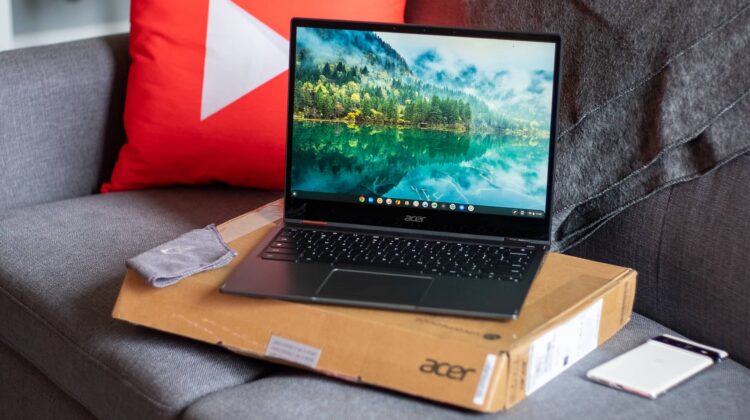
You’ll likely recall that we had hands-on time with the new Acer Chromebook Spin 513 back in January for CES 2022. At the time, we couldn’t benchmark it, we couldn’t show you too much of it and we knew that the hardware was unfinished and pre-production. The Spin 513 we have here today is anything but that. It is ready for the store shelves and will be available at Amazon in under a week from this post for just $615.99 MSRP. There is so much good stuff packed into what looks a lot like the Spin 713’s chassis that I think Acer will a ton of these in 2022. Let’s check it out.
First up, we have to talk about the chassis. If you see huge Spin 713 vibes, you aren’t mistaken. From top to bottom, the Spin 513 doesn’t just borrow from the Spin 713: it flat out steals. But it’s a good thing in this instance, and the Spin 513 comes in both thinner and lighter than the Spin 713 at only 2.81 pounds. With no need for vents or fans, the entire look of this Chromebook is clean, very sleek, and attractive; and the top and bottom portions being made of aluminum give everything a firm, premium feel.
Lifting the lid – which can be done with a single finger – you are quickly met with a very familiar, very good 2256×1504 QHD 3:2 IPS display that is just as pleasing here as it has been over the years on the Spin 713. Beneath it is a backlit keyboard, a huge Gorilla Glass trackpad and nothing else to get in the way. Ports are decent, too, with 3 USB 3.2 ports (2x USB Type C and 1x USB Type A), a headphone/mic jack, and microSD card slot. Above the screen is a 720 HDR webcam that Acer says will utilize temporal noise reduction technology to significantly improve video quality. We’ll test this out to see if that actually works or not.
Inside, we have the star of the show: a MediaTek Kompanio 1380 SoC with 8GB of RAM and 128GB of eMMC storage. This means long battery life (we’ll be testing that out) and solid connections (Wi-Fi 6 and Bluetooth 5.2) are part of the equation as well. Of course, we ran a few benchmarks to finally see how this top-end MediaTek chip would perform, and we weren’t disappointed. With an Octane score of 36,000 and Speedometer 2.0 score of 96, there’s no doubt that this device is far faster than any Chromebook that has come before.
We’ll be testing out all those types of things (and more) for the review, including how it runs Android apps, how good the battery actually is under some real-world stress, and how this Chromebook gets along with larger, external displays when used for bigger productivity tasks. So far, however, this one is very, very impressive. When sat beside the high-end Spin 714 we were recently introduced to, I think Acer has their mid-high-end Chromebook lineup in a very solid spot coming into the mid-year portion of 2022.
SUBSCRIBE TO UPSTREAM
Get Chrome Unboxed delivered straight to your inbox
Upstream is our flagship, curated newsletter with the top stories, most click-worthy deals, giveaways, and trending articles from Chrome Unboxed sent directly to your inbox a few times a week. Join 31,000+ subscribers.
SUBSCRIBE TO UPSTREAM
Get Chrome Unboxed delivered straight to your inbox
Upstream is our flagship, curated newsletter with the top stories, most click-worthy deals, giveaways, and trending articles from Chrome Unboxed sent directly to your inbox a few times a week. Join 31,000+ subscribers.

