Up next in 10



Sponsored by NordVPN. Try it out and get 70% off a three-year plan + 3 months free! Click here: https://chromeunboxed.com/nordvpn
・・・・・・・
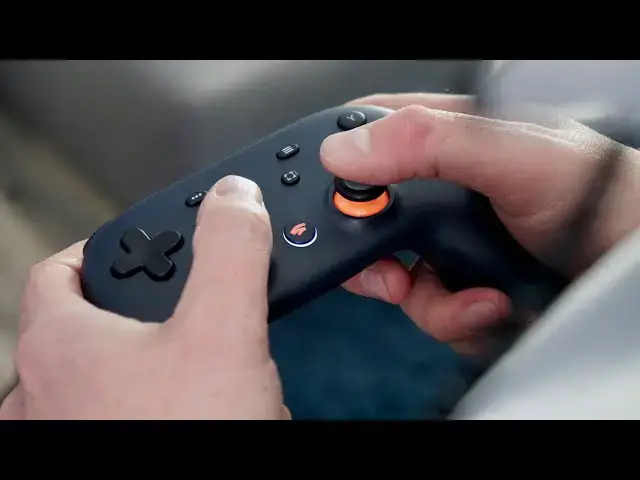
After a bit of a hiccup in the official launch of Stadia, I was up and running with my Founders Edition setup by about 5pm and spent a good portion of the next 24 hours testing Stadia in all its forms. From using the Chromecast on a big TV to using Stadia in a Chrome browser to playing on my Pixel 4 XL, the whole experience was in some ways better than I'd imagined. In other ways, however, Google still has some real work to do.
Read more: https://chromeunboxed.com/stadia-pre-review-one-day-thoughts-chromebook-pixel-chromecast/
Join our newsletter: http://bit.ly/2WjCDm7
・・・・・・・
Shop Chromebooks on Amazon: https://fave.co/2OuedYL
Subscribe to the channel: http://bit.ly/2xFuj6L
The Music We Use - PERFECT for YouTube: http://bit.ly/31W6PYP
Become a member of Chrome Unboxed to help us make our channel even better, and for access to exclusive perks: http://bit.ly/CU-join
Follow us: https://www.instagram.com/chromeunboxed
https://twitter.com/chromeunboxed
https://www.facebook.com/Chromeunboxed
https://mewe.com/join/chromeunboxed
Show More Show Less View Video Transcript
0:00
I've spent just under a day with stadia
0:02
and I have some thoughts from the way it
0:04
works on a chromecast the way it works
0:06
on a Chromebook - the way it works on my
0:08
phone and I'd like to share some of
0:09
those with you but before we get into
0:18
all that this video is brought to you by
0:19
Nord VPN another VPN a choice for
0:21
millions of users whether they be on a
0:23
Chromebook or a Windows machine or a
0:25
MacBook it doesn't really matter they
0:27
keep your browsing safe and secure
0:28
whether you're at home or on the go if
0:30
you'd like to learn more about them and
0:31
their services head over to Chrome on
0:33
box comm /ignore VPN to get started
0:36
today so yeah we had to run home because
0:43
for the I think what third time in a row
0:45
I've had stuff shipped to my house
0:47
instead of remembering to ship it to the
0:48
office so we're gonna take it back to
0:50
the office and get it unpacked and
0:52
hopefully play some video games
0:58
[Music]
1:03
when it comes to actually using stadia
1:05
for me it was less about on day one all
1:08
the bells and whistles and things that
1:10
we might get to do down the road and it
1:12
really became more about whether or not
1:14
this was going to work and like I said
1:17
in the open it was a bit of a mixed bag
1:18
so the first thing I did and the way
1:21
that this setup works is I hooked in the
1:23
the chromecast ultra setup the stadia
1:25
controller and got all that stuff up and
1:27
running and when we talk about
1:28
performance here there's kind of two
1:30
camps there's there's the part of it
1:31
that is just straight-up latency from
1:33
stadia so kin stadia react fast enough
1:36
in a streaming environment to my button
1:39
pushes and the answer for that yeah is
1:41
yes I mean it does that it does that
1:43
pretty well and we're gonna talk about
1:45
that a little bit more but as I got the
1:47
whole thing set up we got the chromecast
1:48
in we got the controller you know all
1:50
hooked up and it steps you through that
1:52
whole process very neatly very cleanly I
1:55
didn't have to go consult a manual or
1:56
look anything up we got set up and going
1:58
I noticed right off the bat there was
2:00
some input lag and that's kind of the
2:02
other half of this thing so is the stuff
2:04
coming from the server fast enough for
2:06
you to react to and then when you react
2:07
to it is it going to actually send that
2:09
command back to the server fast enough
2:11
for it to not feel like there's latency
2:13
and on the chromecast with the
2:15
controller and the chromecast ultra
2:16
unfortunately every game we've tried so
2:18
far there's probably like a quarter
2:20
second to a half second of lag so you
2:22
push the controller in one way there's a
2:24
slight pause and then the thing happens
2:26
on-screen and it's enough between racing
2:28
games fighting games and first-person
2:30
type shooter games that it made me not
2:32
really want to play them with that set
2:34
up and that's kind of unfortunate
2:35
because that's the way the box comes and
2:37
that's how you set it up the first time
2:38
and so a lot of people for right now at
2:41
least day one day two are probably
2:43
getting that exact same experience we've
2:44
got gigabit internet here so you know a
2:47
gig up gig down so connection issues
2:49
aren't the thing here it really just is
2:51
a latency problem between the way the
2:53
controller hooks up to the network and
2:54
the way the chromecast ultra responds to
2:57
that however when we moved on to the
2:58
Chromebook which is where I really want
3:01
to leverage stadia things got a ton
3:03
better but not perfect so the latency
3:06
problem basically just went away I was
3:08
using a keyboard and mouse at first no
3:10
issues whatsoever the minute
3:12
move the mouse everything moves on
3:13
screen if I push forward back left right
3:15
or fire buttons or anything like that on
3:17
the keypad everything just works as soon
3:20
as it's supposed to but with this I had
3:22
a little bit of visual fidelity issues
3:24
so sometimes things would get a little
3:26
bit grainy or it would just stutter and
3:28
stop for a second and then catch back up
3:29
to where it was kind of if you had bad
3:31
bandwidth and we're trying to watch a
3:32
YouTube video for instance you know you
3:34
see something kind of like glitch and
3:36
stutter and then it goes right back it
3:37
wasn't enough that it caused me not to
3:39
be able to finish the level I was
3:40
working on in destiny but you could
3:42
definitely tell there were issues with
3:44
the streaming and in understanding the
3:46
stream and reacting to my movements
3:48
versus playing on the chromecast on the
3:51
chromecast there was a delay on
3:53
everything I did but the stream stayed
3:55
constant and nice and everything looked
3:57
beautiful in the Chrome browser so this
3:59
is gonna apply to you if you use Windows
4:01
or Mac or a Chromebook in the Chrome
4:03
browser it looks great half the time
4:05
sixty percent of the time but there's
4:07
gonna be a lot of framerate drops and
4:09
sometimes where the visuals just don't
4:11
quite match up and it was playable that
4:13
I'll say that I got through a whole
4:15
level and it was it was great to play it
4:17
just wasn't exactly perfect then I moved
4:20
on to the phone so right now you can't
4:22
pair up the controller without the
4:24
chromecast so you have to actually plug
4:25
it straight into the phone launch the
4:27
stadia app started the game got
4:28
everything up and going and input lag
4:31
was not there so there's no issues
4:33
whatsoever with the controller and input
4:35
everything happened exactly as I touch
4:36
the the controller and visually it
4:38
looked kind of like it did on the
4:39
chromecast where there weren't artifacts
4:41
and there weren't issues and there were
4:42
no glitches or stutters in the stream
4:44
itself and so what ended up happening
4:46
was overall the the way it felt to play
4:49
games on stadia felt most native when I
4:52
was using my phone in the controller I
4:54
just didn't really expect that to be
4:55
honest with you but that is the case as
4:57
we stand right now what that tells me is
4:59
that the servers with stadia are fast
5:02
enough and responsive enough to do what
5:04
they need to do when they're provided
5:06
with plugged in control so a keyboard
5:08
mouse or the controller actually plugged
5:11
in I plugged it into the Chromebook -
5:13
and didn't have any latency issues the
5:15
issues not really with the controller
5:16
the issue isn't with the stadia servers
5:18
being able to respond quick enough when
5:20
the commands get to them the latency
5:22
input that I was getting on the
5:23
controller the
5:24
chromecast has to do something with the
5:26
way it connects to Wi-Fi and then it
5:27
talks to the chromecast or talks to the
5:29
server whatever however they've got to
5:31
fix that I believe 100% that they will
5:34
be able to fix that and the other
5:36
problem with the Chrome browser you know
5:38
we're talking about streaming massive
5:40
games in real time in a web browser so
5:43
there's gonna be some hiccups there and
5:44
I kind of expected that to be the case
5:46
it was a little bit better than I
5:48
actually really expected it to be but
5:50
I'm hoping it gets much better to the
5:53
point where we don't see artifacting we
5:55
don't have skips we don't have jerkiness
5:56
because honestly my favorite part of
5:58
playing stadia was playing on the
5:59
Chromebook so that's really stadia in a
6:02
box and 24 hours as I've experienced it
6:04
it's not perfect it doesn't have all the
6:07
features that we thought maybe we would
6:08
get at launch but I'm kind of ok with it
6:11
I'm not ready to dismiss stadia as not
6:14
being a thing that's going to work or
6:15
just being a waste of everyone's time I
6:17
think it's going to take a little bit of
6:18
time for us to get to the point where
6:20
it's exactly what Google envisioned and
6:22
whether again whether we like to admit
6:24
it or not honestly those of us who
6:26
bought in already we're kind of paying
6:28
pay to testers at this point and I'm
6:31
kind of okay with that I do wish Google
6:32
would have just said that I wish they
6:34
would have said this is like an open
6:35
beta you got to pay to play or something
6:37
like that and I think our expectations
6:39
might have been lowered I really feel
6:41
like they are aiming towards getting all
6:42
the features ready and everything in
6:44
place by the time February rolls around
6:46
in stadia base which is the free-to-play
6:48
version of stadia when it rolls out I
6:51
think they'll have a lot of this stuff
6:52
ready to go but right now there are some
6:55
you know rough edges and there's some
6:56
things that need to be worked on but
6:58
that's not to say it's not fun and it's
6:59
not to say it's not amazing to be
7:01
playing something on a chromecast and go
7:03
pick up my Chromebook hit that stadia
7:05
button and hit play and it just jumped
7:08
me into the spot in the game where I was
7:09
just on the TV a second ago it feels a
7:11
little bit like magic and I think as
7:14
Google fixes some of these things and
7:16
they clean up some of the rough edges
7:17
we're gonna have something really really
7:19
cool on our hands but guys that's it for
7:21
this one if you liked it give it a
7:23
thumbs up go down and hit that subscribe
7:24
button and make sure and hit the
7:26
notification bell if you'd like to be
7:27
alerted when we make new videos just
7:28
like this one
7:29
til next time we'll see you
7:35
you
Science