0:00
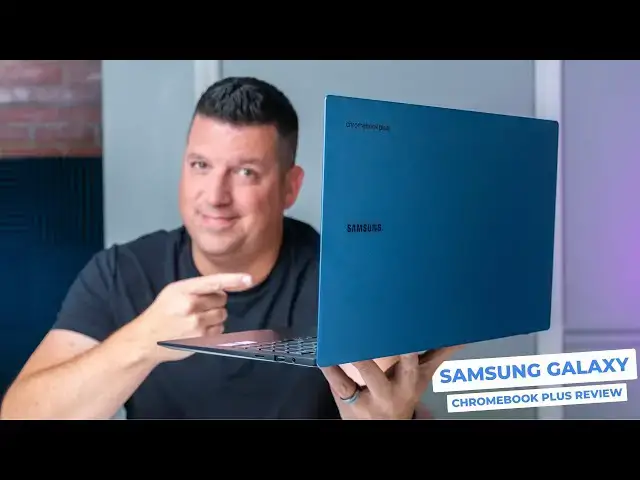
we've waited a long time for this one
0:02
since 2020 in the debut of the original
0:04
Samsung Galaxy Chromebook we've only
0:06
seen like diminishing returns from
0:09
Samsung in the Chromebook space with
0:11
each new device it only became more and
0:13
more clear that they no longer really
0:15
took Chromebook seriously but with the
0:17
Samsung Galaxy Chromebook plus all of
0:19
that is changing gone are the
0:21
forgettable cost cutting uninspired
0:23
design choices and slow outdated
0:25
internals we've gotten over the past 4
0:27
years and Samsung is back in a big big
0:29
way and I'm very happy to tell you about
0:31
this new Galaxy Chromebook plus and how
0:34
it marks a new trajectory for Samsung in
0:36
the Chromebook space so let's talk about
0:42
it but before we get into all that I
0:44
want to extend a quick invitation to our
0:46
awesome and growing Chrome unbox plus
0:48
Community it's a place where a bunch of
0:50
Google and Chromebook fans hang out and
0:52
talk about all sorts of stuff and
0:54
generally just have a really good time
0:56
together in there you're going to get
0:57
access to that Community Access to Joe
1:00
uh exclusive amas with the chrom OS team
1:02
we had one recently with Stella Shannon
1:05
and have one upcoming with John molus uh
1:07
they're exclusive giveaways uh you can
1:09
add free experience on Chrome onebox.com
1:11
and on our podcast as well just it's a
1:14
fantastic value at just two bucks a
1:16
month and we'd really love to see you in
1:18
there so after you watch this video head
1:22
docomo and you can learn more there and
1:24
get signed up with most Chromebooks we
1:26
start with the chassis as like a jumping
1:28
off point before we talk about all the
1:29
not stuff on the inside but with the
1:31
Galaxy Chromebook plus it's a massive
1:34
part of the overall story sure there's a
1:35
bunch of good stuff on the inside as
1:37
well but I don't think we've ever had a
1:39
Chromebook with such a striking
1:40
silhouette that I can remember off the
1:42
top of my head I'm not kidding every
1:44
single person I've handed this
1:45
Chromebook to has had a visceral
1:47
reaction to just holding it the 15.6 in
1:50
size married up with a 2.58 lb weight
1:53
and 11.8 mm thickness just kind of feels
1:56
a bit impossible even using this device
1:58
for a couple weeks now I get the same
2:00
sensation every time I pick it up it
2:02
just feels wild to hold this thing in
2:04
your hands but thin and light only works
2:06
if it's rigid too and thankfully the
2:08
Galaxy Chromebook plus wins in that
2:09
department as well you can hold it from
2:11
a corner with no flex whatsoever and it
2:13
feels 100% sturdy in your hand on a desk
2:17
opened closed I mean the engineering
2:19
here is amazing and this is the absolute
2:21
epitome of well-made I just can't stress
2:25
enough how much I love the build quality
2:27
of this Chromebook but Samsung didn't
2:29
use the excuse of this Chromebook being
2:31
too thin to skimp on ports either you
2:33
get two USB type-c ports a USB type a
2:36
headphone microphone Jack micro SD card
2:38
slot and yes a full-size HDMI port it's
2:42
just kind of unbelievable in a device
2:44
that's this thin and light but it
2:45
doesn't stop there cracking the Neptune
2:48
blue lid open with a perfectly balanced
2:50
one finger lift reveals the gorgeous
2:52
AMOLED screen a fantastic keyboard and
2:55
one of the best trackpads I have ever
2:57
used on a Chromebook now when talking
2:59
about any device these three things the
3:01
screen the keyboard trackpad make up the
3:03
bulk of your interactivity so when
3:04
they're done well it makes for a great
3:07
overall experience and make no mistake
3:09
Samsung has delivered on all three the
3:11
AMOLED screen is full HD and plenty
3:14
bright at 400 nits and well sure I'd
3:16
love to see a Quad HD screen and 120 HZ
3:18
I understand that keeping the price at
3:20
$6.99 just requires certain tradeoffs
3:23
and this to me is an acceptable one the
3:25
display is flat out gorgeous and even
3:28
though it's not 120 HZ there there's no
3:30
ghosting or artifacting anywhere across
3:32
the OS so things still look great with
3:34
smooth animations Inky blacks and
3:36
amazing Punchy colors everywhere you
3:38
look I mean it's a Samsung AMOLED
3:41
display what do you expect now it isn't
3:43
touchcreen and for some of you that's
3:45
going to be like a turnoff but for me
3:47
I've become pretty used to not
3:49
leveraging a touchscreen very often on
3:51
Chromebooks and it's just not been an
3:53
issue at all in my use now that being
3:55
said you need to know what you're
3:56
getting into with this device and if a
3:58
touch input is a huge deal to you just
4:00
know that it's not going to be an option
4:02
on the Samsung Galaxy Chromebook plus
4:04
now underneath that beautiful screen is
4:06
a clicky backlit keyboard that has
4:08
pretty short throw keys that I've been
4:10
really accurate with on a device this
4:12
thin you're not going to get massive
4:13
travel on your keyboard but the feedback
4:15
is great the sound is quiet and I've
4:17
thoroughly enjoyed typing everything on
4:19
this keyboard the layout takes a little
4:21
bit of getting used to but we'll come
4:23
back around to all that in a minute and
4:25
the trackpad underneath the keyboard is
4:26
massive glass and just an absolute
4:29
pleasure to to use yeah I'd love to see
4:30
Samsung put a haptic trackpad in here
4:32
but I don't know that it would fit in
4:34
the chassis and I'm sure it wouldn't
4:35
help that overall price tag either
4:37
though this one has a more standard
4:39
trackpad mechanism it Nails the
4:41
execution and I've Loved using it the
4:43
surface is absolutely buttery smooth The
4:45
Click is solid and confident and all my
4:47
gestures always work as expected no
4:50
complaints here whatsoever under the
4:52
hood we have the Intel Core 3 100 U 8
4:55
gigs of RAM 256 gigs of storage and make
4:58
no mistake this device is very fast for
5:00
reference I got octane scores in the
5:02
90,000 plus range and not once has it
5:05
even come close to breaking a sweat and
5:07
if the fans have kicked on I haven't
5:09
even noticed they are super quiet and it
5:11
never really gets hot and battery life
5:13
has been solid as well well I'd have to
5:16
keep the display down to like under 40%
5:18
to even get near that 13 hours that
5:20
Samsung claims I've been able to get
5:22
like 10 hours or so of use when sticking
5:24
to around 60% brightness and even pacing
5:27
5 to 6 hours when the brightness is up
5:29
between 90 and 100% you have to remember
5:31
that OLED screens are battery Hogs when
5:33
you really get to the top end of their
5:35
brightness so you're going to kill the
5:37
battery faster if you hang out up there
5:39
for hours on end if you stay south of
5:41
that you'll get all day battery with no
5:43
issue now that's a ton of great stuff
5:45
we've just talked about right I mean it
5:47
can't be all good well of course not and
5:50
there are a few quirks with this
5:51
Chromebook that do frustrate me a little
5:53
bit and the first one is the keyboard
5:55
layout the extra keys like the dedicated
5:57
accessibility and dictation buttons are
5:59
pretty great and I'm really learning to
6:01
start leveraging the new quick insert
6:03
key as well my brain's even beginning to
6:05
remember to use the launcher key that's
6:06
down in the bottom row now and I'm
6:08
making the mistake of hitting the quick
6:10
insert key instead of that launcher key
6:12
less and less as I use it and those are
6:14
all things I'll get used to so I'm not
6:15
too flustered by any of that my real
6:18
issue is with the numeric keypad on this
6:20
device it's missing the all important
6:22
keys on the right and with that being
6:24
the case it's just really not that
6:26
valuable numeric keypads should have a
6:29
plus minus an Enter key down the right
6:31
side this one doesn't and it makes doing
6:33
calculations without looking down
6:35
basically impossible and isn't that the
6:38
purpose of this section of the keyboard
6:39
being added and the decision to put this
6:42
basically useless keypad in here means
6:44
they couldn't fit upward firing speakers
6:46
flanking the keyboard and maybe that
6:48
would have helped the audio out just a
6:49
bit as it stands the downward facing
6:51
speakers are mediocre at best are far
6:54
too quiet to be coming from a 15.6 in
6:57
laptop I mean the Tone's decent but the
6:59
over all volume is really limiting and
7:01
kind of disappointing and the same goes
7:02
for the 1080p webcam up top it's
7:05
functional but there are many webcams
7:07
that simply do it far better Samsung
7:09
cheaped out here and it shows they hit
7:11
the necessary resolution spec to keep it
7:13
Chromebook plus but this one's about as
7:15
bad as I've seen to this point
7:17
unfortunately but those cut Corners are
7:19
pretty minimal in my book now I can
7:21
upgrade to a USB webcam if I need to I
7:23
don't listen to a ton of audio directly
7:25
from my Chromebook speakers and I don't
7:27
actually use a numeric keypad very often
7:29
if those things are deal breakers for
7:31
you take note I don't Point them out
7:33
just because I'm looking for something
7:34
to nitpick they're all legitimately
7:36
subpar for a device that is otherwise
7:38
wonderful to use and I really do mean
7:40
that last bit for a person like myself
7:43
this Chromebook simply Nails the
7:44
Necessities so well that I can just
7:46
Overlook the stuff it doesn't excel at
7:48
with this chassis screen keyboard
7:50
trackpad performance the Samsung Galaxy
7:52
Chromebook plus has been an absolute joy
7:55
for me to use I love having it at the
7:57
office at home on my lap and a coffee
7:59
shop or even on a plane it really does
8:01
marry up the big screen experience with
8:03
a smaller devic's portability it looks
8:06
really amazing while doing so while I
8:08
don't know if it's the best Chromebook
8:09
for everyone I think it's an amazing
8:12
option for most of you out there and
8:15
$699 every day you'd be hardpressed to
8:17
find a Chromebook experience that can
8:19
match it but guys that's it for this one
8:21
if you enjoyed this video give us a
8:22
thumbs up head down there hit that
8:23
subscribe button and be sure to ring the
8:25
notification icon as well if you'd like
8:27
to be alerted when we make future videos
8:29
just like this one until next time we'll