Up next in 10



Sponsored by NordVPN. Try it out and get 75% off a three-year plan for a limited time! Click here: https://chromeunboxed.com/nordvpn
Toshiba Chromebook - https://fave.co/2T0QHRB
HP Chromebook 14 - https://fave.co/336rVnO
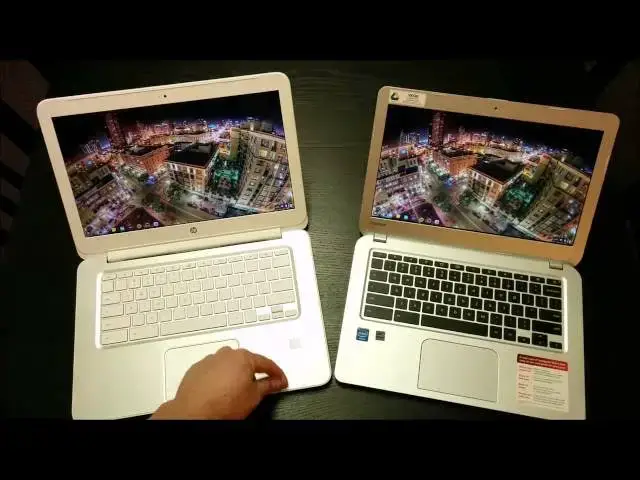
In this video, I compare the Toshiba Chromebook side-by-side with the HP Chromebook 14. Enjoy!
Read more: https://chromeunboxed.com/
Join our newsletter: http://bit.ly/2WjCDm7
・・・・・・・
Subscribe to the channel: http://bit.ly/2xFuj6L
Shop Chromebooks: https://fave.co/2OuedYL
The Music We Use - PERFECT for YouTube: http://bit.ly/31W6PYP
Become a member of Chrome Unboxed to help us make our channel even better, and for access to exclusive perks: http://bit.ly/CU-join
Show More Show Less View Video Transcript
0:01
hey folks Robbie Pay Here Again with
0:03
chrome unboxed today doing a side
0:06
by-side comparison of the HP Chromebook
0:09
14 and the Toshiba
0:12
Chromebook Toshiba Chromebook the one
0:14
here on the right uh if those of you who
0:16
don't know you can watch the full review
0:18
also on the channel so you can uh be
0:21
awesome if you like this video you can
0:23
also subscribe and see all the other
0:24
Chromebook comparisons and reviews there
0:27
but you'll see that there's a full
0:28
review up of of that device and the hp14
0:31
so you can really get down uh into more
0:34
detail with each
0:35
one the Toshiba is a 13.3 in device
0:39
versus the 14in and so probably on the
0:42
camera you can see a slight bit of
0:44
difference uh between the two screen
0:45
sizes but uh it's it's pretty negligible
0:49
and overall even looking through the
0:51
camera lens right now you can tell uh
0:53
the the difference in the devices is
0:56
pretty negligible and one of the things
0:58
you're going to notice in this um side
1:00
by-side comparison will probably be
1:02
shorter than some of the other ones as
1:03
the Toshiba review is also shorter than
1:05
some of the other reviews because what
1:07
we're starting to run into here uh
1:10
is a repetition um in Chromebooks and so
1:15
um one of the best things about
1:17
Chromebooks is the fact they're all
1:18
running the same OS I just got the
1:20
update on both of these guys today so
1:22
they're both running Chrome 33 stable um
1:26
and and it's the exact same thing the
1:28
The Experience across the board is
1:29
always the same I can grab my wife's
1:32
Samsung Chromebook I can uh log into any
1:34
Chromebook I get and get the same
1:36
experience as far as the operating
1:38
system and so that's that's a huge Boon
1:40
and an awesome part of uh being a Chrome
1:42
OS user however when it comes down to
1:45
reviewing and and and side by-side
1:47
comparisons and things like this there's
1:50
really not a ton of differences to deal
1:51
with and so I don't want to waste a lot
1:53
of your time uh going into detail about
1:55
a bunch of things that we've talked
1:57
about a hundred other times but I want
1:58
to point out some of the usage
2:00
differences that I found and over the
2:03
last couple uh about 10 days I used the
2:06
Toshiba as my primary working device and
2:09
what I do is uh website design so coding
2:12
and you know basic coding CSS HTML 5 uh
2:15
PHP that kind of stuff uh nothing too
2:18
intense uh most of the things I do live
2:20
on the web so Chromebooks work really
2:21
well for me um but at the same time I'm
2:25
going to have five to seven eight tabs
2:27
open at a time I also dual boot uh into
2:31
uh umuntu so that I can have such right
2:34
here I've got filezilla open um having
2:37
filezilla and inkscape and in Buu so I'm
2:39
not running a ton of stuff in that
2:41
secondary uh desktop so I just wanted to
2:43
give you kind of my usage pattern so if
2:45
you're somebody who really wants to boot
2:47
into Bo and and run tons of stuff um
2:51
take take what I'm saying with a grain
2:52
of salt and vice versa if you're someone
2:54
who stays in Chrome and has two tabs
2:56
open and that's about it you know take
2:58
that with a grain of salt as well
2:59
because I usually have five to seven
3:01
tabs open I have uh uh maybe an image
3:05
editor which I i' i' found and really
3:08
loved uh this little guy here it's pixel
3:10
or touchup um just you know for resizing
3:14
editing photos cropping them all that
3:16
kind of quick stuff that that I need to
3:18
do a lot because I'm dealing with images
3:20
on websites a lot so I need to deal with
3:22
uh specific ratios and everything I have
3:24
that open usually have Google music or
3:26
Spotify running in the background
3:28
casting up to a chomecast has to play
3:30
the music and so that's kind of my uh my
3:33
scope as far as work goes that being
3:36
said that amount of of work so like I
3:39
said five to seven tabs a couple other
3:40
programs in the background and probably
3:42
Ubuntu running uh with inkscape and
3:46
filezilla going uh on on the other side
3:48
of things I did not run into any issues
3:51
whatsoever with the two gigs um of of
3:55
RAM on the Toshiba from those of you who
3:57
haven't seen the reviews or have
3:59
forgotten the main difference uh in in
4:01
these two guys really comes down to this
4:03
one has two gigs of ram versus the four
4:06
gigs in this one this one does have the
4:08
LTE uh equipped radio in it as well or
4:11
I'm sorry not LTE uh it's HSPA plus uh
4:14
4G from T-Mobile which comes in handy in
4:16
pinches I'm telling you it just it
4:18
really has has saved my butt a couple
4:20
times however um that really is the only
4:22
Hardware difference we're looking at
4:24
here um as you can see from the video
4:26
right now the screens are really really
4:28
similar I'd give a slight nod I I'm
4:31
saying a really slight nod to the
4:32
Toshiba Chromebook on the screen uh a
4:35
it's a little bit smaller so the pixels
4:36
are denser uh and B the contrast ratio
4:39
is a little better I don't know how well
4:40
you can tell that on the camera uh but
4:42
the contrast ratio definitely is better
4:44
over here so the darks look a little
4:46
darker while the brights look a little
4:47
brighter and so um I can tell that just
4:49
looking at them right here if I glance
4:52
back and forth I see it uh spending time
4:54
in front for the day no no real issue
4:57
same thing goes with the battery life
4:58
we're seeing a lot of ilarities here as
5:00
well uh we're showing almost 9 hours
5:03
left on a full charge and over here 7
5:07
and 1/2 hours left on a full charge keep
5:08
in mind I do have utu running over here
5:11
and I actually had just pulled this off
5:12
the charger and it's been I've been
5:13
using it so it's probably basing that on
5:15
being used whereas this guy was asleep I
5:18
just updated him and he was charged so
5:21
um but realistically 8 to 9 hours on
5:24
both of these machines pretty doable
5:26
pretty normal battery life between the
5:28
two so let's talk talk about Hardware uh
5:30
cuz really when Chrome we talk about
5:32
Chromebooks that's really the
5:33
differentiating factor cuz internally
5:35
they're both the Haswell 29 55 uh U and
5:39
so they're they're both running the
5:40
Haswell Celeron uh processor uh we have
5:44
the difference in the ram obviously
5:45
that's different but other than that the
5:47
internal part is is pretty much the same
5:49
so I'm not going to get into running a
5:51
bunch of stuff on them because they both
5:52
run it great uh they both they both load
5:55
websites identically well they uh so you
5:57
can see those things in the individual
5:58
reviews I don't want to spend time uh
6:00
doing those things in this particular
6:02
comparison really want to talk about
6:04
Hardware cuz right now that's the
6:05
differentiator when it comes to
6:06
Chromebooks that's the way that uh
6:08
hardore manufacturers can really say hey
6:10
look I want to make something awesome
6:12
and and this is where I will put my uh
6:14
my hope in the fact that we're going to
6:16
see a mid-range Chromebook sometime this
6:18
year I'm really hoping I'm I got my
6:20
fingers crossed for the new Samsung or
6:22
whatever Asus has coming down the pipe
6:24
or Lenovo one of these companies I'm
6:27
waiting to see a device that that Falls
6:29
in that $400 to $5500 range and says you
6:31
know what we're not going to compromise
6:32
on any of the external hardware so we're
6:34
going to have an awesome keyboard we're
6:35
going to have awesome trackpad you're
6:37
going to have an IPS panel it's going to
6:39
be better than 1366 X 768 which is what
6:41
we see on everything by the way is this
6:43
is what we see on both of these guys
6:45
we're going to give you a 3 or four
6:47
megapixel front-facing or 5 megapixel
6:49
front-facing camera so your your
6:50
Hangouts look amazing rather than the
6:53
720p uh front-facing cameras we get on
6:55
both of these guys and so again right
6:57
now there's just this kind of
6:58
homogeneous thing going on with
7:00
Chromebooks and hopefully that's going
7:01
to be broken up pretty soon um we just
7:03
see a lot of the same stuff a lot of the
7:05
same performance and the performance has
7:07
been good these Haswell devices perform
7:09
great uh both of these guys perform
7:11
really really really well I really enjoy
7:13
them and as I said a lot of people have
7:14
been asking does the 2 gig of RAM hinder
7:17
you on the Toshiba and I would have to
7:19
honestly say I thought it was going to
7:21
and it doesn't um you can look I have a
7:24
video on my feed that talks about uh the
7:27
2 gig uh to 4 gig comparison and I
7:30
really put some uh put some stress on
7:32
the machines I was using an Acer c720p
7:35
at the time and so I really put some
7:36
stress on them and pushed them harder
7:38
than I normally do in a day's work and
7:40
yeah you can see some differences at
7:41
that point but for me as I I kind of
7:43
laid out my work um my my normal work
7:46
case uh for me it didn't really make
7:48
that much of a difference so uh I wanted
7:50
to start with the the Chromebooks open
7:53
and um so we could kind of talk about
7:54
the similarities I want to talk about a
7:56
few of the differences and again uh
7:58
coming back to this point again the
8:00
differences really end up being in a
8:02
build quality um and so what we see now
8:04
again I made a comment before about the
8:06
screens slight nod to the Toshiba uh
8:09
front facing cameras have been identical
8:11
um you know very usable looks good uh
8:14
works for Hangouts I had a couple
8:17
Hangouts actually on the Toshiba as I
8:19
was working with it no problems
8:21
whatsoever it was great um when we talk
8:24
about keyboards um again this is this is
8:27
a thing and you'll hear this across all
8:29
my videos I haven't really been that
8:30
disappointed in any Chromebook keyboard
8:32
at this point it's something it seems
8:33
like manufacturers have just kind of
8:35
gotten a hold of and and really nailed I
8:37
had a lot of Windows uh notebooks that I
8:39
went through that really had crummy
8:41
keyboards and it was staggering cuz I
8:43
was paying 7 $8 $900 for these things
8:45
and the keyboards are just terrible and
8:47
so I don't know what was going on with
8:49
that but uh Chromebooks across the board
8:51
have just had good keyboards uh I don't
8:53
have an issue uh with key travel I don't
8:56
have any issues with uh mistyping and
8:58
everything like that so travel across
9:00
both of these is very similar uh the the
9:03
the keys um have a nice feel to them
9:05
slightly
9:06
texturized um it and it types well um
9:09
and it's spacious you know 13.3 in form
9:11
factor gives you plenty of room uh
9:13
without squashing the keyboard matter of
9:15
fact if you're if you're looking at both
9:17
of these you see a lot of the same
9:18
amount of workspace here and so for me
9:21
uh whether you know 14 versus
9:23
13.3 I didn't see a pro or a con in
9:26
either one I like the fact and we'll get
9:27
to it in a second that the Toshiba is a
9:29
lighter because of its smaller size but
9:31
other than that there's really no big
9:33
deal there uh both of them have the kind
9:35
of anti um anti-fingerprint finish on
9:38
them this one over here has got a smooth
9:41
uh a smooth finish to it but it doesn't
9:43
pick up fingerprints and you can see me
9:44
kind of wiping off some of the just
9:46
stuff that collects on keyboards uh uh
9:49
and workstations over time but uh
9:52
ultimately neither one of them really
9:53
collect fingerprints this one has a
9:55
completely matte finish around here so
9:56
is this one uh you get this kind of
9:58
aluminum
10:00
uh texture plastic here definitely
10:02
plastic you can definitely tell that but
10:05
it looks nice it's a handsome looking
10:07
computer um and both of them are they
10:10
both goodlooking goodlooking uh
10:12
Chromebooks trackpads on both almost the
10:15
exact same size almost the exact same
10:17
layout I will say I have to still give
10:19
the nod to the HP uh on this and that's
10:23
uh and and again just like with the uh
10:26
um the screen I'm I'm talking talking
10:29
about a slight nod um it's not much but
10:32
the HP seems to be a bit more
10:35
responsive
10:37
um and yeah it's doing just fine no no
10:39
hard touching here it's it's pretty easy
10:42
uh and maybe part of that is in in part
10:45
due to uh the trackpad over here has a
10:48
slightly slightly textured feeling to it
10:51
and very very very little um but there's
10:54
a slightly textured feeling to it let's
10:56
load up something we'll go to Google
10:58
Plus that
11:01
um just to show you both of them load
11:03
the render the page the exact same
11:05
amount of time so um and that's not a
11:09
shock and so once we get loaded up here
11:12
okay now we're loaded you can see it's
11:15
nice and responsive the two finger
11:17
scroll you're going to see the same
11:18
behavior over
11:21
here nice and responsive with the two
11:24
finger scroll so um and three fingers up
11:28
and down gives you your overview mode
11:32
and I had some problems with the Acer
11:34
C720 with this you know it would just do
11:36
it sometimes and not others no problems
11:38
with the three finger swipes and I know
11:39
that's part ofly is uh due to the the
11:43
sensitivity on the touchpads so other
11:45
than the fact that this one's a little
11:46
bit uh texturized and this one's really
11:49
really smooth very similar um I did
11:52
every once in a while I noticed a
11:54
sensitivity issue like trying to do the
11:55
three or three finger swipe between tabs
11:58
um and it's working perfectly now like I
12:01
said it was a few times um no issues
12:05
there and then and I never have any
12:06
issues on the hp14 with that either so
12:09
again keyboards kind of a wash uh slight
12:13
Edge to the trackpad over here slight
12:16
Edge to the display over here um the
12:18
front-facing displays again a wash so um
12:23
and and again I'm not going to get into
12:24
the 2 gig versus 4 gigs of RAM uh for my
12:27
use case again surprised that it didn't
12:29
affect me really at all I didn't feel
12:31
like I had to um close things down and
12:34
really manage anything over on the 14 I
12:36
don't think about it ever and so I
12:37
figured I would run into some stuff on
12:39
the on the toiba and I did not so we're
12:42
going to close them and take a look
12:43
around the hardware to kind of finish
12:44
this thing
12:45
out now from the top you can kind of see
12:49
um where the size difference starts to
12:50
come in and we're talking pretty minimal
12:53
amounts here I'm going Place one on top
12:56
of the other
13:00
so that that's kind of what you're
13:02
looking at very very minimal uh when it
13:04
comes to uh size difference the the big
13:08
difference I felt between the two is
13:10
weight um and you can really feel that
13:12
when you pick them up with one hand the
13:14
weight of the Toshiba is so much lighter
13:16
uh feeling uh versus the HP they both
13:19
have a nice solid build to them there's
13:20
not a lot of creaking and clacking um
13:23
there's a little wiggle Little Bend with
13:25
the Toshiba um with the HP uh not really
13:29
much at all um pretty nice and
13:31
firm um let's take a quick view around
13:34
the sides you get a couple USB 3.0 ports
13:37
uh combo headphone microphone Jack HDMI
13:39
out nothing back here except some fans
13:42
SD uh charging slot Kensington lot and
13:45
then the bottom uh and the in the Hole
13:48
uh of the Toshiba is covered in these
13:50
little dimples and so it has a texture
13:52
to it I'm not a fan I I don't like it um
13:55
I don't hate it but I really don't like
13:58
it I really like the texture they used
13:59
on the inside uh kind of just that uh
14:02
matte uh aluminum like finish uh that
14:06
was that was pretty nice I'm not a huge
14:07
fan of the the the dimples on the
14:10
outside part or the bottom um and then
14:14
you know four rubber feet speakers on
14:15
both are plenty loud we'll come back to
14:18
that in just a minute um but overall the
14:21
the device feels good it's pretty slim
14:24
um when we're talking about laptops so
14:26
it has a it it has a nice profile it
14:28
looks good on the T all that kind of
14:30
stuff um the only the cheapest part I
14:33
felt about this guy is right back in
14:35
here um you see quite a bit of give
14:39
there and when the device is actually
14:40
open I can do that back here it really
14:44
just has
14:46
this really cheap feel back here um and
14:50
and the reason I felt that a lot was
14:51
when closing it and getting my fingers
14:53
accidentally up under this you can see
14:55
how much play that has uh it's kind of
14:57
cheap feeling but the hinges feel fine
14:59
so um I I don't again these I'm
15:02
nitpicking here really nitpicking uh we
15:05
come to the HP and you've seen this guy
15:08
in many videos he has stuck with me
15:09
through all my Chromebooks um we have
15:12
the 3.0 um uh USBS here HDMI combo Jack
15:17
Kensington lock uh and then you get an
15:19
additional 2.0 USB then your SIM card
15:23
slot SD card slot charging um nothing
15:26
across the back kind of a slick little
15:29
lip that comes out hold it that way
15:32
right there very reminiscent of the HP
15:34
Envy line of notebooks um nothing across
15:37
the front
15:38
really um fans feet you know speaker
15:42
grills you know Common Fair here and
15:45
because of the way the hinge is built as
15:46
one piece you get a lot more solidarity
15:49
here uh than you do with the Toshiba um
15:52
it again it does not mean that either
15:53
one is better than the other um that
15:55
that really doesn't affect anything
15:59
so as I'm going to give you a side by
16:03
side with the speakers real quick um if
16:08
I had to well I do have to I have to
16:09
choose which one I want to keep I can't
16:11
just keep every Chromebook um I'm still
16:15
going to keep my HP um that's the way it
16:18
is uh like I said
16:21
the the pros and the cons of the two um
16:26
they really kind of outweigh one another
16:28
and so it's not as if the HP is
16:30
overwhelmingly better than the Toshiba
16:32
it really isn't that and so you may be
16:34
looking at these and going well I don't
16:36
like the colors of the HP I don't want
16:38
to deal with a white laptop I want I
16:40
like the silver and black MacBook esque
16:44
look hey go for the Toshiba I I really
16:47
don't have anything bad to say about it
16:50
to be honest with you
16:52
um find something it's got a little
17:01
but I do have to say
17:03
I uh really really really enjoy uh the
17:07
HP and people in in videos before have
17:10
said oh you know this guy really HP wins
17:12
everything he loves it but I do I mean I
17:15
I if the day comes that I review a
17:18
Chromebook and I keep it and sell my HP
17:21
that that'll be the sign that you know
17:22
that I think it's a better device um but
17:24
for right now I I really really like the
17:27
HP um um overall but I really enjoyed
17:31
the Toshiba 13 as well so um again if I
17:35
had if I have to choose and I do have to
17:36
choose I'm keeping the hp14 that again
17:39
is not to say don't buy the Toshiba it's
17:41
a piece of junk it's it's a decent
17:43
Chromebook um and and this particular
17:46
model with 4 gigs and the and the HSPA
17:48
plus radios is 350 and this one's uh 279
17:52
so there's a bit of price cap there as
17:54
well so those things to consider if you
17:57
knock off 70 bucks and that makes a big
17:58
difference for you then don't feel bad
18:01
at all about getting the Toshiba so
18:02
here's the
18:03
HP let's
18:06
crank nice and
18:09
Tiny But loud so plenty of plenty of of
18:13
volume um the laptop speaker
18:25
so definitely have to give the loudness
18:27
and the fullness of the speakers to the
18:30
Toshiba on this
18:31
[Music]
18:33
so I don't know how often you're going
18:35
to be listening to music straight from
18:36
your laptop but Toshiba has a little bit
18:39
better speakers in my opinion a little
18:40
bit Fuller sound and definitely a little
18:42
bit louder uh neither one of them
18:44
distorts at high volume so it's pretty
18:45
cool on both um again uh this is a tough
18:49
one it's it's tough and it's getting to
18:50
that point until we see some Hardware
18:52
manufacturers really decide to
18:53
differentiate themselves in some way uh
18:56
heard IPS panel better speakers
18:59
um that really is the big one for me um
19:02
because everything else is great about
19:04
Chromebooks uh I've said 100 times if I
19:07
could get this device right here with an
19:09
IPS display you know at I don't know at
19:13
uh 1,600 by 900 I I don't think I could
19:17
be satisfied anymore with anything else
19:19
I love everything else about it um so
19:23
that being said guys just about a tie
19:25
between these two but I'm going to go
19:27
with hp1 14 and and um and hopefully
19:30
this has helped some of you make a
19:31
decision I've gotten some personal
19:33
messages saying that you're waiting to
19:34
see um I I can fully say uh the Toshiba
19:37
is a great device and so if you're
19:39
looking at it you like the way it looks
19:41
you like Toshiba um you like I don't
19:43
know I don't know what else defines it
19:45
other than those things or you hate HP
19:47
or something like that hey go for it
19:50
it's a it's a great device um I would
19:52
think I've I've seen online that they
19:54
have opened it up and there are there's
19:56
room for more RAM not user installable
19:58
Ram but there's room for the
20:00
manufacturer to put more RAM in there so
20:01
heck we might see
20:04
a a model with some Wireless
20:06
connectivity and more RAM come out for a
20:08
little bit more money so uh who knows I
20:10
haven't seen anything about that
20:11
specifically but we got a lot more stuff
20:13
coming this year many more Chromebooks
20:15
many more reviews soon as I get the Asus
20:18
Chrome box going to review that guy as
20:19
well so uh excited about 2014 excited
20:22
about what's happening in Chromebooks in
20:24
general and um if you like this video
20:27
feel free to like it subscribe to see
20:29
more videos um more subscriptions I get
20:32
the more chances I'll get to get my
20:33
hands on more Chromebooks and the more
20:35
reviews I'll get to you guys and uh the
20:37
more of these guys you can see and so um
20:39
appreciate you watching uh thanks for
20:41
subscribing those of you who have
20:43
subscribed and those who are going to
20:44
subscribe uh continue to to keep it
20:47
locked on this on the channel and we'll
20:49
have more reviews coming thanks again
20:51
till next time
#Computers & Electronics