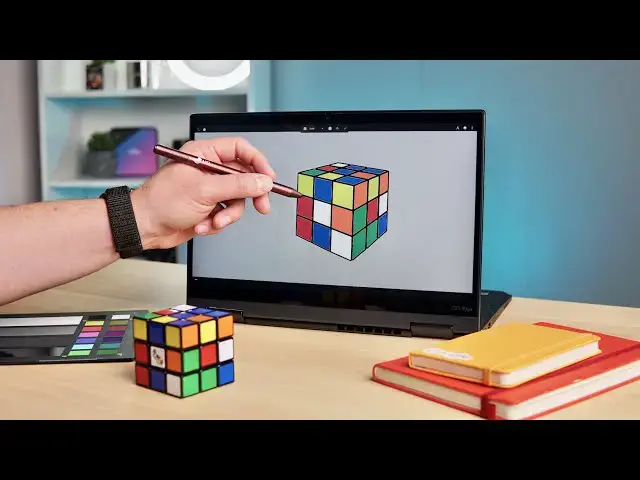
0:04
if you're anything like me
0:05
you've likely never heard of the company
0:09
you probably don't even know that their
0:12
that's not to say that it's not insanely
0:15
i didn't know anything about it until a
0:17
few weeks ago and i was made aware that
0:20
they're bringing this particular
0:21
technology over to not just chromebooks
0:25
pen initiative as well so what is it
0:29
well they have this sensor on a pen that
0:31
they make that works with
0:33
ios and ipad os that allows for users to
0:37
and physically touch it on objects in
0:39
the real world grab the color from that
0:42
immediately put it onto a screen so
0:44
imagine if you're using some sort of
0:47
app where you need to paint something
0:48
and you love the color of
0:50
that particular chair or a painting or
0:52
something like that you literally touch
0:53
the pen to that thing
0:54
it grabs the pantone color from the real
0:56
world and does its best to replicate it
1:00
right there on the screen but it
1:02
requires bluetooth connection it
1:04
you know apps that work alongside with
1:08
ios and ipad os what is significant at
1:12
is the fact that something like this pen
1:15
again this isn't a full production unit
1:19
but this pen a usi stylus that would
1:21
work with chromebooks and any other usi
1:25
has the technology built in it that
1:26
eufro has made for their pens that work
1:28
on ipads and stuff like that
1:30
and it doesn't need bluetooth it doesn't
1:32
need any extra connection it doesn't
1:34
other than for you to touch the back of
1:38
and then begin writing on the screen no
1:40
further connections are needed
1:42
no further technologies and honestly it
1:44
feels a little bit like
1:45
magic and pete mueller the chairman of
1:48
usi was kind enough to send over this
1:51
and a chromebook that already kind of
1:52
has some tweaks made to it so that
1:54
work already because this won't be
1:56
coming to later in the year and
1:58
we've gotten to play with it and i'm not
1:59
going to lie this is one of the coolest
2:01
things i've ever seen so
2:03
let's check it out okay so to give you
2:06
an example of how this whole thing works
2:08
we've got the stylus i found a nice
2:11
of a rubik's cube and then i mixed up
2:13
the rubik's cube we throw into shots all
2:15
and this is just obviously a for
2:17
instance so i i don't draw
2:19
or paint or anything like that but for
2:22
anyone who does and says you know i want
2:23
those colors on this screen the one
2:25
thing you got to remember is
2:26
this is grabbing pantone color so the
2:28
color space is different for the real
2:30
world and real eyes and real objects
2:32
than it is when you have to move it over
2:33
to digital so you move to a
2:35
hex code or an rgba code and it's just
2:38
it's a different color space
2:39
but it's going to get it relatively
2:41
close and help people to
2:43
paint stuff that they see in the real
2:44
world so let's continue with our example
2:47
make this look like the one we've got on
2:49
the table here so first i'm going to
2:52
so i'm just going to touch the back of
2:53
this and as soon as i hover close to the
2:57
you'll see the dot pop up so it's that
3:00
and let's see what other greens we got
3:02
we got a green there green there green
3:05
and i think that's about it showing
3:07
right now and then i want a blue
3:09
so boom hit blue hover close you see the
3:12
up and we're gonna click these here here
3:15
here and you're starting to get the idea
3:17
pretty quickly of how this works it's
3:20
kind of like magic and again i want to
3:22
that this is all happening i didn't pair
3:25
this thing up with this i don't even
3:27
know if the bluetooth is on on this
3:29
again pete sent us this chromebook
3:30
that's kind of prototyped and has some
3:33
these particular pieces of software to
3:36
actually understand what the pin is
3:38
but apart from that there's nothing else
3:40
going on here there's no bluetooth
3:41
connection this pen didn't have to be
3:43
paired up with this chromebook
3:45
it just showed up like this and because
3:48
standard that sends all of the
3:49
information from the pen
3:51
to the device to the screen itself all
3:54
of that stuff is encoded and carried
3:56
that one single connection so for the
3:59
end user it's that simple
4:01
you'll get this pin you'll flip it on
4:03
and you'll start grabbing color
4:05
and writing on the screen for apps that
4:07
utilize the api for this and so
4:09
any app that takes color will be able to
4:11
utilize this if they want to include the
4:14
and so you imagine we start seeing all
4:16
kinds of pins from companies like wall
4:18
top which is what this one is
4:20
and and other usi pen makers that say
4:22
yeah we want to make this with eufrows
4:23
technology we'll have that sensor right
4:25
on the back of the pen
4:26
you can just start grabbing colors from
4:28
all over the place and just like magic
4:31
grab colors from the real world and then
4:33
move them right to your screen
4:35
and honestly it's it's one of the
4:37
coolest pieces of tech we've seen it's
4:38
so cool that it works without any
4:40
additional connections
4:41
and it's even more cool that it's
4:43
working on chromebooks already
4:45
expect to see this actually rolling out
4:47
to the market towards the end of this
4:50
there's still some kinks to be worked
4:51
out but ultimately it's working it's
4:54
and we're so glad to see something that
4:56
is uh just this forward-looking and this
4:59
happening on a chromebook but guys
5:01
that's it for this one if you like this
5:02
video give us a thumbs up head down
5:04
there and hit that subscribe button
5:05
and make sure to ring the notification
5:06
icon as well if you'd like to be alerted
5:08
when we make future videos just like
5:10
until next time we'll see