Up next in 10



Sponsored by NordVPN. Buy a 3-year deal at 70% off, get an extra plan on top! Click here: https://chromeunboxed.com/nordvpn
Shop the Samsung Galaxy Chromebook at Chrome Shop: https://chrmshop.com/samsung-galaxy-chromebook/
・・・・・・・
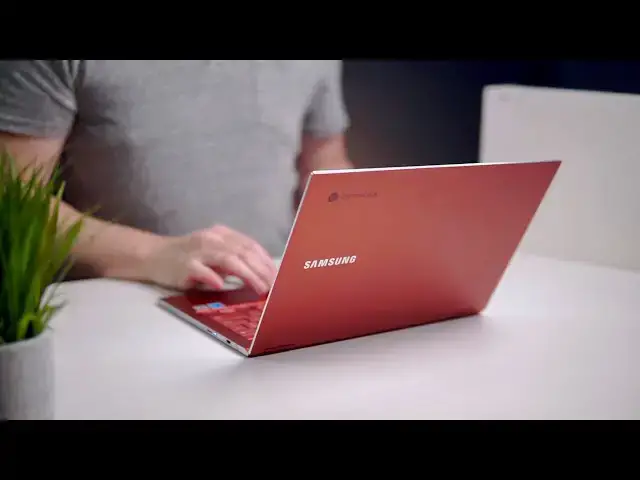
Today, after a few months of waiting, we are finally welcoming the Samsung Galaxy Chromebook into the office. Unlike many devices we review, this isn't a review unit we'll eventually send back to Samsung. Instead, this is my own personal purchase that I plan on keeping around for a long time. Sure, there are countless great Chromebooks on the way in the next 6-9 months, but there's so much I like about this new offering from Samsung that I'm personally taking a swing at making this my full time device for the foreseeable future.
Read more: https://chromeunboxed.com/samsung-galaxy-chromebook-unboxing-hands-on-impressions/
Join our newsletter: http://bit.ly/2WjCDm7
・・・・・・・
Shop Chromebooks on CHROME SHOP: https://chrmshop.com/
Subscribe to the channel: http://bit.ly/2xFuj6L
The Music We Use - PERFECT for YouTube: http://bit.ly/31W6PYP
Show More Show Less View Video Transcript
0:01
[Music]
0:06
today's video is brought to you by Nord
0:09
VPN they're the VPN of choice for
0:11
millions of users because they're
0:12
awesome at what they do that's keeping
0:14
your browsing secure and safe whether
0:15
you're at home or out and about if you'd
0:17
like to learn more about them and their
0:19
services head over to chroma and voxcom
0:20
forward slash Nord VPN to learn more and
0:23
get started today
0:24
so here we are April 6 the day is
0:27
finally here and in the house we have
0:30
the samsung galaxy Chromebook that was
0:33
announced all the way back in January of
0:35
2020 at CES so like the first week of
0:37
January we have a lot of video of this
0:40
device we got to spend quite a bit of
0:41
time with it out there in the desert at
0:44
Las Vegas but the time is now here to
0:48
actually see it in the box get it out of
0:50
the box see what's included in the box
0:52
and begin that review process so without
0:57
any further ado you're seeing this right
0:59
at the same time that I am as far as the
1:01
boxing goes so I can tell you one thing
1:04
that's really cool just like with the
1:05
Asus flipsie 436 it's neat to see a
1:08
unique box it's all white there's
1:11
nothing else going on so I feel like
1:12
there's a trend here with these top two
1:14
your Chromebooks your basic stuff down
1:17
here on the edge but just this white box
1:18
Samsung and then Chromebook up at the
1:20
top which is really cool I'll read off
1:23
the stuff that's on here real quick so
1:24
yeah I 510 210 you processor 13.3 4k
1:30
display at gigs ram to 256 gigs of SSD
1:34
and via me storage Fiesta red so all the
1:37
stuff you'd expect and yes Owen got the
1:39
Fiesta red version of this it seems like
1:41
a few outlets got their review devices
1:44
at some point in the last week or so we
1:47
were not lucky enough to be one of those
1:48
but I made some calls and make sure and
1:51
got to a Best Buy and congrats to them
1:53
by the way on delivering a really good
1:56
curbside pickup service they did an
1:58
excellent job with getting this to me
1:59
with zero contact whatsoever so that was
2:01
really cool hats off to them
2:06
and there it is
2:09
we'll put it aside for just a second oh
2:12
just as thin and awesome feeling even in
2:14
this little thing I'm so excited
2:20
looks like probably just paperwork hmm
2:25
yeah yeah just basic papers it's an
2:31
interesting little contraption the hole
2:32
does in again I'm always for boxing for
2:36
Chromebooks that's not just the standard
2:38
you know cardboard box with nothing else
2:41
in it so let's see what else this
2:43
charging block is kind of unique looking
2:45
curved at the top and bottom I've not
2:48
seen one like this it looks like there's
2:49
an LED indicator they're always welcome
2:51
because that way you can glance down
2:52
when it's plugged in and know that it's
2:53
getting some battery but other than that
2:55
it's a USB type-c brick what kind of
2:57
power we got here 20 volt here it is so
3:02
you know not the most powerful charger
3:03
we've ever seen it looks like this is a
3:05
little grabber for the nubs that will be
3:09
in the stylus so nothing out of the
3:11
ordinary here other than that it's like
3:13
a solid box which is again I love seeing
3:17
unique boxes but you're not here to see
3:20
the Box you can see this thing and again
3:22
we're not going to cover anything in
3:24
this video that we haven't talked about
3:26
before because ultimately this is the
3:28
same Chromebook we saw in January but we
3:32
actually have it in the flesh now and
3:35
there it is in the case you've forgotten
3:38
how pretty that red is I'm just going to
3:42
kind of move it around and hope the
3:43
light catches all those fun colors
3:46
because ultimately the red version of
3:49
this thing is one of the most
3:51
eye-catching devices I've seen in a long
3:53
time
3:54
as thin as I remember and me and just
3:57
rigid gosh this thing feels great and
4:02
again the ones that we messed with in in
4:04
Las Vegas
4:05
we're always tethered they had a thing
4:06
on them and there's stuff around and
4:09
sometimes it's just hard in those
4:10
scenarios to get a feel for a device at
4:13
man
4:13
if you've held a pixel book the original
4:16
pixel book you get a good idea but
4:17
imagine
4:18
taking that and almost like shrinking it
4:20
down a little bit more or finding it
4:22
more cash this feels good so let's see
4:24
it's got some things on the feet to take
4:28
those off so yeah in case you get this
4:31
thing out of the box and I'm not going
4:33
to do that right now they're full
4:34
stickers on the the rubber parts of the
4:36
feet so I have to remove those so that
4:38
it'll sit still on the table but I'm
4:39
gonna leave those for now
4:41
one finger open obviously and this
4:44
thing's not gonna power on just like any
4:46
other Chromebook you got to plug it in
4:48
for a second so we'll cut it wait here
4:49
in just a second to power it on but
4:51
right down on the keyboard deck they've
4:53
got a nice little sticker here
4:54
interesting a google play sticker so
4:56
fingerprint unlock built-in pin super
4:59
thin super light design and 4k AMOLED
5:02
core i5 that didn't put the big project
5:05
Athena sticker on there which is
5:06
interesting that was all over all of
5:09
them in Las Vegas so maybe they've
5:11
elected to to not put that on everything
5:13
and that was just for the purposes of
5:15
that show but again you can just see how
5:19
thin and light this thing is I mean it
5:22
is just pretty and again that one finger
5:25
lift it's just beautiful I mean just as
5:30
impressed as I was honestly in Vegas and
5:34
keyboard feels really great too nice and
5:36
quiet and the trackpad not surprisingly
5:41
glass buttery smooth very good click it
5:46
feels like ton like the pixel book gun
5:48
which I'm a big fan of it's trackpad
5:51
so yeah let's what cut away real quick
5:54
get this thing plugged in and boot it up
5:55
at least and get our eyes on the screen
5:57
for just a second before we wrap this
5:58
thing up okay so we've got this thing
6:01
plugged in and we've got signed in and
6:05
that kind of stuff so the basic setup
6:06
things and I wanted to just show you
6:08
this since I went ahead and peel those
6:09
little silly stickers off the feet that
6:11
one finger lift is perfectly intact
6:13
fingerprint scanner super fast and we
6:16
are in and going and right off the bat
6:19
one thing I noticed with this thing that
6:21
I just wasn't looking for when we were
6:23
messing with it in Vegas is just the
6:25
frame rate of the display a lot of
6:27
Chromebooks have really good colors and
6:29
viewing angles which this one obviously
6:31
but it's also got insane frame rates and
6:34
it's not possible to catch this on
6:36
camera probably but as you move
6:38
something around on the screen instead
6:40
of like seeing ghosting and stuff
6:42
jumping around like it is so fluid
6:45
looking and I think stuff like that is
6:47
what's going to end up making this
6:49
Chromebook feel more premium than things
6:52
that have come before it and this is
6:55
gonna completely blow the shot out but
6:56
right now we're at about I don't know a
6:59
little over 50% but if we crank this
7:01
thing up I mean it is usually under
7:04
these lights and here even bright
7:06
displays look you know just kind of
7:08
average so those look okay that thing
7:09
looks searingly bright we have not
7:11
measured it yet but I guarantee it'll be
7:13
on the level of you know the pixel book
7:15
and stuff like that where it was at
7:17
least 400 nits if not higher so one
7:20
other thing we've seen on the new
7:22
landing page they put out for this is
7:24
that it is 100% RGB Adobe RGB and 100%
7:28
DCI p3 rated so interestingly they they
7:32
put that on their landing page you know
7:34
for things like video editing I'm not
7:37
sure what you're gonna use to edit
7:39
videos on a Chromebook at this point but
7:41
it would be really cool if they already
7:43
worked with Adobe and Adobe Premiere
7:45
rush finally comes out alongside this
7:47
thing and we can actually see what it's
7:49
like to edit videos really on a
7:50
Chromebook but we'll just have to wait
7:52
and see on that a couple other notable
7:54
features here we also have the stowed
7:55
stylus on the side which is also red and
7:59
also I'm looking like the rest of this
8:01
thing it works just like any other
8:02
stylus would on a Chromebook so you know
8:04
Johnny down notes drawing 4000 levels of
8:08
pressure you know edge detection all
8:10
that kind of stuff but the best part is
8:12
it's stowable and I can put it here and
8:14
not lose it it's got a place to go it's
8:15
got a place to stay if you've been
8:17
around here for any length of time you
8:20
know that to me for me this is more
8:22
important than a nice big pin to write
8:25
with because ultimately a lot of us
8:27
don't use the stylus on a regular basis
8:29
but having it there when I need it it's
8:31
more important than its physical size
8:33
additionally again keyboard deck feels
8:36
really great just going through the
8:37
setup process I had to obviously use it
8:38
a little bit more there for a few
8:40
minutes very very impressed all this
8:42
will have to wait on the review for full
8:44
you know opinions on these things but I
8:47
can tell you again using it after not
8:49
having touched it for a few months
8:50
feels great holding it along one corner
8:53
just like this you don't have any flex
8:55
in the chassis the thing feels rigid and
8:58
sturdy which is really awesome the
9:00
hinges feel great folds into tablet mode
9:03
obviously very easily and again I don't
9:06
know that many people are going to use
9:07
this thing as a tablet in this way but
9:10
it's light enough to be used as a tablet
9:12
if you want to and for flipping it
9:14
around and watching a movie or taking a
9:15
quick note and being real flip it right
9:17
back into clamshell mode that's a pretty
9:19
cool thing so the last thing I want to
9:22
check that we could not check why we
9:24
were in Vegas is the speakers there's
9:27
nothing like particularly going on here
9:29
they're not branded anything they don't
9:31
have any special grilles I mean there's
9:34
some pretty cool side it's firing
9:35
grilles here and yeah there's nothing on
9:37
the bottom so no idea actually what the
9:40
speakers are gonna sound like on this so
9:42
so gonna back this up to the beginning
9:45
and try to just hear our intro track
9:47
here at your office while you're stuck
9:49
at home
9:51
[Music]
9:55
okay today's video is brought to you by
9:58
no these are not speakers you're gonna
10:00
go out and buy a Chromebook for but they
10:02
are better than the original pixel book
10:04
but I can already tell you if they're
10:06
nowhere near as good as the pixel book
10:08
oh or the pixel slate which is a little
10:10
unfortunate but in a device this thin
10:12
and this light I was not expecting some
10:15
amazing sound quality but kudos to
10:17
Samsung here for not partnering with
10:19
someone and labeling it and trying to
10:21
make it act like it has amazing speakers
10:23
on it they they just they sound okay and
10:25
they'll get you by if you need to listen
10:27
to some audio or some video chats or
10:30
something like that but I'm gonna wrap
10:31
it up at that and just tell you
10:33
initially hands-on again with this
10:35
device a few months removed from Las
10:37
Vegas I can tell you that this thing
10:39
feels every bit as premium as I remember
10:42
it sometimes we go to these shows and
10:44
we're surprised by release and it's it's
10:46
easy to kind of get swept up in all of
10:48
it and just be like yeah this thing is
10:50
amazing and it's great and then you you
10:51
look back a few months later and wonder
10:53
what was it that great or was I just
10:55
kind of like hiked up or was it the
10:57
surroundings it kind of feels like this
10:59
one's that great there have been some
11:02
early reports of some battery issues and
11:03
some some overheating stuff so obviously
11:05
we're gonna keep an eye on that I'm
11:07
gonna be working on this thing
11:08
specifically from my lap a lot instead
11:11
of just you know docked on my desk so
11:14
we've got to think through all those
11:15
things we got to test all those things
11:17
and you know we need that time to be
11:19
able to do the review but hopefully in
11:22
the in the next couple weeks as we're
11:24
formulating this review and formulating
11:25
full opinions on this device will leak
11:28
out a little bit of information so check
11:30
out the website if you don't already on
11:31
a regular basis I'll be sharing some
11:33
initial thoughts and some initial things
11:35
as I'm kind of preparing for the review
11:37
but that's gonna be it for this one guys
11:39
hope you liked it if you did give it a
11:41
thumbs up go down there and hit the
11:42
subscribe button make sure hit the
11:43
notification bell right next to that if
11:45
you'd like to be alerted when we make
11:47
future videos especially their full
11:49
review of this one and also hit that
11:51
join button down there as well if you'd
11:52
like to see all the cool stuff like
11:54
custom emojis and behind the scenes
11:55
stuff that our members get to take part
11:58
in until next time we'll see you
12:01
[Music]
#Consumer Electronics