Up next in 10



Sponsored by NordVPN. Try it out and get 75% off a three-year plan for a limited time! Click here: https://chromeunboxed.com/nordvpn
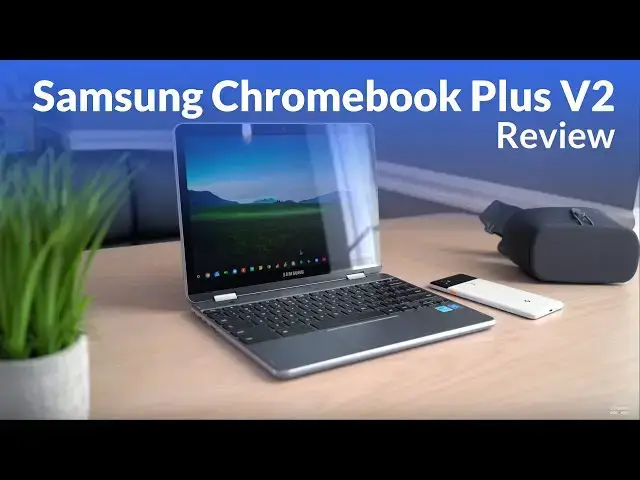
Samsung Chromebook Plus V2 and Read More: http://bit.ly/33OvzBX
Read more: https://chromeunboxed.com/
Join our newsletter: http://bit.ly/2WjCDm7
・・・・・・・
Subscribe to the channel: http://bit.ly/2xFuj6L
Shop Chromebooks: https://fave.co/2OuedYL
The Music We Use - PERFECT for YouTube: http://bit.ly/31W6PYP
Become a member of Chrome Unboxed to help us make our channel even better, and for access to exclusive perks: http://bit.ly/CU-join
Follow us: https://www.instagram.com/chromeunboxed
https://twitter.com/chromeunboxed
Show More Show Less View Video Transcript
0:00
[Music]
0:23
everyone loves a good comparison video
0:25
right we compare cars before we buy and
0:28
we compare groceries we compare gadgets
0:30
we just like seeing one thing next to
0:32
another we like before and after it's
0:33
just human nature in general and in
0:36
preparing for this review of the Samsung
0:38
Chromebook plus v2 it was my nature and
0:41
my habit to compare it I wanted to
0:44
compare it to the first version of the
0:46
Samsung Chromebook plus and honestly
0:48
that just didn't do anyone justice and I
0:50
don't think it would have helped you all
0:52
out as viewers and ultimately we want to
0:54
help you make a purchasing decision
0:55
based on the price of a device and the
0:57
things it brings to the table and to sit
1:00
and look at it versus its predecessor
1:02
just really didn't seem fair now we'll
1:04
do a video of that at some point down
1:06
the road we're gonna get these two
1:07
side-by-side and really look at the
1:09
difference in the two of them but
1:10
ultimately if you walk into a store and
1:13
you come across this device you're gonna
1:14
look at it and say is it worth the money
1:16
is it worth me purchasing this device
1:18
and so we want to review the thing just
1:20
like any other Chromebook we've reviewed
1:22
we want to look at all the things that
1:24
from the build the screen the the
1:26
speakers the way performs and all those
1:28
kind of things and at the end say is it
1:30
worth the money should you buy it and so
1:32
it took us a little longer than normal
1:33
to do this review and that's kind of the
1:35
reason we wanted to compare it but this
1:38
isn't going to be that video so let's
1:40
dive in and look at a review of the
1:42
Samsung Chromebook plus v2 let's start
1:45
off with the build overall this thing is
1:47
well put together it's got nice rounded
1:49
edges and it just feels good in the hand
1:50
and is overall really solid feeling
1:53
there's a little bit of flex if you
1:55
really wrench on it but in general it
1:57
feels pretty good and and for
1:59
Chromebooks in this price range
2:01
I think Samsung did a good job putting
2:03
it together now you will notice there's
2:05
a plastic bottom and that's not that odd
2:07
honestly there's quite a few of
2:09
Chromebooks even in higher price
2:10
brackets the HP Chromebook 13 comes to
2:13
mind the newer Acer Chromebook 15 both
2:16
have plastic bottoms and for me that's
2:18
just never been a troubling thing it
2:19
saves a little bit of weight and on this
2:21
one it's hard to even tell that it's not
2:23
aluminum like the rest of the chassis
2:24
overall the color of the device is
2:26
really cool it's a little bit of a
2:28
unique take on the powder of aluminum
2:30
it's a little bit darker more akin to
2:33
what you see on some of the the new
2:34
MacBook Pros and stuff like that the
2:36
Space Gray but it's just an overall
2:38
great color the device just looks really
2:40
really good
2:41
the one thing I have a little bit of
2:42
issue with on the build quality of this
2:45
thing is it is a convertible and so a
2:47
lot of times convertibles can have a
2:49
little bit of trouble with the way that
2:50
they're weighted and this one in
2:51
particular the screen is just a little
2:54
bit heavy it's not that troublesome when
2:56
it's on the desk but when it's in your
2:58
lap you're gonna feel it it's not
3:00
tipping over or falling over anything
3:01
like that and the hinge is pretty sturdy
3:03
so when you're touching on the screen
3:04
that's not really an issue either it
3:06
just it just feels a little weird
3:07
usually the bottom end of the device is
3:09
a little heavier than the screen and
3:11
that's not exactly the case here so
3:13
let's talk about the screen this one is
3:15
a 16 by 10 screen which is slightly rare
3:18
actually in the Chrome OS world we have
3:21
a growing number of three by two panels
3:23
and a lot of sixteen by nine panels so
3:25
this one comes kind of in between the
3:27
two so if you're not a fan of the taller
3:29
three by two like that's in a pixel book
3:31
of the HP Chromebook x2 or the Samsung
3:33
Chromebook plus or pro that come before
3:35
this one 16 by 10 is kind of a nice
3:38
trade-off because it's not quite as
3:40
letterbox as a 16 by 9 but it's not
3:42
quite as tall as a 3 by 2 and the
3:44
resolution we get here is kind of HD
3:47
plus a few pixels so standard HD at 16
3:50
by 9 is 1920 by 1080 this one is 1920 by
3:52
1200 so those extra pixels coming across
3:55
the bottom and give you that slightly
3:57
taller screen and so this is kind of
3:58
what you see on a MacBook Pro or a
4:00
MacBook they they really like that 16 by
4:02
10 ratio and it gives you a little more
4:04
bang for your buck because there's a 12
4:05
point 2 inch screen that slightly taller
4:08
aspect ratio makes it feel like a little
4:10
bit bigger screen it kind of feels and
4:12
performs more like a 13-inch kind of
4:14
device here ultimately it's bright
4:16
enough around 300 nits it's not quite as
4:19
bright as the panel you get on the the
4:20
x2 and the pixel book stuff like that
4:22
those are 400 nits panels but it's 3 to
4:25
350 I think somewhere in there and
4:27
honestly day to day use it was just fine
4:30
it would probably struggle a little bit
4:32
outside under direct sunlight but but
4:34
under normal lighting situations at a
4:36
coffee shop in an office near a window
4:38
all those kind of things it does just
4:40
fine and the same can be said about the
4:42
pixel density so sure
4:43
not this 2400 by 1600 super pixel dense
4:47
panel that you get on the pixel book but
4:49
it's still a high def screen and
4:51
ultimately because 12.2 inches crams a
4:54
ton of pixels in when we're talking
4:55
about 1920 by 1200 resolution you don't
4:59
see pixels everything still looks really
5:00
sharp so the benefit you have here is
5:03
that you get a little bit of a bump in
5:04
performance because it doesn't have to
5:05
push all of those pixels on the screens
5:07
the keyboard and trackpad on this device
5:09
are actually stand out I have not used
5:12
too many Chromebooks that I've enjoyed
5:13
the keyboard quite as much as this
5:15
device and I'm not a huge stickler on
5:16
keyboards it doesn't have a backlight I
5:18
know for some of you all that's that's a
5:20
deal-breaker but for me it's not and
5:22
overall just the the click enos of the
5:25
keys that travel and just the overall
5:26
experience of using the keyboard in
5:28
general for me was just fantastic and
5:31
second only to the pixel book honestly
5:32
the same could be said of the trackpad I
5:34
don't know exactly what it's made of but
5:36
it resists oils the click mechanism is
5:38
great it's quiet but it works really
5:40
really well it feels firm enough but not
5:43
super smooshy it just performs really
5:46
really well all the gestures you'd
5:47
expect to use swiping up and down to
5:49
finger gestures all that stuff works
5:51
exactly like you would expect but it's
5:53
just consistent and it feels really good
5:54
to use on to the input methods you get a
5:57
pretty interesting mix of things here so
5:59
we got 2 USB type C's and a USB type a
6:03
and so I'm a big fan of still seeing
6:05
this the USB see hasn't really gotten to
6:08
the point we all expected it to by this
6:10
point we kind of thought like this would
6:11
be the one connector to kill everything
6:13
and it will just do everything and
6:15
honestly it has the potential to do so
6:17
it's just we don't have all the
6:19
accessories that work with it just yet
6:21
and even the ones that are supposed to
6:22
work with it don't always work the way
6:23
you expect them to and so it's very nice
6:25
to see a fallback USB a on a device
6:27
that's coming out in 2018 honestly and I
6:30
know every device won't have this but
6:32
it's just nice to have one problem they
6:34
did with this particular device though
6:36
is they put both USB C's on the same
6:38
side and to me that's a huge fail
6:40
because ultimately when you're gonna use
6:42
the USB sees a lot of times you're gonna
6:43
use them with some sort of docking
6:45
mechanism and so if I'm sitting this
6:47
down on my desk and then I'm gonna plug
6:48
a USB C dock into it maybe I don't have
6:50
a dock I've got one USB C for my display
6:53
and I've got one USB C for my charging
6:55
it'd be nice to just have them
6:57
on opposite sides of the device so that
6:59
may be one scenario it's easier to plug
7:01
them in over here and in another
7:02
scenario it's easier over here you don't
7:05
get that option here you're going to the
7:06
left side of the device whether you like
7:08
it or not if you're using USB C and so
7:10
every other device we've seen for the
7:12
most part other than the HP 13 that I
7:14
can think of off the top of my head
7:15
heads has the USB C's on both sides so
7:18
that you kind of get some flexibility
7:19
and Samsung throw them both on one side
7:21
in addition there's a standard micro SD
7:23
card slot and there's no weird fumbly
7:25
hinges or anything trying to cover it up
7:27
one of the things we don't usually
7:28
mention in Chromebook reviews is the
7:31
camera and this particular device the
7:34
front-facing camera is not really that
7:35
big of a deal but the world facing
7:37
camera that is actually on the keyboard
7:38
deck is kind of a big deal and it's one
7:40
of the first ones that we've had like
7:42
this in a Chromebook it's a 13 megapixel
7:44
autofocus camera now the problem is
7:47
right now we don't have anything to show
7:48
you with it because this device is still
7:50
running software that has the old Chrome
7:53
OS camera on it that is absolutely
7:55
terrible and not even worth using
7:56
however we do know that the substitute
7:59
for that is coming via the arc camera so
8:02
the the Google camera that you see on
8:04
Google's phones will be on Chromebooks
8:06
it will make this camera actually worth
8:08
using though in general speakers on
8:10
Chromebooks or laptops aren't that great
8:12
the speakers on this one are
8:14
surprisingly good they are downward
8:15
firing so they're not in the best
8:17
position ever but they're pretty rich
8:20
sounding they're not the loudest things
8:21
I've ever heard my pixel book gets
8:23
louder but it's kind of harsh and a
8:24
little bit tinny this one has a nice
8:26
kind of full sound to it that I really
8:28
appreciate the the thing that comes
8:30
closest to mind when I'm comparing
8:32
speakers like this is the iPad a lot of
8:35
times I'll listen to something on an
8:37
iPad and think man I a police ride a few
8:40
years back they just kind of fix the
8:42
speakers on iPads and iPads just always
8:44
sound good the speaker's always sound
8:45
way fuller and way bigger than they
8:47
should for a smaller device and
8:48
Samsung's kind of done that here so I
8:50
don't know whether it's the chambers or
8:51
the speakers or a combination the
8:53
speaker's actually sound really good
8:55
here and we can't forget to talk about
8:56
the pen so Samsung was the first to
8:58
bring kind of this stowable pin to a
9:01
Chromebook and you know they've done the
9:02
same thing here so the last three
9:04
Chromebooks now that they've made had
9:06
the stowable pen it's a little bit
9:07
different this go-round it just kind of
9:09
you grab it and slide
9:10
just out of the click mechanism but the
9:12
stowing is a little bit different the
9:14
shape at the top of the Pens a little
9:15
bit different but overall we're talking
9:17
the same inking experience here things
9:19
like Google keep work but not that well
9:21
but then when you get into something
9:23
like squid the inking feels really great
9:26
Samsung's done a great job of figuring
9:28
out how to make pen tips and screens
9:30
that go together really well and just
9:31
feel really natural when you're writing
9:33
the one thing to remember here we're
9:35
dealing with an EMR stylist I know a lot
9:37
of artists really like that better and
9:38
so you you are getting an EMR stylist
9:41
here however it's smaller so it's not
9:43
going to be a full-size pen feel like
9:45
you would get with the pixel book or the
9:46
HP it is that smaller kind of standard
9:49
Samsung size stylus so there are pros
9:52
and cons here I still favor the smaller
9:54
stylus that I can put in the device and
9:56
take it with me and not have to worry
9:57
about whether or not I have my stylus
9:59
with me but that's just my preference
10:01
for most people I think having it with
10:03
you is more important than whether its
10:05
large or small and so I think Samsung's
10:07
done a good job here of continuing to
10:09
make room for the stylus and not making
10:11
you toted around separately so we've
10:13
talked about all the outside components
10:14
how's this thing actually get along well
10:17
inside we have an Intel Celeron 39 65 Y
10:20
4 gigs of ram 32 gigs that emmc storage
10:23
so what does that mean exactly well if
10:26
you like benchmarks octane gets about
10:28
14,000 on this thing and speedometers
10:30
around 75 to 77 somewhere in that range
10:32
and so what that means for me is if I'm
10:35
looking at those benchmark scores this
10:37
thing has enough performance under the
10:38
hood to kind of get out of your way so
10:40
that the general users probably not
10:42
going to be thinking about performance
10:43
that often and that's kind of where we
10:45
want to get with Chromebooks in general
10:47
sure it's nice to have the ones that
10:48
just get bonkers octane scores and
10:52
speedometer scores and never ever have a
10:54
hiccup and never think about anything
10:55
but that stuff costs money and in
10:58
general Intel is making chips all over
11:00
the place I couldn't even tell you where
11:02
the 39 65 Y slots itself what generation
11:05
and all that kind of stuff I don't know
11:07
anymore because they've convoluted their
11:09
naming scheme so bad what I can tell you
11:11
is from day to day use this thing
11:13
actually gets along really really well
11:14
now I put it through the same paces I
11:16
put everything else through I run
11:18
everything that I normally would run
11:19
graphics programs IDE s multiple tabs
11:22
open music players all that kind of
11:23
stuff
11:24
of split screens all of that stuff and
11:26
really never had any performance issues
11:28
in general and it does so with decent
11:30
battery life we're talking seven to ten
11:32
hours and I know that's a decent range
11:33
there but seven to ten hours of mixed
11:35
use if you're going at it pretty hard
11:37
and have a lot of stuff open you're
11:38
probably going to get closer to that
11:39
seven hour range but you know you have a
11:41
couple tabs open you're browsing the
11:43
internet you're probably 9 to 10 hours
11:44
somewhere in that range so the question
11:46
we always arrive at at this point in the
11:48
video is should you buy this a couple
11:51
things to consider Samsung wants $499
11:54
for this thing retail we were able to
11:56
pick this one up for $450 retail and I
11:58
think that's getting closer to the
12:00
realistic price range for this device
12:02
not comparing it to a bunch of other
12:04
things just saying okay what is this
12:06
thing worth I think if we get down into
12:08
the 425 to 399 somewhere in there I
12:11
think we get to the point where this
12:13
becomes an easy buy this becomes a
12:15
device that when you've spent that
12:16
amount of money you're gonna be really
12:18
happy with the result you're gonna be
12:19
happy with the performance you can be
12:20
happy with the screen and that you got a
12:22
pin and it's convertible and it does all
12:24
of these things really well for some
12:26
reason $500 for me feels a little steep
12:28
however there's not a ton of Chromebooks
12:30
in the $500 price bracket at the time of
12:33
filming right now I mean we're literally
12:35
talking probably about the ACC 302s
12:37
about the only other thing in this price
12:39
bracket or the older version of this and
12:41
like I said we're not going to get into
12:42
comparing it to its predecessor but in
12:45
general as a daily driver a device that
12:48
you can use I would say over those two
12:50
devices that are in that price bracket I
12:52
like this one better I would be happier
12:54
with this one than those two devices if
12:56
samsung brings this device down or Best
12:58
Buy or whoever you're buying this device
12:59
from gets it down to that 450 425 range
13:03
100% I'd say I think you're gonna be
13:05
really really happy with this device if
13:07
you're coming across it at $500 I'm just
13:10
not sure I'm not sure what I would feel
13:12
if I spent that kind of money on this
13:14
device and so at the end of the day
13:15
hopefully that helps you a little bit
13:17
make a purchasing decision and there's a
13:18
good chance that by the time you're
13:19
watching this video this thing will be
13:21
down in that price range and at that
13:23
point again I would say go for it I
13:25
think it's a good buy at that price it
13:27
brings a lot to the table it brings a
13:28
really really good screen an excellent
13:30
keyboard an excellent trackpad a
13:31
built-in stowable stylus really good
13:34
speakers I mean when we start laying on
13:36
all those stats out on the tape
13:37
and good performance and battery life by
13:39
the way then you know $450 isn't really
13:42
that much to pay for a computer now is
13:44
it oh and it runs Android apps and it'll
13:46
have Linux apps too pretty soon so it
13:49
sounds like a really compelling case
13:50
when we start talking about all of those
13:51
things together and I think Samsung has
13:53
done a really good job here and a lot of
13:55
people are really getting bent out of
13:56
shape comparing it to other things but
13:59
if we look at it by itself with we look
14:00
at it on its own merits I think
14:03
Samsung's put together a really nice
14:04
package and I think it's one that you'd
14:05
be pretty happy with if you can get it
14:07
for around $450 or less but guys that's
14:10
been it for this one if you liked it
14:12
give it a thumbs up hit that subscribe
14:13
button down below and until next time
14:15
we'll see you
14:17
[Music]
#Consumer Electronics
#Product Reviews & Price Comparisons