Up next in 10



Buy the Samsung Chromebook Plus V2: http://fxo.co/1121837/bbscpv2
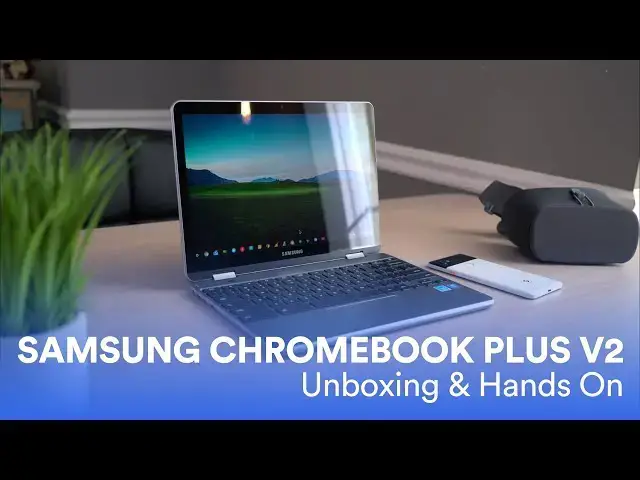
The newest member of the Samsung Chromebook family is upon us, and as we've had it in-hand for a few days, we thought it time to give everyone a few first impressions after spending a day or two working from the device.
To be honest, we're refining how we do these videos still, so I'm going to try something new on for size with this one. I'll give you a very quick summary with pros and cons thus far, but I'm not going to make too many hard judgments just yet. So, here we go!
Buy the Samsung Chromebook Plus V2: http://fxo.co/1121837/bbscpv2
Shop Chromebooks: https://amzn.to/2NE2wKq
Read more: https://chromeunboxed.com/
Follow us: https://www.instagram.com/chromeunboxed
https://twitter.com/chromeunboxed
https://www.facebook.com/Chromeunboxed
https://plus.google.com/+Chromeunboxed
Show More Show Less View Video Transcript
0:01
[Music]
0:20
hey folks probably paying with chroma
0:22
and boxed and today we're gonna be
0:23
taking a first look and giving you some
0:25
initial impressions on the Samsung
0:27
Chromebook plus v2 now you'd be remiss
0:30
for thinking this looks exactly like the
0:32
Samsung Chromebook plus that came out of
0:34
about a year and a half ago and you know
0:36
it's it's somewhat close but there are
0:38
quite a few Hardware differences we want
0:40
to kind of talk through and some
0:41
performance differences as well they've
0:43
added on about 50 bucks to the price and
0:45
so trying to figure out if this thing's
0:47
really worth that extra amount of money
0:49
and we'll make that judgment call on the
0:50
review right now I just want to give you
0:52
36 hours in my first impressions of this
0:55
device and talk you through some of the
0:57
ups and some of the downs I've already
0:58
noticed first up we need to talk about
1:00
the outer pieces here and and there are
1:02
reasons that this device is actually a
1:04
little bit of a different shape than the
1:06
original one but we're gonna get to that
1:07
in a few minutes just know that it's a
1:09
wider version of the original plus but
1:11
it's also a little more shallow so it's
1:13
a little more rectangular overall in its
1:14
shape it's still made of mostly aluminum
1:17
the original one was all aluminum this
1:18
one does have a plastic bottom on it and
1:20
so far it's really not bothered me at
1:23
all the overall package feels at least a
1:25
little bit more firm versus the v1 of
1:28
this device it had a lot of flex in it
1:31
before and and there's still a little
1:32
bit here which is a little disconcerting
1:34
but overall the the entire thing is it's
1:37
relatively firm the upper part of the
1:39
screen for me has felt a little weird
1:41
like the the weighting of it just seems
1:43
a little bit off like the screen just
1:45
seems too heavy
1:46
and I'm not really sure why that is I
1:48
haven't really figured that part out it
1:50
could be because there's a lesser screen
1:51
tech in this one I I'm not really sure
1:54
what's going on but it causes the
1:55
display to wobble just a little bit and
1:58
then it just kind of feels where we're
1:59
holding it but when it's set on a desk
2:01
and you're using it it hasn't bothered
2:03
me one bit at all so let's talk about
2:05
that screen it's one of the defining
2:07
factors of the original Chromebook plus
2:09
and pro it was one of the defining
2:12
things it was one of
2:13
best screen that's ever been on a
2:14
Chromebook apart from the original
2:16
Chromebook pixels and it's the same
2:18
screen that's on the pixel book and
2:19
that's on the Chromebook x2 and so one
2:22
of those things that like for all the
2:24
other parts of the Samsung Chromebook
2:26
plus that were kind of annoying that
2:27
screen kind of made up for them and so
2:29
same things change that and I don't know
2:31
that it's the best move for one it's a
2:34
sixteen by ten screen now instead of a
2:35
three by two it also drops quite a few
2:37
pixels now it's 1920 by 1200 which is a
2:41
1080p class-a panel and so it's a lot
2:45
less pixels it's 12.2 inches now versus
2:47
twelve point three and it does feel
2:49
smaller using it it feels like you're
2:50
using a smaller screen then when I get
2:52
the pixel book out which again has the
2:53
exact same panel as the original plus I
2:56
do kind of like that they reduce the
2:57
pixel count because let's be honest the
2:59
Chromebook plus the original one
3:01
struggled quite a bit that's a bunch of
3:03
pixels to push so we've reduced the
3:05
pixels by a ton on this device that was
3:08
a processor get along a lot better and
3:10
so it's a trade-off
3:11
everything still looks really nice and
3:13
sharp it's 300 nits versus the 400 of
3:16
the old panel so it's not quite as
3:17
bright so it's an aspect ratio I don't
3:20
like quite as much it's got less pixels
3:21
and it's not quite as bright so for most
3:23
people they're looking at that and
3:24
saying hey that's a downgrade but
3:25
because if you're gonna get a little bit
3:27
better performance out of it which is
3:28
kind of cool and it's not such a
3:31
downgrade that you're looking at it and
3:32
thinking oh god this is a terrible
3:33
display so it's just noticeably
3:35
different and it's one of the things
3:37
that changes the overall feel of this
3:38
device from the version one alright so
3:40
another benefactor of this a slightly
3:42
different aspect ratio on the screen is
3:45
the keyboard the keyboard on the
3:47
original + and pro was okay I was a
3:51
little splashy that click mechanism was
3:53
kind of shallow but the worst part of it
3:56
was because of the taller screen and the
3:57
small bezels on the side they almost had
3:59
a chop part of the keys off on the left
4:01
and right so your delete key was really
4:03
small and your Enter key was small and
4:05
shift keys so a lot of people really
4:07
really did not like the keyboards on
4:09
those devices I'm happy to say that
4:11
because of the wider screen on this one
4:13
you now the keyboard goes edge to edge
4:15
but you get a full size keyboard so it
4:17
looks the exact same as you'd see on any
4:19
other Chromebook everything spaced the
4:20
way you would expect it to be all the
4:22
keys are the right size so all that
4:24
stuff is really good the travel is
4:26
actually really good
4:27
and the click mechanism is really good
4:28
I'm gonna be honest it's one of my
4:30
favorites I'm coming from a pixel book
4:32
at all times when I go to a different
4:34
keyboard to test out a Chromebook and
4:35
usually the fall off is significant
4:38
because I love the pixel books keyboard
4:40
and this one has been really really good
4:42
it's got really really quiet keys but
4:44
they're really clicky and tactile and
4:46
they feel really really good however
4:48
they're not backlit so Mastretta offs
4:52
over and over at this thing but overall
4:54
I've really enjoyed
4:55
banging out some articles and doing some
4:57
work and even even typing code and stuff
5:00
not not looking down at the keyboard a
5:01
lot everything's spaced right and feels
5:03
good so thumbs up on the keyboard other
5:06
than the backlighting part and then that
5:07
brings us to the trackpad it's been I
5:10
don't think it's glass I'm almost
5:11
positive it's not glass however whatever
5:13
they made it out of it's great at
5:15
resisting oils it's nice and smooth it's
5:17
about the same size as the old one and a
5:19
click mechanism is fantastic I the input
5:22
methods on this thing have been great
5:23
I've really really enjoyed using it both
5:25
in my lap and on a desk nothing to
5:28
complain about here which is a huge step
5:30
up from the original plus a pro and
5:32
because this is the Chromebook plus it
5:35
has to have a pen right I mean that
5:36
would be weird for them to take that
5:38
away and it does it stowed a little bit
5:39
differently than the original one was
5:41
but yeah it's easy to get to it's pretty
5:43
much the same pin it does have over 4000
5:46
levels of pressure now but I'm not
5:48
really an artist so I can't really take
5:51
advantage of that stuff I just know
5:52
opening up squid jotting down notes has
5:55
been really really good again because of
5:58
the aspect ratio holding this thing in
5:59
portrait mode to take notes feels a
6:01
little weird I really like three by two
6:04
displays for that because it's a little
6:05
bit wider when it's in portrait mode but
6:07
other than that the pen experience has
6:09
been great so there's really nothing to
6:11
complain about there additionally this
6:14
device is being marketed partially like
6:17
if you go to their landing page that
6:18
Samsung has set up for this device with
6:21
a 13 megapixel world facing cameras and
6:24
then I think it's a 5 megapixel maybe a
6:26
megapixel front facing camera I think
6:28
it's five but either way the
6:30
front-facing camera is serviceable did
6:31
some duo calls and that kind of stuff it
6:33
looks fine
6:34
as good as any other Chromebook the
6:37
world facing camera
6:39
as I've said in other videos and I don't
6:43
know when Google's gonna fix this it's
6:45
just not good I hate to say that they're
6:49
marketing it as it's going to be
6:51
something worth using it just isn't at
6:53
all the camera app is still incredibly
6:55
slow the pictures are so soft they
6:58
almost look like you've put some sort of
7:00
Instagram effect or not even Instagram
7:02
but like there's a there's one that
7:03
makes stuff look like paintings it looks
7:05
like I've made an oil painting of what
7:06
I've come looking at it's it's it's
7:08
really bad I mean Google needs to
7:10
address it and I'm shocked that Samsung
7:13
hasn't figured out a way to address it I
7:14
mean whether it's an Android app that
7:16
takes better photos or whatever this
7:18
thing just doesn't take good photos so
7:19
if you're thinking hey they're really
7:20
marketing the camera they got the
7:21
exploded view of the camera and all that
7:23
kind of stuff on their landing page
7:24
surely it's a good camera experience
7:26
think again it is not good not at all
7:29
and so we'll delve into some of that
7:31
stuff for the full review but I'm not
7:32
holding my breath that's gonna get fixed
7:34
anytime soon so unfortunately even
7:36
though it's got a pretty decent sensor
7:38
built in here you're not gonna be doing
7:39
anything worth keeping on it one other
7:42
thing I noted in these first hours of
7:44
using this device is queuing up a
7:46
YouTube video I noticed the sound was
7:48
really really rich and full so much so
7:51
that I went and grabbed the pixel book
7:52
and open it up open the exact same video
7:54
I was watching and and there is a very
7:57
discernible very noticeable difference
7:58
between the speaker quality on these two
8:00
things the pixel book sounded thin and
8:03
harsh and tinny compared to kind of the
8:05
richness of this device and so I don't
8:07
say that about many Chromebooks usually
8:09
the speakers are real bad and they're
8:10
real bad on most laptops but this thing
8:12
is approaching that kind of iPad sound
8:14
and if you've ever had of you know and
8:16
I've had Pro and really listen to some
8:18
good audio on it you can tell it's it's
8:20
full sounding it's kind of rich sounding
8:22
I mean I've been allowed to say in the
8:23
world but it sounds good
8:24
these speakers sound good and that kind
8:26
of shocked me they're just bottom firing
8:27
speakers I don't know if it's because
8:29
the extra room and the chassis or what
8:31
but they've done something good here the
8:33
speaker's sound really good and while
8:34
we're talking about thickness of the
8:36
chassis the the device is a little bit
8:37
thicker than the original and it's about
8:39
a half pound heavier so you're going to
8:40
notice that when you pick it up and move
8:42
it around or have it in tablet mode
8:43
internally what we're looking at here is
8:45
the seller on 39 65 why and we've not
8:48
seen this processor and any other device
8:50
up to this point it is kind of in the KB
8:52
like the seventh gen
8:53
heavy leg line of processors but at this
8:57
point it's getting so convoluted with
9:00
naming processors and what Intel's doing
9:03
with what it's a seller on it's not the
9:05
seller on that kind of goes with the
9:07
Apollo Lake chips so it does better than
9:09
that we're giving 14,000 almost 15,000
9:14
on octane which is pretty good I mean
9:18
it's it gets along just fine you're
9:20
gonna see a hiccup from time to time
9:21
it's not a pixel book and it's not you
9:23
know Core m5 or Core i5 or anything like
9:26
that but it gets along pretty well it
9:28
really didn't give me too much pause at
9:30
all doing my work today and and doing
9:33
some stuff with the kids on it so other
9:36
than that you have four gigs of RAM 32
9:37
gigs internal storage and a lot of
9:39
people get caught up on why isn't this a
9:41
core in three or whatever to keep in
9:43
mind they're probably gonna release a
9:44
Samsung Chromebook Pro v2 as well so
9:47
they need to create some gap there so
9:49
that they can have kind of the entry
9:50
level and then the nicer version but if
9:53
you're coming from the original Plus
9:54
this thing runs circles around it it's
9:57
way way way faster and then add it into
10:00
the fact that it's got way less pixels
10:01
to push I mean it moves along just fine
10:04
so it's it's good to see Samsung at
10:05
least move that bar forward even though
10:07
the RAM and internal storage are pretty
10:09
much the same so overall what we're
10:12
looking at here is a device that's just
10:13
a little confusing to be honest it's a
10:16
step back in certain areas and then a
10:18
definite step forward in other areas and
10:20
maybe if you've never handled a
10:22
Chromebook plus to begin with or a pro
10:24
and you didn't think about those things
10:26
I'm trying to see it from that
10:27
perspective you would be like man this
10:28
this feels like a really good Chromebook
10:30
like there's a lot of good stuff going
10:32
on here but then we have to reach back
10:35
and compare it to what came before it
10:37
and there's stuff that it did better and
10:39
this one's more expensive and it's the
10:42
next version and you just expect
10:43
everything to move forward in
10:45
improvements and it feels like there's
10:47
certain things that improve and certain
10:49
things that didn't so the jury's out for
10:51
me right now we still needed a full
10:53
review obviously I need to spend some
10:55
more time with it and run more tests and
10:57
and inform more opinions about it I'm
11:01
just not sure yet I really opened the
11:03
box expecting not to like it from the
11:05
spec sheet I expect
11:06
just think it was it was bad in always
11:09
shapes or forms but it's kind of growing
11:12
on me a little bit and I kind of liked
11:14
it and so I'm not really sure what to
11:16
make of it yet so you'll have to stick
11:17
around for the full review guys that's
11:19
about it for this one though if you
11:21
liked it give it a thumbs up hit the
11:23
subscribe button below
11:24
stick around and until next time we'll
11:26
see you
11:28
[Music]
#Consumer Electronics
#Shopping
#Consumer Resources