Up next in 10

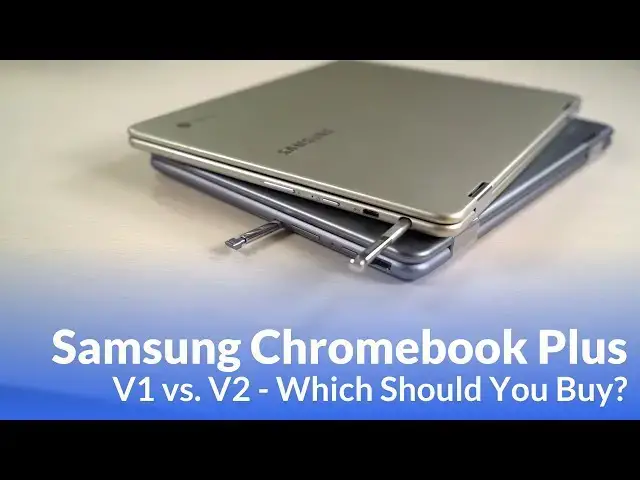
Samsung Chromebook Plus V1 vs V2: Which Is Better?
Sep 29, 2018


Samsung Chromebooks on Amazon: https://amzn.to/2OfoMNZ
Samsung Chromebook Plus V1 Review: https://youtu.be/7W1us4OWhZ0
Samsung Chromebook Plus V2 Review: https://youtu.be/JZsuJ0zldNE
Since Samsung unveiled the surprising Chromebook Plus V2 back in June, the lingering question on everyone's lips has been, "should I buy the new one or stick with the old one?"
Until we got both in the office and really had them side by side, the answer was pretty difficult to discern. These two devices share a lot in common: mainly aluminum build, 4GB of RAM, 32GB of internal storage, garaged stylus, USB Type C and a convertible form factor.
However, there are quite a few differences here as well and, unlike you'd expect, the second iteration of this Chromebook isn't better across the board. In fact, there are still parts of the original that are objectively better than the new version.
As they are both still retailing for $499 at this point, if you are considering either of these devices, the decision could be pretty difficult.
That's where we come in. In this video, we put the V1 and V2 side by side and help you get a better grasp on the strengths and weaknesses between them.
~~~~~~~~~~~~~~~~
Subscribe to the channel: http://bit.ly/2xFuj6L
Show More Show Less View Video Transcript
0:00
if you've happened upon this video it's highly likely you're in the market for a samsung chromebook
0:22
plus and maybe you figured out by now that there's a plus v1 and a plus v2 and maybe you're wondering
0:29
what the difference is in the two. Well, we've got a link actually in the description down below
0:33
We've reviewed both of these devices separately. And if you want to go take a look at those reviews
0:37
and make your own judgment, great, go for it. But if you're looking for a side-by-side comparison
0:42
that's what we're here to do. And specifically, we avoided doing that with this device because
0:46
it was so compelling to actually talk about how Samsung has changed the device from version one
0:51
to version two. And not all the changes are necessarily for the better. So we really wanted
0:56
to set these things side by side to help you make a purchasing decision because at the time of
0:59
filming this video right now, they're the exact same price, $499. So you can't let price make the
1:06
decision for you. So you're really going to have to look at what these things offer and make that
1:10
decision based on what's actually in the package. So let's talk first about similarities. We have
1:14
two convertible Chromebooks made mostly out of aluminum. Both have the pen from Samsung that's
1:20
very identical. Both of them have 4GB of RAM with 32GB of internal storage. Relatively high
1:27
res display on one with a very high res display on the other. They're both pretty bright and have
1:32
good viewing angles. They're both relatively the same weight with one being a little bit lighter
1:37
than the other. There's just a lot of stuff that's similar between the two. Heck, they're even both gray and from the top you'd be forgiven for thinking one's the other. So there's a lot that
1:45
they share in common so that makes it even harder to actually compare these two devices. So we want
1:49
to dig down deep and talk about all the differences now that make one, maybe for you, better than the
1:54
other. All right, at first is probably the most divisive change that Samsung made from V1 to V2
1:59
and that's the screen. So you're probably all familiar by this point if you've looked at all
2:04
at this device with the screen on it. It is a 3x2, 2400x1600, 400-nit display. It's the same thing
2:12
that's on the Pixelbook and the HP Chromebook X2 and the Samsung Chromebook Pro, for that matter
2:17
and it's a fantastic panel. Every time we've reviewed it, we just love it. It's great. It
2:22
looks really good. The taller aspect ratio is great. I feel like it gives you a more squared
2:27
display, which gives you more real estate for that same diagonal measure. I just say lots of
2:32
good things about it because it's a really good panel. That's not to say the one on the V2 is a
2:37
bad panel per se. It's just a little bit shorter and wider. So we got a 12.2 inch display, 16 by 10
2:43
ratio, 300 nit 1920 by 1200 display over here. So that was a lot of numbers. Here's what it
2:50
breaks down to Taller higher density brighter display a little bit shorter wider lower brightness lower density display However on this device with this small of a screen 1080p class so it kind of full HD basically with some extra pixels still looks really good
3:09
You're not going to see a bunch of pixels all over the screen and it's not going to look pixelated. but the win here definitely goes to Samsung V1 versus V2 because it's brighter, it's higher in
3:21
density, and for me, again, this isn't for everybody, but for me, I really, really like the 3x2 layout
3:27
Now, that difference in screen actually bleeds down into the next piece that we're going to talk
3:31
about, and that's kind of the input methods, the keyboard and the trackpad. We're not really going
3:34
to talk about the pens here because they're literally the exact same. The only difference is
3:39
the V2 kind of has a curved top to it because it kind of fits in the bottom side of the device
3:44
but literally that's it. It's the same pin. Really the difference in the input methods are the
3:47
keyboard and the trackpad. And I would go ahead and say the trackpad's almost a bit of a wash
3:52
The one on the V2 I think is a little bit better. The click mechanism is a little more just
3:57
solid and a little quieter. But both of the trackpads feel really good. They resist oils and
4:02
they do really well for themselves. They're not glass, but they get along just fine and I had no
4:08
issues with them whatsoever. So really it boils down to keyboards. And the difference we get with
4:13
the Plus V2 is, like I said, the screen is actually wider versus taller. So it's a wider device
4:20
And one of the big issues with the V1 of this device was that because it was narrow and tall
4:24
and they didn't put huge bezels on the sides, you actually didn't have room for the entire keyboard
4:29
So they kind of cut sides off both sides of the keyboard. And so you have like the tab key and
4:33
the enter key are all truncated and small on each side. But because the new V2 is actually wider
4:39
you get room for a full keyboard here and a good keyboard also. So the Plus actually had a really
4:47
kind of flimsy, terrible keyboard, honestly. It just wasn't good. It was one of the worst keyboards
4:52
that we've seen in a little while. And they really fixed that with the V2. It feels really good. It's
4:58
responsive. It's clicky. It's tactile. It's probably my favorite keyboard shy of, I mean, probably tied
5:03
with the HPX2 and just shy of the Pixelbook. And so now you get a full-size keyboard that feels
5:09
great, that just performs really, really well. Neither one of them are backlit, so there's no
5:13
win there. So the win on input methods, mainly because of the keyboard, has to go to the Plus V2
5:19
From a purely aesthetic perspective, that's a little bit of a toss-up here as well. So
5:24
there are things I like about both of these. The color of the new one is different, and maybe
5:31
because it's different. I like it more. I'm not really sure, but it's different enough that there's
5:36
not a lot of other devices that have this particular color. It's not quite as dark as like the MacBooks
5:41
but it's not as light as this, which is kind of feels like MacBook Air kind of color of silver
5:45
but that not really that big of a deal But aesthetically whenever you look at these things side by side the new one actually quite a bit thicker than the old one It actually almost half a pound heavier as well So it just feels more dense and maybe a little bit more clunky and that extends all the way to the screen too
6:02
We talked about this in the review. The top portion of the screen actually feels a little bit heavy, not to the point where it's falling over or anything
6:09
but it just, I don't know, it feels a little oddly proportioned
6:13
Whereas the old device was just thin and light and it just felt really well proportioned
6:19
Everything just kind of felt balanced and in check. And so overall, just the feel of holding the device in your hand, the lightness, the thinness of it
6:27
even though I might kind of like the color of the new one better, I do tend to like the way that it feels and looks with the V1
6:34
One quick note of something we don't talk too much about with Chromebooks because most of them have really terrible speakers is, well, speakers
6:41
This one has the normal kind of tinny, almost throwaway kind of speakers that most Chromebooks have
6:48
They work in a pinch, but you don't want to listen to anything for any length of time
6:53
on it. The new version of this device, though, has really, really great speakers
6:58
They're not the loudest things we've ever heard, and we said this in the review as well
7:01
but overall, they have this kind of nice, rich, and full sound
7:05
And so if speakers on a laptop, if that's something that's important to you, then the
7:10
V2 definitely knocks it out of the park there. So we've talked about all the outside pieces. How about how they perform? Because one of the nags against the original Plus was the ARM chip
7:19
inside kind of was sluggish. But as Chromebooks are wont to do, over the time since this thing's
7:25
been released, it actually feels a little faster and snappier than it did when it was first released
7:30
And so Chromebooks tend to get faster over time as Chrome OS gets better and uses resources better
7:35
Chrome OS is so light that devices actually perform better over time. And so that's
7:40
that is the case here. We're still getting around 10,000 octane, just, just under that
7:45
on an octane benchmark and somewhere around 14,000 over here. So synthetic benchmarks would tell you
7:50
oh, this is considerably faster than this one, but real world performance isn't that much different
7:55
because both of these are lower end devices. You really aren't going to be trying to multitask and
7:59
do a hundred thousand things all at the same time. You're not going to think, oh, I'm going to have
8:04
18 tabs open and then a music player and all this other stuff, and it's just going to be fine
8:08
because it won't be with either one of these devices. So the minute you take that perspective
8:12
and then kind of back down and go, okay, two or three things at a time with each of these devices
8:17
there's not that much difference in them. They don't really feel that different. And I actually had them side by side and was doing the exact same tasks and not seeing that much
8:26
performance difference. Now I could push the V2 a little bit farther before it started to really
8:31
bogged down than I could the V1. But again, when we approach these devices and think, hey, I'm not
8:36
trying to multitask and do everything under the sun on them. These are devices that are mid-range
8:41
or lower range processors, and I'm only going to try to do one or two things at a time. When you're
8:45
doing that there not that much difference between the two And keep in mind we talking about the same four gigs of RAM the same 32 gigs of internal storage So really it just the processor difference ARM OP1 chip versus this random Celeron 3965Y that they put into this one They both get
9:03
good battery life and they both perform okay. And so I don't know that that's a factor that you can
9:08
look at and go, okay, this one's so much faster than this one because it's just not the case
9:12
One other thing of note is the V2 actually comes equipped with a 13 megapixel world-facing
9:17
camera that can be used whenever you're flipped into tablet mode. It has autofocus and pretty decent optics
9:24
Right now, it's hindered completely by the Chrome OS software because the camera software
9:29
is just terrible. However, there is a fix coming. The Google camera is coming to Chrome OS
9:33
So at the end of all of it, we're here to make a purchasing decision, right
9:37
You've decided, hey, I want the Samsung Chromebook. I want the Plus version
9:40
which one of these am I supposed to get. It's a really, really difficult decision to make
9:46
But here's what I can tell you from my perspective. I like both of them for different things. I like
9:51
the input methods over here. I like the little bit better processing power, even though it's not
9:55
that much more. But over here, I like the form factor. And I really, really love the screen
10:01
And honestly, I can kind of get by the crappy keyboard. I love the fact they both have pen
10:07
inputs and they're both convertibles. And if I'm going to use it as a convertible, I like something that's thinner and I like something that's closer to a square in its form
10:13
factor. So for me, because of the exact same price and performance isn't that different
10:19
if I'm going to choose one of the two, I'm still actually going to go with the V1. I can get over again because I'm going to approach it going, I'm probably not going to try to do
10:27
everything and throw the kitchen sink at this thing. I'm going to do one or two tasks at a time
10:31
with this. I would rather have the good screen and get over the keyboard and have the three by
10:36
2 aspect ratio than have the good keyboard over here and have the diminished screen and the more
10:42
squat aspect ratio. But those are my preferences. That necessarily might not be your preferences
10:47
Both of them are $499, and I think as long as you know what you're getting, it's not that bad of a
10:53
deal. But at the end of the day, just like I said in the review for this one, and I don't remember
10:57
if we said it in this one or not, $499 steep for either one of these devices. If they get closer to
11:02
$400, then it's like, hey, this is a great deal. But at $500 or $550, there's a lot of other
11:08
Chromebooks that are on the horizon and available right now if you look for deals like the Chromebook
11:14
X2 from HP that sometimes comes down in that $550 range. And at that range, at that price
11:19
for only $50 more, 100%, I would say go buy that one, not one of these. But if you're dead set on
11:25
a Samsung, you're dead set on the Chromebook Plus, my money right now would be with the Chromebook
11:30
v1. So guys, I hope this has helped you make a purchasing decision of some sort
11:34
If you liked it, give it a thumbs up, subscribe down below, and until next time, we'll see you