Up next in 10



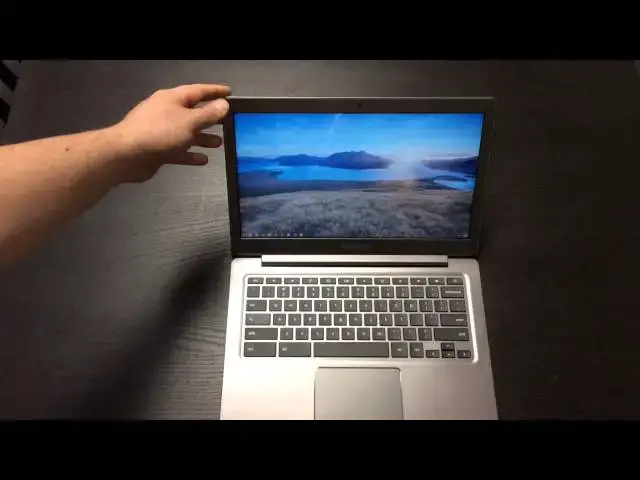
In this video I unbox the much-anticipated Chromebook 2 from Samsung. Enjoy!
Show More Show Less View Video Transcript
0:01
hey folks it's Robbie Payne again with
0:03
chrome unbox coming at you today with an
0:05
unboxing of the much anticipated Samsung
0:09
Chromebook 2. now as many of you know it
0:11
comes in a variant of 11.6 inches and
0:14
13.3 I went with 13.3 because it does
0:16
come with the 1080p screen uh the 11.6
0:21
inch comes with the 1366 by 768 that
0:24
we're kind of used to on most uh most
0:27
Chromebooks so this one does have a step
0:29
up in screen resolution
0:31
other than that the build quality I
0:33
believe between the two of them is
0:34
pretty much the same I want to say the
0:37
processor in this one is clogged just
0:39
ever so slightly higher uh
0:42
from the box yeah it doesn't tell me
0:44
what the clock speed I want to say it's
0:46
2.3
0:47
gigahertz versus 2.1 in the smaller one
0:50
so it's not a huge deal uh packing the
0:52
exynos quad our octa-core processor the
0:56
5800
0:58
now we've got four gigs of RAM and all
1:01
the normal
1:02
um Chromebook add-ons I will say this
1:06
one has been opened uh filmed the
1:08
unboxing and then went to go uh edit it
1:10
and accidentally deleted it so I'm
1:13
re-unboxing this one for you but I've
1:15
tried to package it back up exactly like
1:16
you'll see it when you get it but I
1:19
don't have the mail mailing boxes and
1:21
stuff like that anymore anyway so here
1:23
it is
1:23
um relatively reminiscent of the look
1:26
and feel of the series three Chromebook
1:28
boxing nice sturdy box that's always fun
1:33
here
1:35
and uh you know it was pretty
1:37
straightforward not a lot of stuff in
1:39
the Box
1:40
um
1:42
normal charging kind of stuff nice small
1:46
brick which is nice and this the kind of
1:48
micro end I did not I have not had a
1:51
chance to check this yet to see I still
1:53
have my wife's series three so it looks
1:57
like the same charger which would be
1:58
nice for any of you upgrading you can
2:00
have an extra charger
2:03
as always you get a little get started
2:05
book that
2:07
should be a one-page thing that says
2:09
open sign in to Chrome
2:11
you're done
2:14
nice little sleeve
2:18
put that out of the way and get it here
2:20
for you Feast your eyes on a little bit
2:23
um
2:24
you know first uh
2:26
First Reactions to it honestly the uh
2:29
um the leather-like texture uh is not
2:33
off-putting and actually looks nice in
2:34
person
2:36
um stitching I think is I don't know I
2:39
don't know what I feel about that I
2:40
guess it gives it the leather-like look
2:42
this doesn't feel nearly as leathery
2:44
though as uh the Note tablets and and
2:47
phone I actually have a Note 3 and the
2:50
plastic actually if you didn't know
2:52
better you'd almost think it was leather
2:53
this I don't think there's any mistaking
2:55
it's textured which is nice it's grippy
2:58
um and it's it resists fingerprints
3:00
pretty well
3:01
but you're not going to mistake this for
3:03
leather
3:04
bring it up here and you'll see nice and
3:08
blazing Samsung there and uh the the way
3:12
they inlay the Chrome here is pretty
3:13
cool so it's good looking look around
3:16
the sides on the back you have nothing
3:18
other than hinge on the side we have a
3:21
USB 3.0 Port if it's going to focus for
3:24
me
3:25
there we go uh USB 3.0 Port
3:29
um
3:30
HDMI and then we have a micro
3:32
SD so keep that in mind if you don't
3:35
have any micro OSD cards and you like
3:37
expandable storage you're going to need
3:39
the micro not the big one nothing on the
3:41
front except the lip to open
3:43
and then across this side here we have a
3:45
standard USB Kensington lock combo
3:48
earphone microphone Jack across the
3:51
bottom
3:52
not much going on here some screws which
3:55
if you're the type that likes to take
3:57
stuff apart then that's probably a good
3:58
thing for you These Arm based ones are
4:01
usually soldered all together so not a
4:03
lot to get in there and do as you'll
4:05
notice there's no fan vents because it's
4:07
an arm processor so it doesn't need any
4:09
some of the upcoming
4:12
um Bay Trail and uh from what I
4:15
understand some of the I3 Chromebooks
4:18
won't have won't have vents either so
4:20
that'll be a nice thing we'll see how
4:22
hot it gets and all that kind of stuff
4:24
and then we have the two ports for the
4:26
speakers
4:27
that's about it going around the edge
4:29
let's open this guy up and give it a
4:31
look
4:32
hinge works really nicely I'll say that
4:35
it's not quite uh
4:39
as a lot of you all watch the videos you
4:41
see that I like ones that can open with
4:42
one finger it can't do that I'm thinking
4:45
maybe over time maybe once it
4:47
it lightens you know the the hinge
4:49
chills out a little bit because in this
4:50
area it works one finger
4:52
and so it's almost there uh the hinge is
4:55
just a little sticky
4:57
and so
4:59
um we have a nice huge trackpad here my
5:03
whole hand fits across and I got
5:04
relatively large hands
5:06
um
5:07
inside is all this kind of brushed
5:09
plastic aluminum looking kind of stuff
5:11
resist fingerprints really well and
5:14
there are no stickers in here there was
5:15
a little Energy Star Sticker over here
5:17
and it came off really simply so that's
5:20
a really nice touch Samsung well done uh
5:23
without killing the look of the
5:25
Chromebook with a bunch of cheap looking
5:26
stickers
5:28
around the inside here like I said we've
5:30
got these nice dipped slightly textured
5:32
Keys travel on them very good I think
5:36
it's going to be a nice typing
5:37
experience there
5:39
um trackpad is very responsive
5:42
and I'll open up a couple things here
5:44
just to have some things open
5:47
and so you can see three finger swipe
5:50
works as expected
5:57
if we open up a couple tabs
5:59
three finger swipe between tabs works
6:01
just fine as well so
6:03
um trackpad is nice the little Chrome
6:05
accents around it really set it off
6:07
pretty nicely as far as from a aesthetic
6:09
point of view the screen I know a lot of
6:11
people have wondered about the screen in
6:13
general you know just wondering if you
6:15
know how the how the screen is going to
6:17
fare is as far as being a 1080p screen
6:19
but it's also a TN panel
6:21
um honestly the the screen on a left and
6:25
right Axis and I can turn it and kind of
6:27
show you
6:29
um doesn't do too bad
6:31
um you know I'm viewing it from pretty
6:32
far off angle loses some brightness but
6:34
not a big deal where it really struggles
6:36
that I've seen so far is those top
6:40
viewing angles it's it's pretty bad
6:42
polarized and so um you know it's a TN
6:45
panel and
6:46
if you all if if you've watched many of
6:49
my videos you've heard me go on probably
6:51
ad nauseam about having nice displays
6:53
and Chromebooks just an IPS panel
6:55
doesn't have to be anything flashy but
6:57
anyway I digress
7:00
um so that's a quick look around overall
7:02
it's a good looking device no clue how
7:04
it's going to really perform like I said
7:05
I did the unboxing and that was about it
7:06
and so I haven't really done much on it
7:08
I'll try to get uh Ubuntu and Linux on
7:12
it early next week I've got a lot of
7:14
work to do today and a busy weekend so
7:18
we'll see how that goes
7:20
um but I just wanted to give you a quick
7:21
Hands-On quick unboxing and a look first
7:24
look at it it's a it's a pretty device
7:26
and it looks really nice we'll we'll see
7:29
where the performance Factor comes in
7:31
there
7:32
um and and I'll probably within a week
7:34
or so I'll get you a full review I'll
7:36
attempt to work from this
7:38
um obviously if it's if it struggles
7:40
like previous arm processors I probably
7:43
won't be able to work from it because I
7:44
can't I can't sacrifice productivity
7:46
from work just to check out a Chromebook
7:48
but I'll attempt to spend a lot of time
7:50
with this guy in the meantime drop me a
7:52
comment in the video drop a comment on
7:54
Google Plus drop a comment on my website
7:57
Chrome unboxed I'll post this video
7:59
there as well
8:00
and if you have any specific questions
8:02
about it especially software related
8:04
stuff in the Chrome OS World feel free
8:07
to drop those in there I'll give stuff a
8:08
try if you've got a favorite app that
8:10
you want to know how it runs or there's
8:12
a particular set of websites that you
8:13
like to look at you know I know that for
8:15
those of you who don't know
8:17
um mad finger who makes Dead Trigger
8:19
Dead Trigger 2 and Shadowgun these games
8:21
that are really popular on Android and
8:23
iOS actually has really pioneered uh I'm
8:26
not sorry not mad well mad finger but
8:28
working with unity
8:29
um there they've actually got Dead
8:31
Trigger 2 running in the cloud in a
8:33
website so no plugins nothing necessary
8:35
you just navigate to a website you're
8:37
playing a really neat 3D
8:39
a zombie hacking game fun stuff and so
8:43
this stuff's coming along so it's really
8:45
interesting to see how different
8:46
Chromebooks play with these sites that
8:48
are really pushing some really uh
8:50
awesome graphic stuff so if you have
8:52
questions about those things you say hey
8:54
I want you to run this through we run
8:55
you know I'll run octane I'm trying to
8:57
start doing that from here on out on
8:59
some of these Chromebooks
9:01
yeah benchmark scores on everything a
9:03
lot of times it's better to see real
9:04
world like I go to this side a lot and
9:06
it struggles on my series three what's
9:08
it do on this on this new one and I go
9:10
to the site and it does great on my
9:12
Haswell Chromebook what's it going to do
9:13
on this guy so some of those things are
9:16
helpful I'll run it through those tests
9:18
if you have any questions like I said
9:19
leave them in the comments thanks for
9:22
watching make sure to like the video
9:23
subscribe if you haven't already and
9:26
stick around the full review will be
9:28
coming and we've got a whole summer full
9:29
of tons of Chrome OS stuff so it's going
9:32
to be an exciting few months so stick
9:34
around stay tuned and until next time
9:36
you guys have a good one
#Consumer Electronics