0:00
If you've been around the Chromebook scene for any amount of time, you've probably become
0:03
familiar with the tired insinuations that Chromebooks aren't real laptops or that you
0:08
can't get real work done on them. And while I'm not here to try and refute every single one of those arguments today
0:15
I did want to quickly share with all of you this new setup that I've been using a Chromebook
0:20
for because up until recently, this particular task was relegated to Windows laptops only
0:26
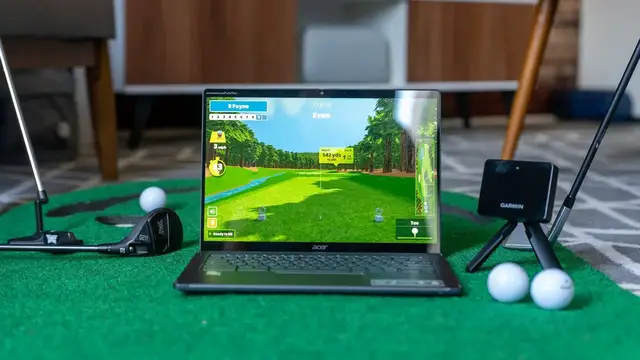
But not anymore. Today, I want to show you my golf simulator setup, powered by a Chromebook
0:37
Before we get into all that though, let me tell you about my previous setup for all this golf
0:42
simulator stuff. I purchased two Windows gaming laptops in the past year to use for this exact
0:47
purpose, and both of those laptops never saw any attention outside of golf-related activities
0:53
To get things running, particular software with particular drivers and particular bridge
0:57
applications needed to be installed and run in just the right order to get my SkyTrack
1:02
to talk to my laptop just right so we could play golf with it
1:06
It's not a simple setup and far from what I would call user-friendly
1:10
Now that's understandable, of course, since golf launch monitors aren't exactly your
1:15
run-of-the-mill consumer devices. They need specialized software and interfaces and drivers to work properly, and while all
1:22
of that could technically work on a Chromebook or an iPad or a MacBook with the right attention
1:27
most of these software companies have chosen to keep things a bit more siloed likely for the sake of simplifying development I mean let face it people aren coming out in droves to buy launch monitors for at use Well at least they
1:40
weren't. Recently, a new launch monitor by Garmin, the Approach R10, showed up and caused a bit of a
1:46
stink in the fledgling at-home golf sim industry. First off, the unit itself costs just $599 in a
1:53
market dominated by affordable options that range anywhere from $2,000 all the way up to $10,000
1:59
end. That upper end is of course reserved for the more precise devices used for things like club
2:04
fitting and tour pros, but if you want to get fully crazy with all this, you could drop $25,000
2:09
on a TrackMan that is so accurate it uses the exact same radars the military uses to track
2:15
ballistic missiles. It can all get out of control pretty quickly. So seeing a radar-based unit that
2:21
is battery-powered, small enough to slip in your golf bag and cost only a tiny fraction of the
2:26
current devices on offer was already a pretty big deal. Along with this little launch monitor also
2:31
came a simple way to wirelessly connect devices to it via the mobile phone app, and that app
2:36
holds the key to letting users take advantage of something like a Chromebook to run a full-fledged
2:42
simulator bay. Garmin's Golf app allows for other third-party apps to integrate with it
2:47
and one of those applications is a new one on the scene called Awesome Golf. As the name implies
2:52
it is awesome. Built completely around mobile apps and family-focused gaming, Awesome Golf
2:58
leverages the Garmin Approach R10 to give you access to a powerful driving range, tons of mini
3:04
games and challenges and even access to four full courses with more on the way It been a wildly fun time using the Awesome Golf software and it specifically because of the developer
3:15
mobile-friendly setup that we've been able to play tons of golf using the Approach R10 and a
3:21
Chromebook. The setup is dead simple, and though this isn't a how-to video, I can tell you that
3:26
getting Awesome Golf installed on your Chromebook and connected to the Approach R10 takes all of
3:31
about five minutes. You just get the app installed on your Chromebook from the Play Store and then
3:35
install the Garmin Golf app on your phone along with the Awesome Golf Assistant app. Once you have
3:40
the R10 set up and the walkthrough is all provided by the Garmin Golf app, you can then launch Awesome
3:46
Golf Assistant on your phone, launch the Awesome Golf app on your Chromebook, and then connect them
3:51
up via the Assistant app and you're off and running with a completely wireless golf simulator setup
3:57
It was all so simple and seamless that I was kind of mesmerized the first time we got it all running
4:02
The Chromebook makes a great fit for this simulator setup since it makes an external display setup really easy
4:09
And once you're projecting your screen where you choose, you could just as easily just monitor your shots right on the Chromebook's built-in display if you choose
4:17
Playing rounds of golf or mini games feels right at home and natural on the Chromebook
4:22
The shots register quickly. the interface works with touchscreen or mouse input and there's no part of this
4:28
equation that feels half-baked or hacky it just works and that's precisely why I
4:33
wanted to share this with you all know the number of our viewers who will run
4:37
out and buy the Garmin approach are 10 and awesome golf or not high but that not really the point instead just as it is happening with video editing and gaming on Chromebooks the number of things that you can do on a Chromebook just keeps dwindling
4:51
and I love that. Sure, you can't run other golf sim software on a Chromebook at this point due to
4:56
the fact that those apps are written for Windows only for the most part, but the fact that I can
5:00
run this setup with just my Chromebook is a testament to where development is headed and how
5:05
Chromebooks fit into that equation in the future. As mobile devices become the target for more and
5:10
more of this type of development, Chromebooks are part of that conversation. We're a ways off from
5:16
seeing specified software like golf simulators being built for Android, Linux, or the web
5:21
but Awesome Golf running on my Chromebook makes me wonder what else is possible. What's the next
5:26
thing that arises that I never thought I would do on a Chromebook that turns out to not only be
5:30
possible but pretty awesome too. I don't share this fun, interesting setup with you to encourage
5:35
you to start playing golf or to pick up a Garmin R10 as much as I do to assure you that Chromebooks
5:41
are growing in their abilities and developers are beginning to finally see the worth in making apps
5:46
that are outside of the box for them as well. But guys, that's it for this one. If you enjoyed this
5:50
video, give us a thumbs up, head down there, hit that subscribe button, and be sure to ring the
5:54
notification icon next to that as well if you'd like to be alerted when we make future videos
5:58
just like this one. Until next time, we'll see you