Up next in 10



Sponsored by NordVPN. Try it out and get 75% off a three-year plan for a limited time! Click here: https://chromeunboxed.com/nordvpn
Buy the Poin2 Chromebook 14 on Amazon: https://fave.co/2yAIQAB
・・・・・・・
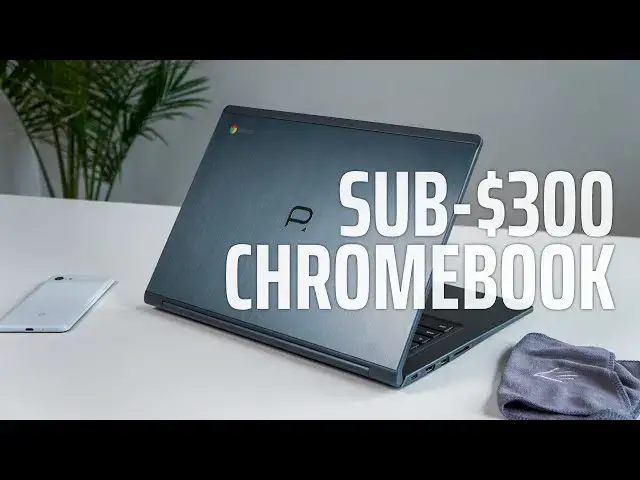
Right off the bat, I want to make sure we're all looking at the Poin2 Chromebook 14 through a very particular lense: the lense of price. You see, when a device drops down into this price range, it becomes quite a bit easier to forgive things that aren't perfect, and that is exactly the case when we talk about the Poin2 Chromebook 14. Since you can find this Chromebook anywhere between $250-$300 brand new on Amazon on any given day, we have to allow that to inform the way we review this Chromebook.
Read more: https://chromeunboxed.com/
Join our newsletter: http://bit.ly/2WjCDm7
・・・・・・・
Become a member of Chrome Unboxed to help us make our channel even better, and for access to exclusive perks: http://bit.ly/CU-join
Subscribe to the channel: http://bit.ly/2xFuj6L
Shop Chromebooks: https://fave.co/2OuedYL
The Music We Use - http://bit.ly/31W6PYP
Show More Show Less View Video Transcript
0:00
when it comes to buying a Chromebook
0:01
there's generally two camps of people
0:03
the people with the latest greatest
0:05
hardware and the best build materials
0:07
and don't really care how much it cost
0:08
and then there are the people that want
0:10
the most bang for their buck and they
0:12
want the best deal and they want to get
0:13
as much as they can out of every dollar
0:15
if you're in that second camp of people
0:17
we might have a Chromebook for you this
0:27
video is brought to you by Nord VP and
0:29
they are the VPN of choice for lots of
0:31
chromebook users and Android users iOS
0:33
users Windows users and Mac users it
0:36
works on all platforms and will secure
0:38
your browsing whether you're at home or
0:40
on the go if you'd like to learn more
0:41
about them and their service go to
0:43
Chrome and box.com forward slash Nord
0:45
VPN to get started today
0:47
a quick note before we get into all the
0:50
normal parts of the review for this one
0:52
and that's the price I normally save
0:54
that for the end of the review but it
0:55
informs everything about this Chromebook
0:58
because when price gets low and low
1:00
enough this one being in the 250 to 260
1:03
dollar range brand new all the time
1:05
pretty much on Amazon that changes the
1:07
way you look at basically everything so
1:10
if it doesn't have the best screen in
1:11
the world or the best keyboard or the
1:13
best trackpad or whatever fill in the
1:15
blank
1:15
you kind of start forgiving those things
1:17
when you can only spend 250 bucks when I
1:19
can buy multiple of these for what I
1:21
would pay for a higher in Chromebook you
1:23
start to forgive a lot of things so I
1:25
wanted to mention that right off the top
1:27
250 $260 somewhere in there on Amazon
1:30
again the link will be in the
1:31
description as it always is but keep
1:32
that in mind as we go through each of
1:34
the parts of this review so first up is
1:36
build quality when we start talking
1:38
about sub $300 Chromebooks in general
1:40
what you're met with is a lot of plastic
1:42
a lot of flimsy and pretty much the
1:45
bargain-basement of build materials and
1:47
that's just not the case with the point
1:49
to chromebook sure there's a plastic
1:51
edge around most of it but the general
1:53
large parts of it the top the bottom and
1:56
the keyboard deck are all built out of
1:58
brushed aluminum and so it gives it a
2:00
nice kind of premium feel in general it
2:03
gives it kind of a premium look and it
2:05
makes it feel sturdy and substantial
2:07
it's a little bit heavy and that's just
2:09
to be expected when you get this much
2:10
aluminum on any device
2:12
but overall
2:13
the feel of this thing does not feel
2:15
like a $300 device in any way shape or
2:17
form I was really impressed with it the
2:19
minute I got it out of the box and after
2:20
having used it for a little while I'm
2:22
still impressed with it I like the way
2:24
this thing is put together moving on to
2:25
the screen again I go back to this idea
2:28
of the price really kind of informing my
2:30
opinion on this but this is a decently
2:32
good screen it's not the best screen
2:34
you're gonna ever see but it is full HD
2:36
14 inches 16 by 9 it's a touchscreen and
2:40
it gets decently bright it's not gonna
2:42
stand up against some of the high
2:43
high-end Chromebooks but in most
2:46
lighting situations it was fine for me
2:48
touch works just like you would expect
2:50
it to the colors look good it's IPS it
2:52
has good viewing angles so again sub 300
2:55
bucks
2:56
I don't expect too much what I actually
2:57
expect on most Chromebooks is a bunch of
3:00
washed out viewing angles terrible
3:02
colors all that kind of stuff and you
3:04
don't get any of those things on this
3:05
Chromebook it actually looks pretty good
3:07
and when you're using it you don't sit
3:09
around and think about how bad the
3:11
display is and that's a big deal on a
3:13
Chromebook for less than 300 bucks
3:14
moving on down the keyboard and trackpad
3:16
are pretty good here I think
3:18
somewhere in like a mid-range Acer
3:21
device for instance where you're getting
3:22
a lot of travel not the best clique in
3:24
the world but it's serviceable it's not
3:27
a bad keyboard I've certainly used many
3:29
worse keyboards and there's no
3:31
backlighting here and that's not really
3:33
a surprise
3:33
overall typing on this is just average
3:36
it's okay the trackpad is a little below
3:40
average and not necessarily because of
3:42
the surface the surface has a weird
3:43
coating on it that seemed to help it and
3:45
kind of resist building up oils so as
3:47
far as smoothness goes it stayed smooth
3:50
for long periods of time the click
3:52
mechanism though is where this thing
3:53
felt really budget it wasn't floating
3:55
around and flopping around like some
3:57
that I've run into before that we're
3:58
really aggravating that way that's not
4:00
the problem
4:01
it actually was almost like on the other
4:02
side where it was too stiff to click and
4:04
it it just felt like work using it and
4:07
it could just be our model here you may
4:10
order this thing and not run into that
4:11
whatsoever so it's not a terrible
4:13
trackpad it's just not great and so it
4:15
kind of just falls in that average
4:16
category but again I have to go back to
4:19
the price at this price point when I
4:21
consider how much we paid to get this in
4:23
the office and start reviewing it
4:25
it just doesn't really bother me that
4:27
much around the sides of the device who
4:29
were met with him interesting port
4:30
selection there's a little bit of
4:32
everything going on here but just kind
4:34
of one of each one so we've got a USB
4:36
type-c that can be used just like any
4:38
other USB type C so display or charging
4:41
or data transfer then you have a USB
4:43
type a and then you have a full size
4:45
HDMI slot which is kind of interesting
4:48
we don't see those very often at all and
4:50
then you have a full size SD card slot
4:52
over on the other side headphone
4:54
microphone jack and a Kensington lock so
4:56
again a little bit of everything here
4:57
and in general that means you can kind
5:00
of live a dongle list life so if you
5:02
just need to hook it up to a projector
5:03
or a screen you've got HDMI just plug
5:06
the cable in you need SD card support
5:08
from your camera or something like that
5:09
well no need for an adapter just plug it
5:11
in there and that seems almost a little
5:13
bit odd in this day and age because this
5:15
is a slightly older baseboard in general
5:17
it's got some of those ports on it and I
5:20
kind of miss some of them it's nice to
5:21
be able to just hook stuff in and know
5:23
that I don't have to have a dongle with
5:25
me to get all the connections that I
5:27
need on a daily basis finally let's talk
5:29
about performance and internals on this
5:31
device we've got the media tech 81-73
5:33
processors an ARM processor paired up
5:36
with four gigs of RAM and 32 gigs of
5:38
internal storage the four gigs of ram
5:39
and 32 gigs of internal storage are
5:41
pretty normal on lower-end Chromebooks
5:43
and so while I'd like to see 64 gigs of
5:46
storage it's not that big of a deal and
5:48
we know that 4 gigs of ram can get by
5:50
pretty well for most devices what's a
5:51
little bit different here is that this
5:52
is an ARM chip and for those of you who
5:54
aren't familiar ARM chips are generally
5:56
used in phones and tablets and things
5:58
like that so they are geared well
6:00
towards running Android apps because
6:02
Android app developers first and
6:04
foremost are always going to write their
6:05
apps for ARM based chips first and so
6:08
what we did see is that running Chrome
6:10
based tasks and browser based things I
6:13
think it along ok they do they do fine
6:15
especially if you keep things kind of
6:17
minimalized so you don't want to have 40
6:18
tabs open try having like 5 tabs open
6:21
and only a couple apps and closing stuff
6:23
in the background and everything moves
6:24
along well enough to get stuff done and
6:26
it's fine but when we start talking
6:28
about Android performance and Android
6:30
app performance I was really really
6:32
surprised on how well some 3d games like
6:34
modern combat or Altos Odyssey they ran
6:37
really really smooth high
6:39
frame rates and things just worked
6:40
really well and I could play them with
6:41
the touchscreen and it surprisingly
6:44
compared to the way it operated with
6:46
chrome did really really well and so
6:49
that's something to consider if you're
6:51
going to get this device and you're
6:52
going to use a lot of Android
6:53
applications it's going to probably do
6:55
better than you would expect it to at
6:57
$250 if you're buying it to primarily do
7:00
Chrome based tasks and you like to have
7:02
a ton of stuff open and windows all over
7:04
the place just know that you're probably
7:06
going to bog this processor down but in
7:08
general it does pretty good especially
7:10
again considering 250 bucks so it all
7:25
comes right back around to price and
7:27
whether you should buy this device and
7:30
so as we wrap up it's pretty easy to
7:32
tell you if you're gonna spend less than
7:34
$300 and you want the most bang for your
7:36
buck this is the Chromebook to go for it
7:38
just got a lot of stuff going for it in
7:40
this price bracket and you're not going
7:41
to find much else that brings you a
7:43
decent viewing angle on your screen Full
7:46
HD 14-inch aluminum build a decent
7:50
trackpad and a decent keyboard and all
7:52
the ports and all that kind of stuff
7:54
you're just not gonna find something
7:55
this good in this price range one thing
7:58
I do need to say about it though as we
7:59
wrap up this device actually has been
8:02
out for a little longer than what we're
8:04
seeing like we just got it in the office
8:06
a month ago and it just showed up in
8:08
Amazon around that time but it's
8:10
actually been out for like a year and a
8:12
half so when you start talking to end of
8:13
life with Chromebooks it ranges
8:15
somewhere between five and six and a
8:16
half years I think the end of life on
8:18
this one is about three to
8:19
three-and-a-half years from this point
8:20
on so it's a $250 Chromebook we don't
8:23
expect it to last for like five or six
8:25
years but some of you buy devices and
8:27
you want to think through how long you
8:28
can keep it how long it's going to keep
8:30
getting updated and so that is something
8:32
you need to consider
8:33
yeah it's cheaper but the end of life is
8:35
gonna be a little sooner than maybe you
8:36
would expect if you do decide to
8:38
purchase this device but overall it's so
8:41
easy to recommend I've actually kind of
8:43
enjoyed using it and again every time I
8:45
get a little frustrated with it or I
8:46
think I wish it would move a little
8:47
faster or I just
8:49
love the screen at this particular angle
8:51
or whatever it's so much easier to look
8:53
at it be like they have videos 250 bucks
8:54
you know if it fixes so many of the
8:57
issues that we have with Chromebooks in
8:58
general when they're just this
9:00
affordable and so guys that's it for
9:01
this one if you liked it give it a
9:03
thumbs up hit that subscribe button down
9:05
below so you don't miss further reviews
9:07
like this down the road and until next
9:09
time we'll see you
9:11
[Music]
9:14
[Applause]
9:14
[Music]
#Consumer Electronics
#Product Reviews & Price Comparisons