Up next in 10



Sponsored by NordVPN. Try it out and get 75% off a three-year plan for a limited time! Click here: https://chromeunboxed.com/nordvpn
・・・・・・・
Buy the Pixelbook Go from Amazon: http://bit.ly/2Wus29B
Google’s event this week has basically taken over our YouTube Channel and website with all the fun, new hardware on offer. As great as those shows and hands-on events are, there are things we simply cannot properly observe in the loud, strangely-lit environments. There’s also a bit of anxious energy that exists in those settings that makes it very tough to really react to hardware in a measured way.
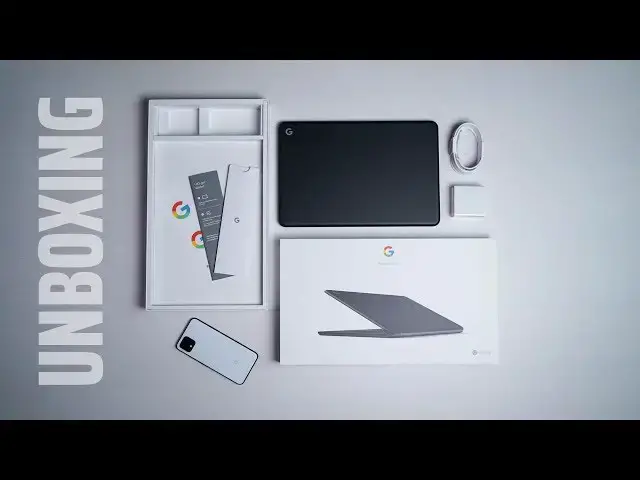
Thankfully, our Pixelbook Go review unit has already arrived in the office and we wanted to at least get the basic unboxing on video so you all could see the full new buyer’s experience for yourselves.
Read more: https://chromeunboxed.com/pixelbook-go-unboxing-hands-on/
Join our newsletter: http://bit.ly/2WjCDm7
・・・・・・・
Shop Chromebooks: http://bit.ly/chrmbooks
Subscribe to the channel: http://bit.ly/2xFuj6L
The Music We Use - PERFECT for YouTube: http://bit.ly/31W6PYP
Show More Show Less View Video Transcript
0:02
[Music]
0:14
well here it is guys the pixel will go
0:17
it is here in the office and we are
0:19
going to unbox it but real quick before
0:20
we do that this video is brought to you
0:22
by Nord VPNs they're the VPN of choice
0:24
for millions of users including users
0:26
that will be using the pixel book go
0:28
because they're awesome at what they do
0:29
and that is keeping your browsing secure
0:31
while you're at home or out and about if
0:33
you'd like to learn more about their
0:34
services just head over to Chrome and
0:36
voxcom forward slash Nord VPN to get
0:39
started today alright guys so without
0:41
any further ado this is the pixel book
0:43
go box and we're just gonna open it up
0:46
and see what the experience is gonna be
0:48
like for users who choose to go with
0:51
this Chromebook and right off the start
0:53
before we even peel any of the plastic
0:55
off I can tell you the whole thing looks
0:56
premium and that's gonna be a theme that
0:59
we're gonna talk about a lot whenever we
1:00
talk about this particular device
1:02
because as we've talked about already
1:03
this is not the highest SPECT Chromebook
1:07
it actually has 8th to end processors
1:09
inside but Google doesn't seem to be
1:10
that concerned with performance and
1:13
making sure they have the highest specs
1:15
out there and every little Bell and
1:16
whistle on this Chromebook instead this
1:18
is kind of the Chromebook experience
1:20
distilled but you're still getting the
1:22
premium feel and the premium experience
1:24
of having a Google made Chromebook so I
1:27
think it's gonna be a great a great
1:29
combination of things with again with
1:31
the look the feel the build quality that
1:33
Google brings and not really worrying so
1:36
much about having every single Bell and
1:37
whistle so we'll see obviously for the
1:39
full review we just want to unbox it but
1:41
I wanted to say that right up front
1:42
because you know the box on here is nice
1:44
and everything inside is probably gonna
1:45
be really nice and that's just part of
1:47
what you're buying whenever you buy a
1:49
Google made Chromebook let's get the
1:52
plastic off here
2:00
so this is the core i5 model with 128
2:05
gigs of internal storage 8 gigs of ram
2:07
all of them have at least 8 gigs of ram
2:08
as you get up into the higher end I 5
2:11
and i7 models you get some models with
2:13
cigar with 16 gigs of ram which is
2:15
pretty cool but I don't know that it's
2:17
really necessary when you're talking
2:19
about day to day use performance and all
2:21
that kind of stuff
2:21
and as we assumed get in the box
2:24
everything's just laid out it just is
2:25
nice looking and if you've watched this
2:28
channel very often and I'm not gonna
2:29
harp on this too much more after this
2:31
point but if you watch this channel very
2:32
often you realize when we go to unbox
2:34
Chromebooks it's really pedestrian the
2:37
way that they're packaged most times
2:38
they're in brown you know recycled
2:41
looking boxes there's nothing that makes
2:43
you feel like you're getting something
2:44
premium not the case with a Google made
2:47
Chromebook everything looks super
2:48
premium and super nice get these nice
2:51
vertically aligned books so let's get
2:53
started open it
2:54
follow your screen things sign in in a
2:57
couple languages again so to get a love
2:59
about Chrome OS simplicity ooh some
3:02
stickers in the box that's kind of fun
3:03
so you get a couple of the G stickers
3:06
and a team pixel book sticker so you can
3:09
stick on something again just nice
3:12
touches it's part of the Google
3:14
Experience USBC cable nice long cable
3:17
here and no surprise the charging block
3:20
that we've seen with the pixel book
3:22
pixel slate and now the pixel book go
3:25
we'll pull this guy up and just make
3:28
sure nothing else under here again just
3:30
well done packaging everything looks
3:32
really nice and well put together and
3:35
we'll see if it boots up without having
3:38
to be plugged in
3:43
[Music]
3:47
now it's only been a couple days since
3:49
we saw this device back in in New York
3:52
at Google's event but again right out of
3:55
the box as soon as I pull it out the the
3:58
touch of this thing I think it just
3:59
feels great
4:00
it's insanely light and super grippy on
4:03
the bottom with those ridges that are
4:05
down here this magnesium alloy chassis
4:07
rubber feet all the way across so it's
4:10
just gonna grip really well around the
4:12
outside you've got a USB type-c and a
4:15
headphone jack in the USB type-c that's
4:17
it there's nothing else no vents no fan
4:20
ports no speaker grills nothing this
4:23
thing is just a beautiful slab of
4:25
Chromebook awesomeness and a nice G
4:27
right there at the top yeah it just
4:29
looks awesome on the table and again we
4:32
get that one finger lift which is
4:34
brilliant and it actually booted up so
4:37
very cool the screen came on that's just
4:40
unusual most girl books ship and you've
4:43
got to plug them in to kind of wake them
4:44
up from shipping so it's nice to have
4:46
this experience open it up and we're
4:48
ready to go
4:49
there's nothing new here that we didn't
4:50
talk about in our previous video before
4:52
and those initial hands on but now we're
4:55
in an environment where it's kind of
4:57
quiet so we can we can hear a couple
4:59
things I'm gonna be really quiet and
5:00
just type really quickly on here and
5:04
those keys are super super quiet I mean
5:07
they're there they're branded hush keys
5:09
and so they have the feel and the click
5:13
of the original pixel book keys but they
5:16
have the quietness of the pixels slate
5:18
keys and then we've got this nice glass
5:20
trackpad here pretty quiet the original
5:24
pixel book trackpad is actually a little
5:25
bit loud a little bit clunky
5:27
it felt good and it worked really well
5:28
but it was kind of loud this one is nice
5:32
and quiet again the only other thing in
5:35
here these upward firing speakers and
5:37
you know we'll spend some time with
5:38
those and kind of get an idea of how
5:41
well those things perform the screen I
5:44
can tell you is it's pretty bright we
5:47
crank it all the way up you can tell
5:48
under normal lighting like we're in
5:50
we're getting pretty bright lighting
5:51
right now kind of in the studio but this
5:53
is way more normal than what Google had
5:55
set up in the
5:56
event where they just had these huge
5:59
windows overhead and it was just
6:00
straight up sunshine right down on these
6:03
screens and so everybody's videos make
6:05
the screens look like they're not that
6:07
bright
6:07
well obviously measure them for the full
6:09
review and kind of get an actual reading
6:11
on them but plenty bright it looks very
6:13
vibrant in here and that's always a good
6:15
thing there sometimes our lighting in
6:16
here even makes some of the dimmer
6:18
chromebooks look pretty dim this one
6:20
doesn't seem to be struggling whatsoever
6:21
with that
6:23
like I said upward firing speakers are
6:25
nice they look nice here on the deck and
6:27
I'm sure they're gonna sound great we're
6:28
going to save some of the stuff
6:29
obviously we have to save it further
6:30
review but in general the whole thing
6:34
just again it looks great it feels great
6:36
we're talking 8th gen this one is the
6:38
core i5 again but I would probably say
6:42
most people need to get the core m3 so
6:44
that's the same processor that's in the
6:46
very popular a SUSE 434 it's got eight
6:49
gigs of ram and 64 gigs of storage it's
6:52
going to be a great workhorse computer
6:53
and because of the way it is built in it
6:56
the weight feels and the way it looks on
6:58
a table those are the things you're
6:59
spending your money on with this
7:00
particular Chromebook no it doesn't have
7:02
a fingerprint scanner no it doesn't have
7:04
a stylus it doesn't work with a pixel
7:06
book pin and ultimately it only opens
7:09
that far so writing with a pen would be
7:11
kind of awkward and kind of strange
7:13
anyway so I don't know that you'd even
7:15
want it with with this particular device
7:18
this one is meant to aim at the middle
7:20
this is a device that more people will
7:22
be able to buy compared with the pixel
7:25
book and the pixel slate that were
7:26
priced at a thousand and twelve hundred
7:28
dollars so I think Google's put together
7:30
a great package here obviously I need to
7:32
spend some time using the device because
7:35
when devices are built really well and
7:37
they feel really good it's easy to make
7:39
this great first impression and make us
7:40
think man this is just gonna be great
7:42
but who knows because I've been using a
7:44
lot of different Chromebooks over the
7:45
past six months my feelings might have
7:47
changed a bit towards premium build and
7:50
premium looks and premium feel and maybe
7:52
I you know want the things that I just
7:55
said that this device doesn't deliver
7:57
and so we won't know until I spend some
7:59
time with it and I want to spend plenty
8:01
of time with it so that I can tell you
8:02
all if you're looking and you're
8:03
thinking about getting the pixel book go
8:05
exactly the the things that I miss about
8:07
you know some of the other devices
8:09
and all the things that are great about
8:11
this particular one so if you aren't
8:13
subscribed to the channel what I need
8:15
you to do is go down there and hit the
8:16
subscribe button give us a thumbs up if
8:18
this has helped you out in any way shape
8:19
or form and make sure to hit the
8:21
notification bell next to that subscribe
8:22
button so that you can be alerted when
8:24
we do put out our review of this device
8:26
and all kinds of other Chromebooks that
8:27
are coming out this fall guys that's
8:29
been it for this one until next time
8:30
we'll see you
8:32
[Music]