Up next in 10

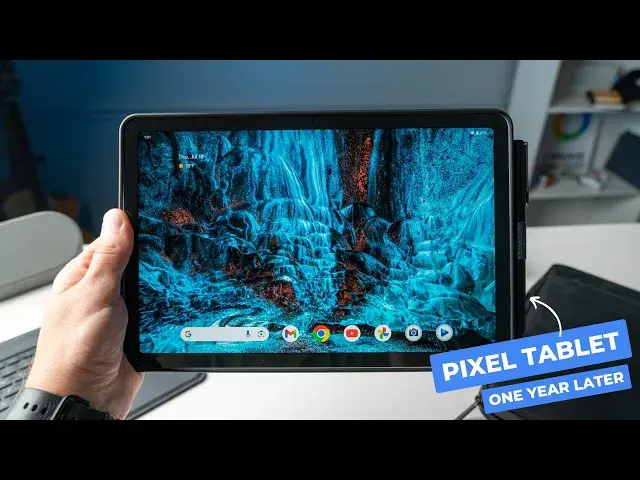
Pixel Tablet 1 Year Later Review: What It's Like Actually Using It
Sep 12, 2024


Sponsored by eiP. Get productive and protect your Pixel Tablet with their new Magnetix Keyboard Case and Slim Tablet Bag. Click the links below to purchase!
US eiP LINKS 👇
eiP Magnetix Pixel tablet Keyboard Case: https://amzn.to/4aJG8se
eiP Slim Tablet Bag: https://amzn.to/4aF2QBG
UK eiP LINKS 👇
eiP Magnetix Pixel tablet Keyboard Case: https://amzn.to/4fLs45i
eiP Slim Tablet Bag: https://amzn.to/3M5zPW8
・・・・・・・
The Pixel Tablet has been out for a little over a year now and I’ve been using it more and more lately. This Google-made Android tablet/smart home display definitely had a bit of a lackluster debut but it's now a device that I pick up a lot so let’s talk through how I’ve been using the Pixel Tablet and if it's still worth it, one year in.
👉 Buy the Pixel Tablet with dock: https://howl.me/cmYeMFhwOlc
👉 Buy the Pixel Tablet only: https://howl.me/cmYeM4XNCa8
📰 Read more: https://chromeunboxed.com/thoughts-on-the-pixel-tablet-after-actually-using-it-for-a-year/
📧 Subscribe to our newsletter: http://bit.ly/2WjCDm7
Show More Show Less View Video Transcript
0:00
The Pixel tablet has been out for a little over a year now
0:03
and I've been using it more and more lately. This Google made Android tablet slash smart home display
0:09
definitely had a bit of a lackluster debut, but it's now a device that I pick up a lot
0:14
So let's talk through how I've been using the Pixel tablet and if it's still worth it one year in
0:23
But before we get into that, today's video is brought to you by EIP
0:27
a new brand from the folks that make Panoval. Their new magnetics Bluetooth keyboard case
0:32
for the Pixel tablet includes a detachable keyboard that has seven different backlighting colors
0:37
and yes, a track pad that supports multi-gesture so that you can swipe between apps, pinch to zoom
0:43
and even take a screenshot. The keyboard also has a row of built-in shortcuts
0:47
giving you quick access to things like media controls on screen brightness. It has a whopping 200 hours of battery life
0:52
and the whole thing magnetically attaches to the case so that you can just pop it off
0:57
and just take the case when you're not typing. Maybe if you're taking notes or if you want to dock the tablet with the case
1:03
maybe if you're working on a recipe in the kitchen. The protective case is also well-made
1:07
with a sturdy stand that can adjust from 30 to 135 degrees
1:10
a pin loop to easily store your Panoval USI pin, and the stand cutout allows for easy docking
1:16
In addition to the new case, EIP also has a new slim tablet bag
1:21
that's made to fit the Pixel tablet perfectly. It has multiple compartments inside for extra storage
1:26
and the zippers are even lined, making this the only fully water-repellent bag
1:30
on the market. So if you own a Pixel tablet, you really need to check out the new Magnetics Keyboard
1:35
and Slim Bag from EIP. You can find links to both products down in the description
1:39
And again, a big shout out to EIP for sponsoring this video
1:43
All right, so first up, just a quick overview of the hardware here in case anybody needs a refresher
1:49
The Pixel tablet is a mid-range Android tablet that was originally sold with an included speaker dock
1:54
that could give you a Nest Hub-like experience all while charging the tablet
1:58
so it's always ready to go when you just wanna pop it off the dock and just use the tablet
2:02
The build quality is solid and it feels great in the hand. It's light and portable
2:07
and certainly has that Google design aesthetic that I love. The bezels are a bit big, but they're necessary
2:12
giving you somewhere to grab onto the tablet. And the screen is only 60 Hertz
2:17
but it still looks great with plenty of brightness and punchy colors
2:21
and the rounded corners on the display are just a nice touch that add to the whole user experience
2:26
Internally, you've got eight gigs of RAM and the option for 128 or 256 gigs of storage
2:32
paired up with a Tensor G2 processor. And moving around, this device is buttery smooth
2:37
The back and front-facing cameras are both usable. They're not great, but they're usable if you need to scan a document
2:43
or take a video call. The dock has magnets that are strong enough to hold the tablet on securely
2:48
but not too strong that you can't easily pop it off. And it also has the built-in speaker, of course
2:53
that I've been using a lot just to play background music in my home office. On the software side
2:57
you're met with a nice, clean Google version of Android that also includes a few extras layered on top of the OS
3:03
And although there's been some rumors of the Pixel tablet stealing a few features from the Nest Hub Max
3:08
like look-to-talk and quick gestures, they haven't arrived yet. But honestly, for me
3:13
the dock is more of just a convenient place to keep the tablet charged at all times
3:17
It's a nice picture frame and an occasional smart home controller. But what about when you take the Pixel tablet
3:23
off of the dock? Well, I'll tell you, this is where the Pixel tablet has really surprised me
3:28
I have found several key use cases for just the tablet that I didn't think about when it first arrived
3:33
And I think Google recognizes the usefulness of just the tablet too, since you can now buy just the tablet without the dock
3:39
Again, the dock is great and does add some unique functionality to the tablet
3:43
but what is it like just using the tablet? I've found the Pixel tablet
3:48
to be a great around-the-house device that I've been using to read a few pages of a book
3:52
here and there, to watch some YouTube videos, but mainly I've been using it to triage emails
3:57
in the morning before I make it to the desk. And it's just nice to grab the tablet for these tasks
4:02
instead of getting out my Chromebook. And there's just something about using the tablet
4:07
in this way that forces me to focus on one thing at a time. At my desk, I might have a half dozen windows open
4:13
with messaging apps running on the side, and I can easily get sucked into distractions
4:17
But with the Pixel tablet, I find myself siloed in one or maybe two apps
4:23
using split screen and staying much more focused on the task at hand
4:27
But I've loved using the Pixel tablet as my portable baby monitor too
4:31
If I wanna step outside or into the garage, but still keep an eye on the camera
4:35
I can just pop off the Pixel tablet and take it with me. And this way I can use my phone
4:40
without taking my eye off the camera. Of course, if you don't have kids
4:43
you could still use the tablet as your portable security feed. But here's where things get interesting
4:49
With a few accessories, you can actually get pretty productive on the Pixel tablet too
4:54
And one of those is a stylus. With any USI 2.0 pen
4:58
you can easily jot down notes, make sketches, or just navigate through the device
5:02
But the other is a keyboard case. Of course, you could pair up any Bluetooth keyboard
5:07
like the new Logitech keys to go to and a mouse to get productive
5:12
but then you're gonna need a case with some sort of kickstand or a tablet stand
5:16
and then you're gonna have to pack those accessories around with you. But a keyboard case gives you all of that functionality
5:22
in a folio style form factor that you can easily throw in a bag
5:26
or just carry around with you. I've been using the new EIP Magnetics case
5:30
since they sent this over to us, and it's honestly been a game changer for the Pixel tablet
5:34
I've been using it for a few weeks now, and I haven't taken the Pixel tablet out of the case once
5:38
since you can just pop off the keyboard when you don't need it. And with the full backlit keyboard
5:43
a shortcut row, a pen loop, this case gives you a lot of what you need
5:48
to get some things done on the Pixel tablet. And I think for the right person, this could be your laptop replacement
5:52
when you're away from the desk, or maybe even your main device, depending on your workload
5:57
I personally like to still have a full desktop for certain things
6:01
but that's just because of the work I do. If you're the type of person that is out and about a lot
6:06
or at meetings a lot, and you just don't need a full desktop workstation
6:10
this case could seriously be a game changer. Okay, so overall, what do I think about the Pixel tablet
6:17
one year in? Well, I'll tell you this, I left it at the office the other day
6:21
after we were making some social media videos for the new EIP case
6:25
and I found myself really missing it. So while it's not perfect
6:29
it has some real useful applications for me, and I've come to lean on it as my main smart home display
6:34
in my home office, and as a tablet that I can actually get some work done on
6:38
And I think that says a lot about the Pixel tablet. But that wraps up this video
6:43
I appreciate you all watching. If you like this video, give us a thumbs up
6:47
If you loved it, go down there and click subscribe, and make sure to ring that notification bell
6:51
to get a notification when we publish new videos. And also drop a comment below if you use the Pixel tablet
6:57
and let me know how you use it. We really do read those comments, and I'd love to hear from you
7:01
All right, I'll catch you guys in the next one. See you
#Consumer Electronics
#Gadgets & Portable Electronics
#Home Automation
#Other