Up next in 10



Sponsored by Penoval. Make your ideas come alive with the Penoval USI Pen. Buy here: https://bit.ly/3DtVPU1
Shop and see the full list of products here: https://chrmshop.com
・・・・・・・
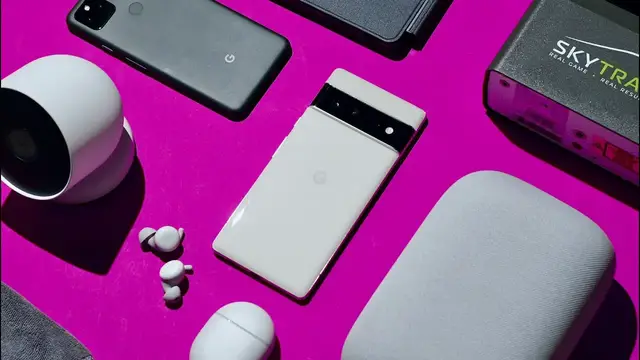
If you are looking for some awesome tech, you have come to the right place!! In today's video, we are going to be talking about some of our favorite tech gadgets that we have enjoyed using in the past year with prices ranging from $20 to $2,000. We’re going to highlight a few of our favorite gadgets in this video but we’ve also put together a full list of products over at chrmshop.com!
Read more: https://chromeunboxed.com/
Join our newsletter: http://bit.ly/2WjCDm7
・・・・・・・
Fueled by Fresh Roasted Coffee (15% off with code CHROMEUNBOXED): https://chromeunboxed.com/coffee
Shop Chromebooks on CHROME SHOP: https://chrmshop.com/
Subscribe to the channel: http://bit.ly/2xFuj6L
Show More Show Less View Video Transcript
0:00
If you're looking for some awesome tech, you've come to the right place
0:03
Today we're going to be talking about some of our favorite tech gadgets that we've enjoyed using in the past year
0:08
with prices ranging from $20,000 to $2,000. And we're talking any and all tech here, not just Chromebooks, but also some smartphones, some home tech
0:18
and even a golf simulator. We're going to highlight a few of our favorite gadgets in this video
0:22
but we've also put together a full list, and we'll make sure to link that down in the description if you want to go check out all of the product
0:30
All right, with that being said, let's hop into a couple of our favorite tech gadgets
0:38
But before we get into that, today's video is brought to you by Pen Oval. Pen Oval is a premium stylus maker that creates finely crafted digital pens for devices like the Microsoft Surface, the iPad, and Chromebooks
0:50
The new Pin Oval stylus works with any U.S.I-compatible Chromebook and features a unique ergonomic design, is rechargeable with USBC, has a
0:59
built-in eraser end and has a firm pen tip that gives you better pressure sensing when you're
1:05
writing, and it feels more like actually writing with a pen instead of some of the other
1:09
U.S.I pins on the market that have more of like a floating pen tip. You can learn more about
1:13
Penovel and their new U.S. pen pen by clicking the link in the description below. So let's get
1:18
started with a couple ChromeOS devices first. First up, we have the Lenovo Chromebook Duet
1:23
5, which has been one of our favorite ChromeOS devices around the office lately. It is super thin
1:28
and light and has an amazing screen and the Snapdragon 7c Gen 2 processor is
1:33
faster than expected giving plenty of performance for this type of kind of
1:37
consumption or casual use device we honestly think the Lenovo Chromebook duet 5
1:41
might have finally found the sweet spot between ChromeOS tablet and Chromebook
1:45
the 13 inch full HD OLED screen and the insane battery life make this thing a great device for watching YouTube at home or taking it to the coffee shop It like they cut all the right corners and delivered a great overall experience
2:00
And there's a model at Best Buy that you can pick up right now for $499
2:04
So if you're looking for a larger ChromeWest tablet, the Lenovo Chromebook Duet 5 is definitely something that you might want to consider
2:11
Next up, we have a device that is a little different. The HP Chromebase 22 is the next generation all in one ChromeWest
2:18
device. It features a unique rotating full HD display that can flip from portrait to landscape just
2:24
by pulling down on the side of the display. It features a sleek cone-shaped base that houses all
2:30
of the internals and some pretty good speakers in there too. And it has a 10th-gen Intel processor
2:35
that honestly offers up this amazing premium and powerful Chromeways desktop experience that's
2:41
kind of unlike any other we have right now. Okay, so now moving on to smartphones. If you've
2:47
been following along on our channel, you've probably seen some of our coverage of the new Google
2:51
Pixel 6 and 6 Pro. We've waited a long time for a true flagship phone from Google, and let me tell
2:58
y'all, these phones deliver with great screens, top-notch build quality, and Google's own
3:04
TensorFlowSOC inside, these phones give Pixel fans two great options. Whether you go to the smaller
3:10
six or the larger 6 Pro, you're going to get a great phone, and it's just awesome that we finally
3:14
have some true flagship phones from Google. But if flagship isn't your thing and you're not so
3:20
concerned about having the latest and greatest, then the Pixel 5A is still a great phone and is an
3:27
incredible value. Google has been getting really good at making mid-range phones, and the 5A is
3:31
just the latest example of that. You can get a whole lot of phone for a very small price. And oh, by the
3:37
way you still getting that very very excellent pixel camera So if you need a good quality phone and you want the kind of clean pixel Android experience and a great camera the Pixel 5A is hard to be All right so there you have some awesome Chromebooks and a couple of great phone options
3:53
but now let's talk about some home entertainment. And some of the things that we'd recommend that you pick up to have around the house
3:59
First up, we have the on Android TV streaming dongle from Walmart
4:04
This thing is an incredibly affordable alternative to the Chromecast with Google TV
4:07
and still gives you everything that you need to start streaming content
4:11
right now. The interface is pretty similar to what you get with Google TV. You can play Stadia
4:17
in G4S now, and it supports 4K streaming. Oh, and the best part is you can get all of this. All of your
4:23
streaming services integrated in one place with a nice remote for 20 bucks from Walmart right now
4:29
So if you want to save a little money, this is a great, affordable alternative to the Chromecast with
4:35
Google TV. Next up, we have the new Ness Camera and Ness Doorbell. The big win for both of these
4:41
security cameras is that they are battery powered and don't require any hard wiring or electrical
4:46
setup. We seriously just charged up the camera, mounted it on the shelf in our office with the super
4:50
strong magnetic base, and that was it. Then we set up the home away routine in the Google
4:55
home app, and that uses our location to turn the camera on and off, and it's just worked perfectly
5:01
Gabe has been using the doorbell over at his house and loves it too. Again, the big win here
5:06
is that you don't have to hardwire anything on the front of your house, just mount the base
5:10
charge up the camera and you're ready to go. Both the camera and the doorbells say that they will last up to six months on a single charge
5:17
but obviously that's going to depend on how many notifications are being triggered
5:20
So if you need some home security and you want to stay in the Google ecosystem
5:25
the NEST camera and NEST doorbell are fantastic options. And last but certainly not least
5:30
we have something that is a little different, but we wanted to include it because it something that we honestly just really enjoyed having around the office this past year and that is our golf simulator setup So if you like golf and you into tech gadgets a golf simulator setup is like the perfect blend of tech and golf
5:47
And if you're in our Patreon community, you've seen a couple different versions of our simulator setup
5:51
But I think Robbie is really settled in on this particular setup. At the core of it is a Skytrack launch monitor
5:58
It costs $2,000, which sounds like a lot, but is actually at the lower end of the spectrum for these type of high
6:04
accurate launch monitors. But this thing has just been incredibly reliable and has given us access to golf all year round
6:11
At one point, we were just hitting golf balls into a net and using a TV as the display, but we recently
6:15
made a huge upgrade and added the Epson Home Cinema 880 projector to the mix with a spornia net
6:22
The net is perfect and gives us a good amount of protection for those not so good shots, and it breaks
6:28
down into a manageable carrying bag in just a couple minutes. And it has an optional impact screen
6:34
for projecting your simulator. It's the best net and impact screen combo that we've used by far
6:40
and we would recommend going this route if you're wanting to have a projector with your setup
6:45
But overall, this has been the best version of our simulator setup
6:49
and we've just really enjoyed having it around. So there you have it. Those are our favorite tech gadgets that we've been enjoying here lately
6:56
Don't forget to click the link down in the description if you want to see the full list of products
7:00
But that's it for today, guys. We appreciate you all watching. If you'd like the video, go down there and give us a thumbs up, hit the subscribe button
7:07
and make sure to ring the little notification bell next to it if you'd like to be alerted
7:11
when we make future videos just like this one. I appreciate you all watching. See ya
#Computer Hardware
#Laptops & Notebooks
#Entertainment Media
#Gadgets & Portable Electronics