0:00
about a year ago we made a video of an
0:02
upcoming change to Chrome OS it was
0:04
Chrome OS 70 it was in the developer
0:05
mode at the time but we made a video
0:07
about this change and it was a massive
0:09
overhaul to the tablet UI for Chrome OS
0:12
and that version of the operating system
0:15
was actually what shipped with the pixel
0:17
slate later on in that year and though
0:19
that device was met with subpar reviews
0:22
in general for this change to the
0:24
overall operating system was something
0:26
that Google has continued to work on
0:28
over the course of the last year in that
0:30
same period of time Google also decided
0:33
to stop making tablets which has
0:35
prompted people to ask is Google done
0:37
just messing with tablet operating
0:39
systems are they done really developing
0:42
Chrome OS as a tablet operating system
0:43
and there's a change that's coming in
0:45
Chrome OS 78 that we want to show you
0:47
today that hopefully proves the point to
0:49
most people that Google is not done
0:52
working on tablet mode
1:00
before we dive in this video is brought
1:02
to you by Nord VPN and there the VPN of
1:04
choice for millions of consumers because
1:06
they're awesome at what they do
1:07
keeping your browsing secure while
1:09
you're at home or on the go if you'd
1:11
like to learn more about them go to
1:12
Chrome on box comm forward slash Nord
1:14
VPN to learn more today okay so nothing
1:18
looks out of the ordinary here we're in
1:20
Chrome OS 78 in dev mode so eventually
1:22
178 makes it down to stable you'll see
1:24
this 77 should be rolling out very soon
1:27
so six to eight weeks will say this
1:30
should be in stable mode but here's what
1:32
I want to show you this is doesn't look
1:34
out of the ordinary same thing you pull
1:36
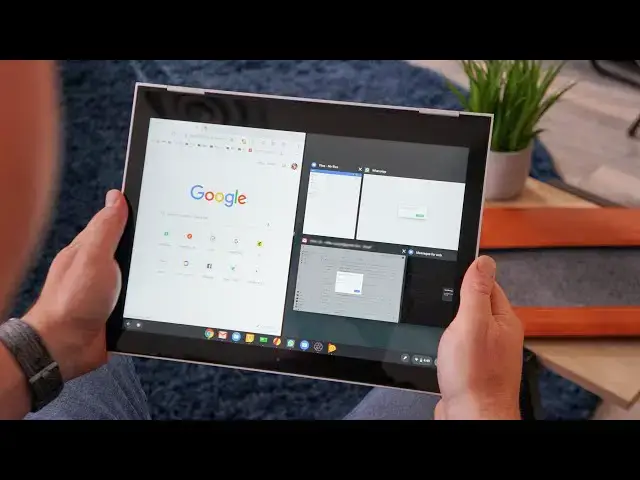
down and we go into multitasking none of
1:38
this looks strange or odd this is the
1:40
same stuff we've seen except now you see
1:42
the layout here we only see six apps
1:44
well I have multiple things open as you
1:47
and so when I go into this mode instead
1:50
of seeing all of them crammed onto the
1:52
screen and and trying to you know force
1:54
and render all of those every single
1:55
time I move in and out of overview mode
1:57
well let's see six all the rest of the
2:00
apps I have open are virtually sitting
2:02
off to the side of the screen and now we
2:03
have this nice scroll that we can move
2:05
through a la I pad honestly this is kind
2:07
of the way the iPad works in iOS so
2:10
again we can go down we can go to split
2:13
screen and again the same thing occurs
2:15
here it's a very nice way to move
2:17
through all of your open screens without
2:19
Chrome OS having to continue to render
2:21
everything that's off the screen so you
2:22
have 15 apps open instead of having to
2:25
graphically render all of them all it
2:27
has to do is render these and the same
2:29
thing happens as we kind of move into
2:31
different size of the split screen it
2:33
doesn't have to change any of this over
2:35
here because now you can scroll through
2:37
these things the same thing is true when
2:40
we go into this mode if we go here
2:45
now we have 6 6 by 6 same way here so
2:49
now if we go split-screen this is still
2:53
a little finicky it actually will resize
2:56
this you can see that
3:01
it's a very nice graphical touch and the
3:04
way that Chrome OS is laying out these
3:06
windows now and the whole point being
3:09
here Google is not just satisfied with
3:13
sitting in neutral and going well this
3:14
is what tablet mode is and just go for
3:16
it clearly they are still developing
3:18
tablet mode clearly they want split
3:20
screen to be a good experience clearly
3:22
they are thinking through different ways
3:24
to move the UI forward and this is a
3:26
very very big step forward for Chrome OS
3:29
s tablet UI and it's gonna hopefully
3:31
once it's fully you know put into the
3:34
operating system and cleaned up
3:35
completely it should help a lot of these
3:37
things with some of these older
3:38
Chromebooks so you can see a little bit
3:40
of the jank there as we go into the
3:42
overview mode some of that should clean
3:43
up because now the operating system
3:45
doesn't have to think about rendering
3:46
all of this stuff all at once it can
3:48
just do this for right now and as I'm
3:50
going through start to render stuff as
3:52
it brings it into view and so overall
3:55
not only is this a better way to layout
3:57
the tablet overview mode it's a better
3:59
way for them to conserve resources for
4:01
devices that don't have nearly as much
4:02
power or getting older getting on an age
4:05
but guys that's it we just wanted to
4:06
show you that Google is not done with
4:09
tablets their continue to move forward
4:10
they're continuing to update the OS and
4:12
even to the point of making some pretty
4:14
big UI changes when it comes to tablet
4:17
mode cuz this whole thing that we just
4:18
showed you does not exist in desktop
4:20
mode and I don't think it's going to so
4:22
desktop overview still looks just like
4:23
it did so this is just for tablets
4:26
Google is not giving up on tablets and
4:28
I'm giving up on Chrome OS tablets they
4:30
may not be making the hardware anymore
4:32
but they are continuing to develop the
4:34
software if you like this video guys
4:35
give it a thumbs up hit subscribe and
4:37
make sure and hit the notification bell
4:39
if you want to be updated when we make
4:41
new videos just like this one till next