Up next in 10



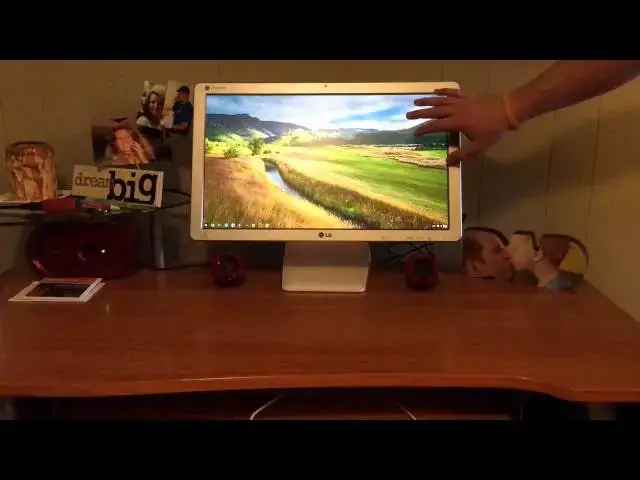
In this video, I take a quick look a the LG Chromebase.
Show More Show Less View Video Transcript
0:00
hey folks Robie Pay Here Again with
0:01
chroma box coming at you today with an
0:04
unboxing handson with the LG Chrome base
0:09
as you guys know this one features an
0:11
IPS uh 22in full HD
0:15
panel uh comes with packing pretty much
0:18
your standard Chromebook uh stats you
0:22
got two gigs of RAM You' got the Haswell
0:25
acceleron processor inside uh 16 gigs of
0:28
storage so nothing nothing Earth
0:30
shattering there the big deal here is
0:32
the form factor so uh let's let's get
0:35
into it and check out what this
0:38
allinone chrome base is all about cuz
0:43
really that's what it comes down to
0:44
right I mean you got to decide do I want
0:46
to buy this or do I want to buy a
0:48
monitor and a Chromebook
0:50
and I don't know I don't know the answer
0:53
to that I guess it's some of the things
0:54
depend probably
0:56
on what you're going to need it for
0:58
here's some instructions some probably
1:00
had to put this thing
1:06
together keyboard it is wired I so wish
1:10
it was Bluetooth um I being picky and at
1:13
the price point honestly I shouldn't be
1:14
picky at all um I'm very happy with the
1:16
price that this guy came in under um
1:19
pretty standard Fair uh with the mouse
1:21
there nothing nothing
1:24
fancy power brick no big deal that it's
1:27
kind of big it's going to be on the desk
1:29
so it doesn't really matter I would see
1:32
the use case for this guy being
1:33
something of a you know this could this
1:36
could be in uh schools it could be in
1:39
dorms uh offices that kind of thing uh
1:43
back plate for the mount or for the
1:46
stand stand
1:48
itself looks like another
1:51
plate uh some screws so I might have to
1:53
assemble some
1:56
things and the Chrome base itself
2:01
and 22 inch monitor that's a big big
2:11
guy get this box out of the
2:16
way and I'm just going to set it here
2:18
for now
2:21
um it's big there's no way to get around
2:24
it it's big 22 in that's a that's a nice
2:27
size for a screen so be real interested
2:30
I'm going to break here for a second and
2:31
turn it on and or get it put together
2:33
and then turn it on and kind of come
2:35
back but first blush uh you know it
2:38
feels solid um pretty heavy uh but we
2:42
have ethernet connection here which is
2:44
odd you don't see that on a lot of
2:46
Chromebooks Chrome anything really power
2:49
uh some USB slots I don't see SS so I'm
2:51
assuming these are 2.0 slots here uh is
2:55
that Kensington lock awesome and HDMI
2:59
now interesting ly enough that's HDMI in
3:02
um so this device actually can act as
3:04
your secondary monitor to your Windows
3:07
or Mac device and you could then use
3:11
this as the monitor for that and then
3:13
just have Chrome OS whenever you're not
3:15
want to get into all that other stuff
3:17
and so that's part of the uh uh interest
3:20
for me I think it's kind of interesting
3:22
to know that hey this is my one that
3:24
sits at home on the desk but you know
3:27
for the most part I'm in Chrome when I
3:28
need to I can jump in Windows hit that
3:30
input button and jump over to Windows
3:33
that's a pretty neat thing and a pretty
3:35
neat setup well thought out by LG on
3:37
that um so I'm going to take just a
3:38
minute I'm going to throw it together
3:40
real quick turn it on uh let you know
3:42
what I think about the screen and uh and
3:44
then get to the process of actually
3:45
reviewing this guy all right guys we had
3:48
a little change of scenery there the uh
3:51
setup at the office I I didn't have a
3:53
screwdriver and there's a few small
3:55
things that need to be put together uh
3:56
in order for this guy to work so I went
3:58
ahead and brought it home put it on my
4:00
home desk which uh unfortunately doesn't
4:02
get a whole lot of use anymore uh down
4:04
below the desk there's a Windows PC that
4:07
basically sits untouched uh but I'm
4:09
going to show you a really neat trick
4:10
before we get done with this uh this
4:12
quick Hands-On here anyway I got it out
4:14
of the box um couple things the um the
4:19
base is not attached obviously in the
4:22
box so there are six screws that have to
4:24
be put in with a fill set screw dri very
4:25
simple it took 5 minutes I just didn't
4:27
have one at the office so it's actually
4:29
pretty Prett easy process getting it out
4:31
and unboxed is not a big deal um also
4:34
you'll see pan down here you've got the
4:37
uh wired mouse and keyboard be nice if
4:40
they were Bluetooth but we're at $350
4:42
here so not going to complain couple
4:45
quick observations I've already made
4:46
just from having the thing and starting
4:48
it up um one the IPS display is gorgeous
4:51
I do have the brightness turned down
4:53
quite a bit because it was washing out
4:54
my video and so I did that uh from all
4:58
angles uh from up top down low Left
5:01
Right looks great doesn't wash out
5:02
colors are really nice it has a nice
5:04
tilt mechanism to it so you can kind of
5:06
tilt it it is anti-glare as well so it's
5:09
going to knock down any kind of glares
5:10
you run into has built-in speakers in it
5:13
uh we'll we'll hit some of the stuff in
5:14
the review but just to let you know
5:16
built-in speakers aren't great but they
5:18
aren't terrible um you can adjust the
5:20
volume interestingly enough it does have
5:21
a couple touch buttons across the front
5:23
here so the power um the Chrome button
5:26
I'll talk to that in just a second um
5:28
you've got the reader button which I've
5:30
got it set on reader one reader 2 is
5:32
even dimmer uh I suppose in dark lit
5:34
settings you can just click that button
5:35
real quick and and uh not wash your eyes
5:38
out left and right enables you to do
5:41
your volume here um so you have volume
5:43
of the hardware and then the Chrome
5:44
volume as well so those two things work
5:46
together and then it's got a audio jack
5:49
over here as well as an additional SD or
5:52
USB spot here three on the back uh this
5:55
is a kind of difficult one to show you
5:56
everything three on the back HDMI on the
5:58
back it is an HDM my uh input and we're
6:01
going to we're going to look at that
6:02
here in just a
6:03
second um and then you've
6:08
got that's it uh when you have the
6:11
ethernet port and we showed some of
6:12
those whenever we had the box or the the
6:14
thing flat down um but it is really nice
6:17
to have these touch controls across the
6:18
front so no reaching under and clicking
6:19
buttons and trying to navigate it's all
6:21
it all pops right up here on the screen
6:23
and they're just touch sensitive so
6:24
they're flush which is really really
6:26
sweet um so that allows you to adjust
6:29
your monitor just like you would so it's
6:30
it's a monitor with the Chrome box built
6:32
in with but it's also an an external
6:35
monitor too uh which is really neat
6:37
because what I also did while I was
6:38
setting it up was went ahead and hooked
6:40
my PC into it in the back end so you
6:42
just touch this button that says Chrome
6:44
it's going to flip inputs and
6:48
Tada here's the Windows PC and you can
6:50
tell it's got crap popping up all over
6:51
the place here cuz I haven't turned it
6:53
on in quite some time and that's just a
6:56
testament to the awesomeness that is
6:57
Chrome and Chrome OS and and the fact
7:00
that I'm able to get away from my PC uh
7:02
Little Bits at a time is awesome but
7:04
it's really cool that this is there um
7:06
this could be an amazing use case for a
7:08
lot of people hey I need a monitor I'm
7:10
going to pay 200 bucks for a 23in IPS
7:13
1080p monitor anyway this one has
7:15
speakers in it um but then it also has
7:18
its own OS and so while Windows is
7:20
taking its time booting up I don't
7:22
really have to mess with it I can just
7:23
hit my Chrome button and jump into
7:25
Chrome and get my stuff done and when I
7:27
need that extra little bit of horsepower
7:30
click the button bam you're right over
7:32
into Windows um that's a really sweet
7:34
setup it's a really uh ingenious way to
7:37
set this thing up I absolutely love that
7:39
feature um and I really am contemplating
7:43
uh whether I'm going to keep this guy or
7:44
not I'm going and pay for it and
7:46
actually and keep it um as opposed to
7:48
just reviewing and sending it back I
7:50
don't know we'll see I'm going to spend
7:52
some time with it as much as I can I
7:53
think I'm going to tote this to the
7:55
office they're doing some work there
7:56
tomorrow so I'm not going to take it to
7:57
the office tomorrow uh but for the rest
7:59
of the week I just got a new monitor at
8:01
the office I got a nice 1080p 24 in
8:03
monitor to work from u in that hooking
8:05
in my Acer c720p is a really really
8:08
brilliant combo but I can take this guy
8:10
over there internally I mean we're
8:12
talking about the same stuff as most
8:13
Chromebooks your Acer C720 or hp14 if
8:17
we're talking about the 2 gig variety
8:20
this does not have a 4 gig option at
8:21
this point um and from what I understand
8:24
is like any other Chromebook it's non
8:25
upgradable and so that's a bit of a
8:27
bummer if this thing could be bumped up
8:29
to full
8:30
um or if they would have said hey we got
8:31
all this space in this guy you know here
8:34
open the thing up and you can pop in
8:35
another Ram stick and I might do some
8:37
research this this this week while I'm
8:39
reviewing it and find that to be the
8:40
case for me if that is the case um I
8:44
will likely keep this device and it will
8:46
become probably my main workstation um
8:49
because that the ability to jump back
8:50
and forth between Windows is really
8:52
really Nifty um and uh yeah it it it's
8:57
it's a nice device guys it it looks
8:59
really clean on the desktop you can see
9:00
it sitting there um it it's non
9:03
obtrusive um and if you're using it kind
9:06
of in a desktop scenario like this I I
9:09
don't see any fault except for the lack
9:10
of ram in it and for a lot of people
9:12
that's not even going to be an issue um
9:14
for me I do notice a difference uh just
9:16
based on the way that I work um so um I
9:19
I really end up needing that 4 gigs of
9:21
RAM from time to time not not all the
9:23
time every day but a lot of times I need
9:25
it so for me it would not be optimal
9:28
unless there's some way to crack it open
9:29
and add those 4 gigs of RAM so um I'm
9:32
going to look into that a little bit now
9:33
that these are out in the wild and some
9:34
people are getting to their hands on
9:36
them in different ways maybe somebody's
9:37
already done it um obviously it's not
9:39
something I'm going to experiment on CU
9:40
likely I'm going to be taking this thing
9:42
uh and returning it from where it came
9:45
but we will see in the week to come or
9:47
so I'm going to put it through it Paces
9:49
spend some time with it uh do all the
9:51
things I normally do on Chrome books
9:53
because ultimately guys behind the
9:55
hardware this is still chromos s it's
9:57
all the same stuff so um really that's
9:59
about it for the unboxing the Hands-On
10:01
that kind of stuff um like I said first
10:04
blush it's it's gorgeous looking it
10:06
really is uh let's uh real quick let me
10:08
take a look at the front-facing camera
10:11
see how it does this room is not well
10:13
lit
10:15
um where's my camera we
10:20
are um not too shabby
10:27
actually yeah this is our collecti all
10:29
room and it's not very well lit so um
10:32
it's not doing too bad there so decent
10:34
looking front-facing camera too like I
10:36
said all the rest of the hardware stuff
10:37
is really really usable and I just I
10:40
can't get over how awesome that
10:42
is Tada
10:44
Windows that's that's just really cool
10:47
and I think that could be a really great
10:48
entrance way for somebody who's going
10:50
I'm not sure about Chrome OS well hey
10:51
get this thing uh it's a great monitor
10:54
for your Windows PC uh it's got built-in
10:56
speakers 1080p IPS panel great thing so
10:59
for an extra hundred bucks it also just
11:01
has Chrome happening to run on there so
11:03
maybe you'll boot into it from from time
11:05
to time and see how it works and highly
11:07
likely most people that boot into Chrome
11:09
and start using Chrome and feel its
11:11
lightweightness and and just cleanliness
11:13
in general uh tend to gravitate towards
11:15
it I just find that to be the truth and
11:17
so um it could be a really interesting
11:19
product uh especially in schools you
11:21
know places like hotels that kind of
11:23
thing where people just need some basic
11:24
web access man uh I think this could be
11:27
a really neat uh product for those and
11:29
hopefully LG maybe comes out with some
11:31
some of the I3 models four and 8 gigs of
11:33
RAM and that kind of stuff you know down
11:34
the road to say hey here's some premiums
11:36
you can still get the Chromebase with
11:38
this kind of stuff or bump it up and
11:39
have some Bluetooth peripherals that
11:41
kind of stuff would be kind of neat but
11:43
anyway that's all for the unboxing for
11:45
right now if you like this video give it
11:46
a thumbs up uh feel free to subscribe
11:49
down below subscribers are building
11:50
every day the more of these guy more of
11:52
these subscribers I get guys uh the more
11:54
likely it is I'm going to get more uh uh
11:57
Chrome based stuff in order to get my
11:58
hands on to review to let you know help
12:01
you make decisions all that kind of
12:02
stuff so like it share the video um
12:05
momentum's been great and I appreciate
12:07
everybody who's subscribed already
12:08
everybody who's liked videos and
12:10
commented and just been a part of all
12:11
this it's just been a fun ride and so I
12:14
look forward to doing lots more of this
12:15
stuff and we'll have the review of this
12:17
guy up within a week week and a half or
12:19
so something like that um so look out
12:21
for that keep it locked to the channel
12:22
until then guys have a great one see you
12:25
next time
#Consumer Electronics