Up next in 10



Sponsored by NordVPN. Try it out and get 75% off a three-year plan for a limited time! Click here: https://chromeunboxed.com/nordvpn
Shop Lenovo Yoga Chromebook i5 8GB 128GB: http://fxo.co/1121837/c630youtube
Shop Lenovo Yoga Chromebook i3 8GB 64GB: http://fxo.co/1121837/c630lenovoyt
・・・・・・・
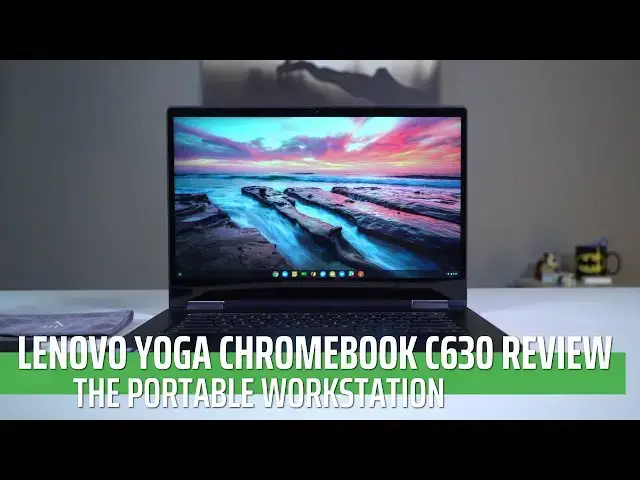
Chromebooks, by their very nature, are mobile machines built for individuals on the go. With their quick boot times, nimble nature, and always-connected personas, Chromebooks are found often in the hands of individuals who value those traits. People who value the light and quick nature of Chromebooks tend to find themselves on the go a lot, in places like coffee shops and airports, trying to get a few things done on the move.
・・・・・・・
Subscribe to the channel: http://bit.ly/2xFuj6L
Shop Chromebooks: https://amzn.to/2NE2wKq
Read more: https://chromeunboxed.com/
Follow us:
Show More Show Less View Video Transcript
0:00
because of their nature Chromebooks get
0:02
used on the go a lot they're quick to
0:04
boot up and quick to get into tasks so
0:06
people that use them tend to find
0:08
themselves in places like coffee shops
0:09
or airports where they don't have all
0:11
their extra stuff around the number of
0:12
desk or external display Mouse and all
0:15
that stuff so they need one device that
0:17
can get everything done all in one
0:19
package maybe just right in their lap
0:21
and for road warriors like that this
0:24
might be just the Chromebook
0:27
[Music]
0:32
so this is the Lenovo yoga Chromebook c6
0:36
30 and it is by all definitions a great
0:39
portable workstation it's a device that
0:41
has a big enough screen that make you
0:44
productive when you're on the go but it
0:46
adds so much more to that equation there
0:48
are so many things this Chromebook gets
0:49
right no it's not perfect no Chromebook
0:51
is but this one is a really really great
0:54
workstation and we want to tell you why
0:56
oh and by the way when you are working
0:57
on the go at a coffee shop or something
0:59
like that you really need to protect
1:01
your privacy and Nord VPN does that
1:03
better than anybody else on your
1:05
Chromebook on your phone on any device
1:08
really all you got to do is go over to
1:09
chroma and box comm forward slash Nord
1:12
VPN check them out and get started today
1:15
so let's start off with the build
1:17
quality of this and it's something we
1:19
need to talk about because this is a big
1:21
device 15.6 inches it's 17 millimeters
1:26
thick which is not too bad but it's
1:27
about 4 pounds but it's solid aluminum
1:30
and it's built like a tank and it feels
1:31
really really good the way the the
1:34
finish on the outside of the case feels
1:36
it's just really really well put
1:38
together and exudes quality from top to
1:42
bottom I really really liked just
1:44
handling it in general and yeah 15.6
1:47
inches is bigger than most Chromebooks
1:49
but it's really not that big of a device
1:51
in general fits in most backpacks no big
1:53
deal there it is a convertible and
1:56
that's important because no you're not
1:58
going to use this thing as a tablet I
2:00
mean it's just ridiculously large as a
2:01
tablet but you can fold it into a tent
2:04
mode or something like that if you're on
2:05
an airplane or if you're in a situation
2:07
like where you don't have much space and
2:09
you just need to use the touchscreen you
2:10
can fold it into that display mode in
2:11
your lap and really still get a lot of
2:13
stuff done and kind of utilize the
2:15
touchscreen as you would on a really
2:17
really oversized tablet but overall
2:19
lenovo is just done a great job of
2:21
putting together just a solid solid
2:23
Chromebook that looks
2:24
every part premium and feels it as well
2:27
now we can't talk about this device
2:28
without talking about what lenovo put up
2:31
as its main selling point which is the
2:33
screen if you remember when it was
2:34
announced all the way back in september
2:36
this device was actually announced as
2:38
the world's first 4k chromebook this one
2:40
does not have 4k and from what we can
2:42
hear from lenovo at this point right now
2:45
we don't know when or if the 4k device
2:48
is even gonna come to the states so
2:50
don't hold your breath for that and
2:51
don't let that be a decision-making
2:53
process you're gonna wait around for the
2:55
4k display the good news here is the
2:57
1080p display that's in this particular
3:00
model and in the model that you can get
3:01
right now looks really really good and
3:04
just like other Chromebooks that have
3:05
come out at the end of 2018 it's just
3:07
this nice solid full HD sixteen by nine
3:11
panel it's got great viewing angles and
3:13
it's got really slim bezels and the
3:15
colors pop really well and it's probably
3:17
about 300 nits which is bright enough
3:19
for most scenarios that you're going to
3:21
be in the thing just looks really good
3:23
as pleasing to the eye and oh by the way
3:26
when you only push a full HD amount of
3:28
pixels which is 1920 by 1080 the
3:31
processor doesn't have to work nearly as
3:33
hard to push those pixels around the
3:35
screen so you also get the benefit of
3:36
added performance here and you're no
3:39
worse for wear as far as what you're
3:40
looking at on the screen I will say the
3:42
colors on this are a little bit warm in
3:44
temperature so if I have it next to my
3:46
monitor on my desk or if I've got it
3:48
next to the pixel book for instance
3:49
which is a little bit cool it tends to
3:51
look a little bit yellowish so if you're
3:52
looking at it in a display like at a
3:54
Best Buy or something you might notice
3:56
that but honestly using it all by itself
3:58
that warmness of the screen never really
4:00
bothered me whatsoever
4:02
so accompanying that good screen is a
4:04
really really good keyboard and trackpad
4:06
combo on this one the one thing I will
4:09
say is even though on lenovo's website
4:11
and on Best Buy and pretty much
4:12
everywhere you see this thing listed it
4:14
says it's backlit it definitely is not
4:16
backlit and we can't get a firm Hanser
4:18
from Lenovo on whether or not we're
4:20
gonna see that or not so I don't know if
4:22
their marketing campaign is just
4:24
confused with what the actual device is
4:26
we're not really sure at this point but
4:27
what I can firmly tell you is that no
4:29
device I don't think that you can buy
4:30
right now is going to be backlit so
4:32
don't expect that and that is a little
4:34
bit of a bummer with an overall dark
4:36
device it would be really awesome to see
4:38
this thing backlit because the keyboard
4:39
is so good Lenovo has made great
4:41
keyboards for a long time this is no
4:43
exception
4:44
it's clicky travels great and just
4:46
typing on this thing is just butter and
4:47
the trackpad though they don't tout it
4:50
as glass I'm pretty sure is etched glass
4:52
and so you get a really really nice
4:55
smooth
4:56
great click and overall just inputting
4:58
anything on this device feels great it's
5:01
super responsive and I really love it I
5:03
just wish they would have added
5:04
backlighting for this along the sides
5:06
you're met with what has become a pretty
5:08
familiar port selection a lot of these
5:10
devices that came out in the end of 2018
5:12
are based on the same baseboard so it's
5:14
not surprising that we would see this
5:16
but that's really really good news here
5:18
because we're giving the layout that
5:19
gives us the USB type-c on both sides
5:21
which can be used for charging for
5:23
display for data transfer on either side
5:26
but then an additional USB type a that
5:28
can be used for any of your legacy
5:29
peripherals without needing a dongle to
5:32
convert USB see the USB a which is
5:34
really nice and can be really really
5:36
handy you also get a Kensington lock a
5:39
headphone microphone jack none of these
5:40
things are surprising but they're just
5:42
nice things to have on your device and
5:44
you also get a micro SD card slot you
5:48
may not need that though depending on
5:49
which model of this thing you pick up
5:51
but we'll get to that in a second the
5:53
speakers on this thing are ok they
5:57
aren't the worst thing I've ever heard
5:58
but they're not great and we're starting
6:00
to get some devices that have better
6:02
speakers in them especially with the
6:04
pixel slate even though it doesn't do a
6:06
lot of things well that one has some
6:07
speakers that I love listening to stuff
6:09
on this one does not fall in that camp
6:11
they're just laptop speakers so don't
6:13
expect anything crazy with them as I
6:15
said just a second ago you may not need
6:18
that micro SD card slot that's because
6:20
inside of this thing with the core i5
6:22
model you're getting a hundred and
6:24
twenty eight gigs of internal storage so
6:26
I'll a pixel book and a couple other
6:28
devices that have come out it's also
6:30
paired up with eight gigs of ram and
6:32
this is the core i5 that is the u series
6:34
so if you're confused by Intel's naming
6:36
schemes weak on r2 we really have to
6:39
look this stuff up a lot but in general
6:41
the u series so as a u in the model name
6:43
anywhere that means it's a fand
6:44
processor it means it absorbs a little
6:46
bit more power as it's doing its tasks
6:48
and it needs a fan to keep it cool that
6:50
also means it's a lot more powerful it's
6:52
more of a desktop class processor and
6:54
that's what this has in it so there's a
6:56
Core i5 and a core i3 model that you can
6:58
get the core i5 has 128 gigs of storage
7:00
the core i3 that lenovo sells comes with
7:03
64 gigs of internal storage either one
7:05
of those is a lot for Chrome OS the
7:07
operating system doesn't take up
7:09
room and honestly you just don't need
7:11
that much storage on Chromebooks they
7:13
want you to do cloud computing in
7:15
general and so 128 gigs of storage for
7:17
me personally has always just been so
7:20
much more storage than I ever even think
7:22
about needing so yeah you may need that
7:24
microSD card slot if you store
7:26
everything you've got on local drives
7:28
and stuff like that but in general most
7:30
users 64 gigs is plenty and this thing
7:33
just flies with those internals and we
7:36
don't have the i3 but we've had other
7:38
devices with the i3 they're shipping so
7:40
we can tell you either the i3 or the i-5
7:42
these you series processors with a 1080p
7:44
screen absolutely fly I mean things that
7:48
you would try to do on the pixel book or
7:50
the pixel slate that are you know the
7:52
latest and greatest you know supposed to
7:54
be the best thing and they're expensive
7:56
and give you the best performance that
7:58
you could possibly think of this thing
8:00
will smoke them along with the Dell
8:02
Chromebook the Inspiron Chromebook the
8:04
HP x 360 they all have the same kind of
8:07
baseboard and processor set in them and
8:09
they absolutely fly I can't stress that
8:11
enough if you want the fastest
8:13
Chromebook you can get this thing
8:15
absolutely blows the doors off I'm gonna
8:18
tell you octane scores and stuff because
8:19
they vary and benchmarks or benchmarks
8:22
I'm telling you real world performance
8:23
actually putting this thing through its
8:25
paces nothing I could throw at it would
8:27
slow it down absolutely nothing in the
8:29
choke point for Chromebooks right now is
8:31
some of the tablet multitasking no
8:33
issues whatsoever I mean I had multiple
8:35
tabs multiple instances of HD videos
8:39
running at the same time and all of that
8:40
stuff that stutters like crazy on the
8:42
pixel slate no issue whatsoever on this
8:44
device so if you want something fast
8:46
this is your Chromebook so with all of
8:48
that in mind with all the specs and all
8:50
the stuff that we can talk about the
8:52
goods and the bads and this thing's
8:53
mostly good it still comes down to the
8:56
fact that because of the screen size and
8:58
real estate you get on this thing it is
9:00
made for people on the go again it's not
9:02
the lightest Chromebook here we're gonna
9:04
see it's not the the smallest Chromebook
9:05
here we're going to use but when you are
9:07
actually out on the road when you were
9:09
actually away from your desk and having
9:10
to get stuff done this extra screen real
9:13
estate and the size of this device in
9:15
the speed of this device make it
9:16
something that is just a pleasure to
9:18
work on I can't tell you enough how much
9:20
I've really really enjoyed this
9:23
device and the only time that I even
9:24
looked at it and thought there's one
9:26
thing I wish it would have was with
9:28
backlighting on the keys there are a few
9:30
times when I had it at home in my lap
9:32
and we just had a lamp on or something
9:34
in the living room and it was kind of
9:36
tough to see the keys and I know for
9:38
some of you that's a deal breaker and
9:39
that's so unfortunate especially since
9:40
they list it with backlit keys on the
9:43
website so I Lenovo if you're listening
9:45
please start shipping this thing with
9:48
backlit keys people will buy it for that
9:50
purpose and apart from that one thing as
9:52
far as having a device that is a
9:54
portable workhorse that you could take
9:56
with you on the road and get stuff done
9:58
this thing's it it MSRP s for $600 for
10:02
the core i3 version seven hundred seven
10:05
hundred twenty dollars for the core i5
10:07
version I would tell you the core i3
10:09
version is plenty you still get those
10:10
eight gigs of ram and I think 64 gigs of
10:12
internal storage is plenty but we see
10:15
sales on these Chromebooks all the time
10:17
I mean prices are volatile and it's not
10:20
going to be a big deal to see probably
10:21
the 700 down into the 600 and 550 range
10:24
and maybe to see that new $600 one down
10:27
into the 500 and 450 range and at those
10:30
prices absolutely get one of these
10:32
things if a larger Chromebook is even a
10:35
little bit on your radar because this
10:37
thing is a fantastic fantastic device I
10:40
can't recommend it enough lenovo has
10:42
done just a really really good job with
10:43
this one but guys that's it for this one
10:46
if you liked it give it a thumbs up hit
10:48
that subscribe button below and until
10:49
next time we'll see
10:55
[Music]
#Computers & Electronics