0:00
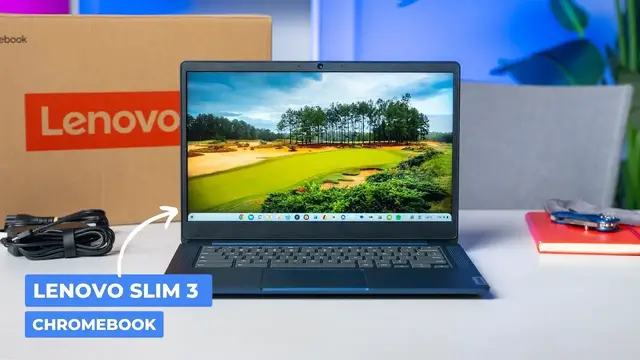
so this here in front of me is the new lenovo chromebook thinkpad slim 3 it's those words in
0:27
some sort of fashion. I think it's actually IdeaPad Chromebook Slim 3, but it doesn't really matter
0:34
We all call it the Slim 3. And it's one of those devices that kind of showed up quietly. So we saw
0:39
the Flex 3i at CES and a lot of the same ideas, kind of the same DNA that Lenovo used to make that
0:46
device. And we've done a review of it and stuff. And it's an impressive Chromebook for a really
0:50
good price. This follows kind of in that same vein. So it's a device that is not a convertible
0:57
So this is a clamshell. It's still all made of plastic, and it's still meant to be an affordable
1:02
device. Now, the Flex 3i comes with the N100 processor, so the newest small core Intel
1:09
Alder Lake chip. This one instead comes with MediaTek's newest entry-level chip that we had
1:15
hands-on time with very little at CES, and we've not had a Chromebook with that chip inside just
1:20
yet. This one comes with that. It's the Campanio 520 chip. It's paired up with 4 gigs of RAM
1:25
64 gigs of storage so we're not impressing anybody with any specs here but I have been
1:31
using this Chromebook for about a week or so basically just at home and kind of on the weekends
1:36
and I'm actually pretty impressed with what Lenovo has done on a very modest budget here
1:42
Now on a normal day it's $319 I think but it has been on sale twice now for $169 and so you're
1:49
talking a sub $200 Chromebook that honestly whenever we start talking about those kind of
1:54
price points, you just expect a lot of things to go wrong. Bad screens, flimsy, flimsy build quality
2:00
not a lot of port selection, very slow processors, no storage, all those kind of things. Bad track
2:06
pads, you name it. Those things start falling apart. And that's just not all been the case here
2:11
Now, it's not everything perfect with this Chromebook by any stretch of the imagination, but
2:15
I can tell you like you pick it up there an attention to detail on this Chromebook that you don see on too many Chromebooks that are in this price category especially the one that since it launched like a month ago has dropped down to sub 200 bucks
2:29
twice already. Just like even where the lines and stuff come together, it's just, it's just well
2:34
built. It's well put together and yeah, it's all plastic, but it feels firm in your hands. Like I
2:39
can't wrench on it. It's, it's really well put together. There's obviously no fans here. It's an
2:43
ARM processor, and there's no real ports down one side of it here. It just has a Kensington lock
2:49
on that side. But if we flip over here, you do get one USB type C port that will do display out
2:55
USB type A, headphone microphone, micro SD card slot, which you're going to want because it's
2:59
only 64 gigs of storage. I found on cheaper Chromebooks ones that I'm just leveraging like
3:04
web apps and stuff on, 64 gigs is usually enough to kind of get things done with. But
3:09
it doesn't stop on just the outside. Like it's a good looking Chromebook. Once I open it up, even the rigidity here, like I can move it a little bit
3:18
But for an all plastic build, something I can hold onto by the corner like this and it feels solid
3:24
Thumbs up. I love that. We'll talk about my favorite part of this one, the screen here in
3:29
just a second. But surprisingly, because that top part is firm, like there's a little give there
3:35
but I'm putting pretty substantial pressure here on it. Not a ton of give. The keyframe's
3:40
actually really good too. Now it's not backlit, but you know, it's nice and quiet and you know
3:45
the keys feel good. Like typing long form stuff on this has been really comfortable
3:49
You get upward firing stereo speakers that aren't great. I wasn't surprised by that really
3:55
They're going to have to cut corners somewhere with this thing. Those are not good speakers
3:59
but they give you some stereo separation, which is something I guess. It's a 720p camera that
4:05
looks pretty bad. But it does have the privacy shade on there, which again, I think all Chromebooks
4:09
should, but this one does have it. And for a cheap Chromebook, it's just nice to see that stuff
4:15
Again, plastic trackpad or Mylar here. But the click is pretty reassuring. It's been super smooth
4:21
It doesn't get sticky. It's been used. And I didn't even wipe it off for this because I kind
4:24
of wanted to show you, I've been using this thing. And I'm happy with the trackpad performance too
4:30
And so when you pop this thing open on the desk, it's really comfortable actually to use
4:36
So as I said earlier, my favorite part of this thing is actually the screen. And I don't think
4:39
I ever said that for a sub Chromebook And the majority of the time it been available it has been sub So I just going to kind of keep referring it to that or referring to it as that Uh again it it just over normally but it does go on sale frequently already but it is a matte finish uh 16 by nine full HD
4:57
14 inch screen, but it has touchability as well. And just incredibly vibrant colors. Like
5:03
our cameras always make the colors look good on Chromebooks, even on screens that aren't really
5:08
that good. Um, but I'm telling you, there's something really nice about looking at this
5:13
screen. Um, the, the combination maybe of the, it's not super matte finish. There's still a tad
5:18
bit of glare, which I think lets the color still be good and the viewing angles to be really solid
5:24
but it's just a treat to look at. It's fantastic. And I'm a sucker for a matte finish touchscreen
5:29
I just like the way it feels whenever you're like scrolling through stuff. So it's nice to reach up
5:34
and be able to touch stuff when you need it. Uh, but the colors, the brightness at 300 nits
5:38
It's plenty high definition, so 1080p at 14 inches is just a really nice sweet spot
5:44
You don't have to scale too much. You can scale it up a little bit, but overall, it's a great panel
5:49
And again, I'm like, it's a $200 or sub-$200 Chromebook. It's just wild
5:53
So now you've got this nice build quality, a really nice typing experience with a good
5:57
trackpad and a great screen. It's like you're getting most of the stuff you need to feel good about using your Chromebook
6:03
all in one place. Now, where things do get interesting is you've got four gigs of RAM and the Companion 520
6:09
Now, this is a follow-up to the Companion 500, or what we used to refer to as the MT8183
6:14
It's the processor that was most famously in the Lenovo Chromebook Duet 3, meaning it's
6:19
not real fast. It is a step up from that chip in every way
6:24
So it can handle multitasking better. It can do 1080p output to an external monitor
6:30
It obviously can handle 1080p on the internal screen, too. But overall, you're going to run into, if you're doing more than like two things at a time, you're going to start seeing some lag, some processor lag there
6:41
So just know that going in. I mean, you have to know when you're paying this little amount of money for a Chromebook that there are going to be some things that aren't stellar about it
6:50
And again, the performance is if you keep things in check. You know, I went in and pushed it
6:54
I had 10 tabs open or whatever and two or three messengers open and music running on Spotify and doing graphic design work and Gravit
7:04
I felt it big time. I go to just switch desks and just stop for a second and have to gather itself and go to the next thing It just part of it Four gigs of RAM doesn help that either But if you kind of keep it down
7:18
keep it narrowed to, hey, I'm going to get on Facebook or I'm going to answer some email or
7:22
I'm going to check my bank or I'm going to watch a video or something like that, it has no problem
7:26
with any of those things. Getting a few tasks done at one time is fine. I'd say really expanding
7:32
out into a bunch of virtual desks, probably not what you want to be doing on this
7:36
But ultimately, that makes for a really good Chromebook experience. And at the end of the day, we have to talk about price all the time
7:45
It informs your purchase decision. And every time this thing goes on sale, again, it's been there twice in the course of the
7:51
month or so that it's been available. It's kind of a no-brainer Chromebook
7:55
You want one that you just can have around the house that doesn't feel like a cheap piece
7:59
of crap sitting around. This is an awesome Chromebook to consider for that
8:05
Don't get it when it's not on sale. It's been on sale enough already early on that I could say, if you see it at its MSRP
8:10
just wait a minute. Take a step back and give it time. It will go back on sale
8:15
I almost can promise you that. And if you spend $169 on this thing, I 100% guarantee you will be satisfied with what you bought
8:23
You're going to enjoy using this thing. If you go and spend $300 on it, some of the performance issues might give you some hassle there
8:31
But yeah, I love what they put together with this thing. I love what Lenovo is doing between this and the Flex
8:36
and hopefully some upcoming Duet tablets. If you've not heard about that, check out the website, chromeandbox.com
8:42
We've been talking about some upcoming Duet 3, Duet 5 possibilities with a much more powerful MediaTek processor inside
8:49
So I can imagine them doing some pretty sweet stuff there as well
8:53
So Lenovo, if you're listening, keep doing what you're doing in this price range
8:57
This is really, really interesting stuff. And I think Chromebooks that are great for a lot of people
9:02
that just kind of need a device around the house or need a device for the kids or something for school or something like that
9:06
uh, the, the slim three is a great choice in all of those cases, but guys, that is it for this one
9:12
If you enjoyed this video, give us a thumbs up, head down there, hit that subscribe button and
9:16
be sure to hit the notification icon as well. If you'd like to be alerted when we make future
9:20
videos, just like this one until next time, we'll see