0:00
The promise of Chromebook Plus is pretty simple
0:02
Make devices that have all the necessary hardware to deliver a great all-around ChromeOS experience
0:07
at a price that doesn't hurt too bad. And so far, every Chromebook Plus model that I've used for any amount of time has delivered on this promise
0:14
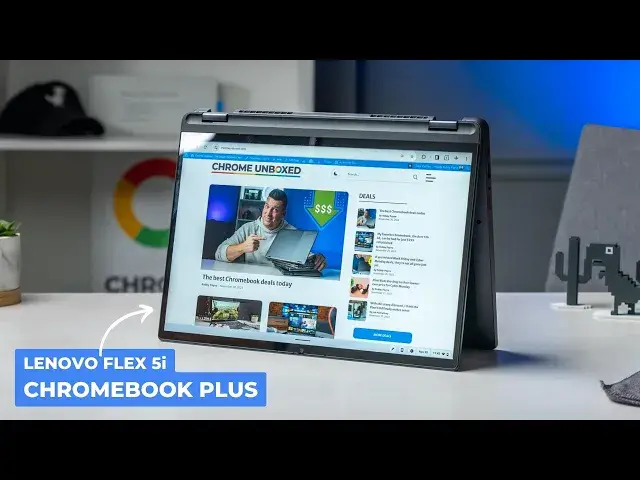
So it should come as no surprise when I tell you that the Lenovo Flex 5I Chromebook Plus is fantastic, imperfect, but a very enjoyable Chromebook experience
0:24
Let's talk about it. And before we get going, a quick apology for my voice
0:33
I've been dealing with laryngitis. I've made my vocal cords bad, and they're not quick to forgive, apparently
0:39
So I'm sorry, my voice sounds like this. I'm doing everything I can to make it go away, but we also don't want to stop making content
0:46
and we don't want to stop getting through these Chromebook Plus reviews so that you guys can see them
0:50
So bear with me through this, and this is a shorter review, so you won't have to listen to my
0:55
scratchy throat too long. Early on, before Chromebook Plus was actually unveiled
0:59
I was under the impression that the Slim 3i Chromebook from Lenovo wasn't just a soon-to-be Chromebook Plus model itself
1:06
but it was also like an example of what Chromebook Plus would mean from a build quality standpoint
1:11
I mean that device is like ultra rigid frame is just so impressive feeling And I really thought that was gonna be like a marker of Chromebook Plus quality Unfortunately the Slim 3i is a bit of a unicorn in that regard
1:23
and overall build quality on Chromebook Plus devices is, well, fine. I mean, for the most part
1:29
it's not bad, but it's not standout either, and that definitely applies to the Flex 5E here
1:34
Like many other Chromebooks, the all-aluminum and glass lid feels really great, but it makes the
1:39
plastic keyboard deck feel just average by comparison. There's only moderate flex in the bottom half of the chassis and all the seams come together very nicely
1:48
So overall, I'd say the build quality is good, not great. It's not exceptional, but it's not a deal
1:54
breaker either. But a big upgrade Lenovo included in this version of the Flex 5i is in the display
1:59
department. Versus the older models of this Chromebook, this new 16 by 10, 14 inch
2:04
1080p screen looks really great. It's bright at over 300 nits. And with reasonable size
2:09
bezels all around, it really becomes one of the real highlights of the Flex 5i. Look, I always want to see
2:14
400 Nits to really fawn over a screen, but this one is really good. And it's an important step up
2:20
from the older 250 Nits 16 by 9 screens that Lenovo used to use on the Flex 5 series. Above that
2:26
screen, you get the Chromebook Plus certified 1080P webcam with temporal noise reduction. And with the
2:31
additional camera tricks provided by a Chromebook Plus like background blur an enhanced lighting correction you can actually get decent images and videos from this camera Like most Chromebooks it a small sensor so don expect like cinema quality or anything
2:44
but it does look pretty good with decent lighting. And though the keyboard deck isn't as rigid as I'd prefer, the typing experience is still
2:51
really good, and the spacious smooth trackpad performs just like you would expect
2:56
If I'm going to be a little bit picky, I'd like the keys to be a bit firmer. There's like a little bit of wobble to the keycaps that makes the keyboard feel
3:02
feel a bit loose, but I've been really fast and accurate on this keyframe, so I can't complain
3:06
too much, and as always, having backlighting there is nice to have. And flanking that keyboard is a set
3:11
of upward-facing stereo speakers that are quite good. The speakers in devices like the HPX-36014C
3:18
do outclass this one a bit, but the sound from these speakers is full and loud. It's good enough for some
3:23
YouTube content or like gaming here and there. Around the sides of the device, we also get a nice
3:27
port selection, including two USB type C's, USB Type A, headphone, microphone jack, micro SD card slot
3:34
and a Kensington lock. If I'm going to gripe a little bit, though, I would love to see a full-size
3:38
HDMI port here so that I wouldn't have to get out a dongle or a dock whenever I'm at the desk
3:43
But having USB Type C on each side and a decent docking station does take care of that
3:47
And we almost don have to talk about the internals do we With Chromebook Plus you know it fast but I go over them anyway The Flex5i has has the Intel Core I3 1315U 8 gigs of RAM and 128 gigs of storage and that means things are fast and efficient
4:03
At no point in my work did I ever run into any performance issues, and I'd imagine you probably won't either
4:09
I mean, from general Chromebook tasks to multitasking to cloud gaming, this Chromebook, not surprisingly
4:15
handled all of it with ease. And it can do all that while maintaining an 8 to 10 hour battery life
4:19
I mean, there's just nothing to complain about here. And I think overall, that's the takeaway
4:23
Yeah, some Chromebook Plus models are better than others, and I think this one is one of the best
4:28
but all of them are great at the main Chromebook stuff, and that's where Google has done something pretty cool
4:34
with this entire Chromebook Plus thing. We still have other models to review, of course
4:38
but I feel like I'll be saying a lot of the same stuff with each of those reviews, and that's a good thing
4:44
Now you just have to decide what size or what form factor you want, and you can know that if it's a Chromebook
4:49
Plus, it's probably pretty good. But guys, that's it for this one. If you enjoyed this video, give us a thumbs up
4:54
Head down there, hit that subscribe button, and be sure to ring the notification icon as well
4:58
If you'd like to be alerted when we make future videos just like this one. Until next time, we'll see you