Up next in 10



Sponsored by NordVPN. Buy a 3-year deal at 70% off, get an extra plan on top! Click here: https://chromeunboxed.com/nordvpn
・・・・・・・
Let’s get this out of the way up front: Chrome OS on tablets has been pretty bad up to this point. Whether it was the lack of a proper tablet UI, the poorly considered first attempt at a new tablet UI on the Slate, or simply the fault of slow, cheap hardware, the overall experience has been really bad for a ton of users. It’s even become so poor that Google themselves backed out of making tablets at all moving forward.
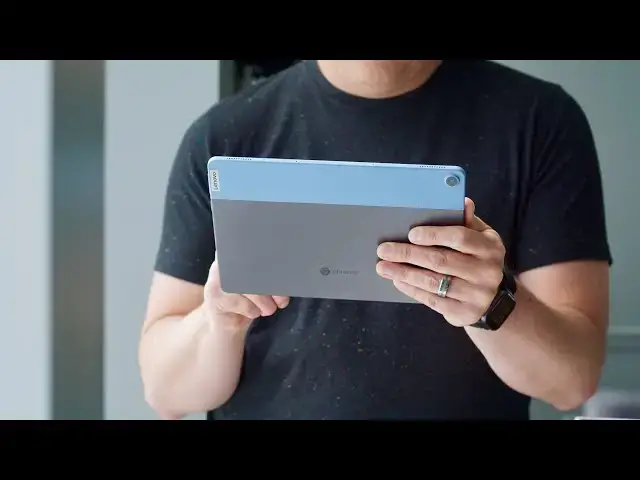
Luckily for you and for me, Google didn’t give up on the idea of tablets: only the possibility of building new ones in-house. The software for tablets running Chrome OS has only continued to grow and mature, and the Lenovo Chromebook Duet is the first real benefactor of these efforts. With this device, Lenovo is looking to enter the narrative and tell a bit of a different story with Chrome OS on tablets. And I think they have a real shot at altering the eventual outcome of this product category’s future.
Read more: https://chromeunboxed.com/lenovo-chromebook-duet-review-value-affordable-chrome-os-tablet/
Join our newsletter: http://bit.ly/2WjCDm7
・・・・・・・
Shop Chromebooks on CHROME SHOP: https://chrmshop.com/
Subscribe to the channel: http://bit.ly/2xFuj6L
The Music We Use - PERFECT for YouTube: http://bit.ly/31W6PYP
Show More Show Less View Video Transcript
0:00
it's no secret chrome os on tablets up
0:02
to this point has not been a really good
0:04
experience and we've had a few attempts
0:07
and a lot of them have just not worked
0:08
out that well and into this narrative
0:11
lenovo has launched this the chromebook
0:14
duet and
0:15
i think it's attempt to change that
0:17
story is working out quite well let's
0:20
get into it
0:21
[Music]
0:25
today's video is brought to you by
0:26
nordvpn they're the vpn of choice for
0:28
millions of consumers because they're
0:30
awesome at what they do and that's
0:31
keeping your browsing safe and secure
0:33
whether you're at home or on the go if
0:34
you'd like to learn more about them and
0:36
their services head over to
0:37
chromeunbox.com forward slash nordvpn
0:40
and you can learn more and get started
0:41
today before we jump into all the parts
0:43
of this review i want to mention one
0:45
thing right up front that we normally
0:46
hold towards the end because it informs
0:48
so much about what we think about this
0:51
chromebook tablet and that's the price
0:54
it starts at 279 dollars that's what the
0:56
keyboard included and that price is just
0:59
absolutely bonkers and it changes the
1:01
way that we have to look at just about
1:02
everything with this device because no
1:04
matter what this thing does it's going
1:06
to get a pass all over the place because
1:08
of the absolutely low price and the
1:10
value proposition it adds to that so i
1:12
wanted to make sure that you understand
1:14
that right up front so we're not kind of
1:16
holding that until the end of this
1:17
review let's start with the build
1:18
quality what lenovo has put together at
1:20
this price point is kind of insane
1:23
honestly when you pick this thing up
1:25
there's nothing about it that feels
1:26
cheap or
1:28
budget in any way shape or form we've
1:30
got metal on the outside the thing is
1:32
super thin it weighs less than a pound
1:35
it's glass all across the front and
1:37
again the thing just exudes quality it
1:39
looks awesome just sitting there on the
1:41
desk but when you hold it in your hand
1:43
it feels secure and firm and well put
1:46
together and well thought out and then
1:48
you add in the keyboard and the back
1:49
piece that come with this device it
1:51
comes right in the box it's no
1:52
additional purchase and the magnet is
1:55
nice and strong that attaches the
1:56
keyboard on the bottom and the back
1:58
piece that just pops into place that has
2:00
the kickstand built in
2:02
snaps on easily as well and the whole
2:04
thing just cohesively goes together it
2:06
looks good it feels good in the hand the
2:08
hinge on the back extends to multiple
2:11
angles so depending on your situation
2:13
you can kind of stand the thing up
2:15
exactly as you would like it the
2:16
keyboard feels pretty nice and well made
2:19
too again to be something that's
2:20
included in the box and for the first
2:22
time of many times i'm going to
2:24
reference at this price point the fact
2:26
that you get that keyboard and that back
2:28
stand in the box with this device is
2:30
just kind of crazy and the whole thing
2:32
comes together it looks good it feels
2:34
good and punches way above its weight
2:37
class here for a 280 dollar chromebook
2:40
or tablet depending on how you want to
2:42
look at it the thing is built well it
2:44
looks great it feels great and lenovo
2:46
just absolutely knocked it out of the
2:48
park putting this thing together moving
2:49
on to the screen this is another place
2:51
where lenovo killed it honestly it's a
2:53
1080p plus screen so it's actually
2:56
1920x1200 which gives it a 16 by 10
2:59
aspect ratio and that helps it to be a
3:01
little bit taller and a little more
3:03
squarish and honestly just makes it feel
3:05
a little bit less ridiculous using as a
3:07
tablet in either landscape or portrait
3:09
mode so
3:10
it's a win here this kind of resolution
3:12
on that size of screen 10.1 inches
3:14
diagonal
3:16
makes for a really nice ppi and it makes
3:19
it look like there's not really any
3:20
pixels on the screen at all and so from
3:22
any viewing distance it's a tablet after
3:24
all so sometimes you're holding it up
3:25
close and sometimes it's on a desk you
3:27
know with the keyboard in front of it it
3:29
just looks great in any form or fashion
3:31
oh and it is 400 nits in brightness so
3:35
there weren't really any environments
3:36
where i ran into a situation where the
3:38
screen felt dim the colors look great
3:39
the viewing angles look great across the
3:41
board again when we start talking about
3:44
a budget device which is what this thing
3:45
falls under it's insane that the screen
3:48
looks this good budget devices usually
3:49
have terrible screens and that is just
3:51
not the case at all
3:53
way to go lenovo this screen looks
3:54
awesome moving on to the keyboard and
3:56
trackpad
3:57
these are interesting because again this
3:59
is a tablet first and foremost but it
4:02
does come in the box and this is after
4:04
all a chromebook so it's best to think
4:06
of it as a there when you need it sort
4:07
of situation it acts as kind of a cover
4:10
for the tablet and you can just pop it
4:11
off and use the tablet all you want and
4:13
then when you actually need to sit down
4:15
and bang out a handful of emails or you
4:17
know do some more serious web browsing
4:19
or a handful of other tasks then you you
4:20
know pop the keyboard on and get to work
4:22
with it there are some things that need
4:24
to be said about it though the the key
4:26
travel is good but the key spacing is
4:28
very tight obviously because it's a 10.1
4:30
inch tablet so there's just not a lot of
4:32
space all the keys are there but they
4:34
had to make some concessions around that
4:36
that being said i was able to get some
4:38
pretty decent productivity and typing
4:40
speed on it once my fingers were more
4:42
used to the spacing and more used to
4:44
some of the strange keys that are there
4:45
and how they're kind of sized on this
4:47
keyboard as for the trackpad it is small
4:49
too and again these are things that you
4:51
would expect on a 10.1 inch tablet
4:54
keyboard
4:55
but it works pretty well things you know
4:57
gestures and sliding around on it are
4:59
fine there are times when it misses a
5:01
handful of you know two finger clicks or
5:03
three finger clicks and if it's in your
5:05
lap in certain
5:06
angles and certain scenarios it can be a
5:08
little finicky to get those clicks but
5:11
overall again as a thing that's kind of
5:14
uh an accessory to a tablet it it does
5:17
all right and when it's sitting on a
5:19
desk or on a table it's actually quite
5:21
nice to use to be honest with you and
5:23
for what feels like just a free
5:25
accessory that you're getting along with
5:26
this tablet
5:28
it performs as well as you'd expect it
5:30
to i wouldn't say that this is something
5:31
you're going to do hours and hours of
5:33
work on i wouldn't want to do hours and
5:35
hours of work on it but again when you
5:37
need it and you need to just pop it in
5:39
and get a few things done
5:40
it does the job around the outsides of
5:42
the device you'll find just a couple
5:44
speaker grills power volume rocker and
5:46
then a single usb type c port the
5:48
speakers are a pretty big improvement
5:50
over the 10e if you saw that video where
5:53
i just deemed those speakers pretty much
5:55
garbage
5:56
these speakers are a big improvement
5:57
over those and we're going to work in
5:59
quite a few scenarios they're loud
6:01
they're kind of tinny but for tablet
6:03
speakers they do pretty well and give
6:04
you decent stereo separation the usb
6:06
type-c port while i wish there was a
6:09
headphone microphone jack alongside it
6:11
it will act as your headphone microphone
6:13
jack with the included dongle that they
6:15
put in the box
6:16
it also acts as your charging port you
6:18
know your data transfer port and your
6:20
display outport on the inside this
6:22
tablet is rocking the mediatek p60t
6:26
processor otherwise known as the 8183 as
6:28
it was in development four gigs of ram
6:31
64 gigs of internal storage or you can
6:33
bump that up for 20 bucks to 128 gigs of
6:36
internal storage and
6:37
frankly that's the one i would recommend
6:39
that you go get it's the only one that's
6:41
been available so far at best buy so for
6:43
299 dollars you double your storage
6:46
that's just kind of a no-brainer because
6:47
there's no external storage options here
6:49
what that all comes together to mean is
6:52
a pretty decent software experience that
6:54
i think is only going to get better with
6:56
time because
6:57
let's face it you get eight years of
6:59
updates with this tablet so if you buy
7:01
one it's probably going to be around for
7:02
a little bit and all of these new
7:04
gestures that chrome os has introduced
7:06
for tablet mode like swipe up to go home
7:08
and swipe up and hold for multitasking
7:10
and swipe in from the left to go back
7:12
and split screen mode and all that kind
7:13
of stuff those things are all kind of
7:15
new honestly right now and they're
7:17
behaving quite well on this tablet
7:19
already they're only going to get better
7:21
and ultimately it's made for a really
7:24
nice kind of fun tablet experience and
7:26
that's just not been something i've been
7:28
able to say about chrome os tablets
7:29
honestly it's always been lurching and
7:31
slow and sluggish and dropped animations
7:34
and even with a processor that's not you
7:36
know top of its class and best in class
7:39
and the fastest thing you've ever used
7:41
this thing gets along pretty well and i
7:43
get to use all those gestures and kind
7:44
of move stuff around and it feels i
7:47
don't know dare i say it a little more
7:48
ipad-esque and that's in a good way
7:51
because ipads are nice and smooth
7:53
they're fast and they're the experience
7:54
on tablets a lot of people are used to
7:57
while this isn't as smooth as an ipad i
7:59
don't want to say that the gesture and
8:01
navigation system that is being used now
8:03
kind of does feel like that and it
8:05
mimics what you see on android now and
8:07
what is starting to feel cohesively as
8:09
the way that you move around a touch
8:11
screen device and so i'm glad to see the
8:14
developers for chrome os start to
8:16
implement all this stuff and i'm glad to
8:17
see that the lenovo
8:19
chromebook duet actually uses all of
8:21
these gestures well and and does a good
8:23
job at rendering all of them on screen
8:25
another benefit here is battery life and
8:27
i think lenovo says something like 10 to
8:29
12 hours and i was easily getting that
8:32
of use time if not more sometimes i mean
8:34
there were times i was clicking on the
8:35
battery in the bottom it said something
8:37
like 16 or 17 hours left at like 90
8:40
percent i i don't think you're gonna get
8:42
those kind of numbers but if you're
8:43
looking to cruise above 10 hours of use
8:45
time this thing is going to do that
8:47
easily and that's pretty awesome and
8:49
that's thanks mainly in part due to that
8:51
arm architecture that arm processor
8:53
that's inside
8:54
because they are very very easy on the
8:56
battery and while you may lose a tad bit
8:58
of performance because of that you're
9:00
gaining a ton of battery performance
9:02
here and this thing is an all-day champ
9:04
no questions another benefit to that arm
9:06
architecture that's running in here is
9:07
the fact that android games run really
9:10
really well and android apps across the
9:12
board do because ultimately android apps
9:14
are written for arm processors first and
9:16
then they can add x86 or intel type
9:19
chips support later and because of this
9:22
i was able to run all sorts of games and
9:24
applications way better than i would
9:26
have expected to and honestly some games
9:29
like call of duty mobile for instance
9:30
that i can't even get to get past like
9:32
the main menu screens on intel based
9:34
chromebooks not only ran on this thing
9:37
but was completely playable super
9:39
enjoyable actually
9:40
to jump into matches and play and so
9:43
it's worth thinking about again this is
9:44
a tablet first so a lot of people are
9:46
going to be installing android apps on
9:48
here and it runs android apps really
9:50
well another benefit that you get here
9:52
again this is a tablet first is the
9:54
ability to use a usi stylus once they
9:57
become available and i have to throw
9:59
that in there because as we're filming
10:00
this they're very hard to get your hands
10:02
on lenovo hasn't even released their own
10:04
usi stylus they say it is coming very
10:06
soon so hopefully in the next few weeks
10:09
maybe a couple months we'll see lenovo's
10:11
own branded usi stylus so i can't really
10:13
say much about the stylus support how
10:15
well it does or doesn't work at this
10:16
point because i don't have their stylus
10:18
to use with it yet but eventually you'll
10:20
just be able to buy a usi stylus pick up
10:22
this tablet jot notes and google keep or
10:25
squid or whatever your
10:26
note-taking app is of choice or if you
10:28
want to draw or doodle or any of those
10:30
types of things this thing will support
10:32
all styluses that are usi certified
10:36
[Music]
10:45
so at this point it's pretty clear to
10:47
see this is a well-built attractive
10:50
fun-to-use crazy affordable chromebook
10:54
tablet and i think lenovo's done a great
10:56
job here in changing this narrative
10:58
where
10:59
i honestly up to this point to this
11:01
device have thought yeah chrome os on
11:03
tablets i just don't know where the
11:05
benefit is i don't know that it's
11:07
something i want to use
11:09
i feel like the duet is changing that
11:11
it's changing it for me i'm not even a
11:12
tablet guy i'm someone who i'm either on
11:14
my phone large screen phone or i'm going
11:16
to pick up my chromebook and while
11:18
that's still the case for me i don't
11:20
know that i'm going to go to this device
11:21
all the time for everything i found
11:24
myself using it in situations i probably
11:26
wouldn't have thought of using a tablet
11:28
before sitting on the couch looking up
11:29
some stuff doing some shopping checking
11:31
social media reading the news casting
11:34
youtube tv some of those things that
11:36
i've relegated to my phone and wished i
11:37
had a bigger screen on it's been nice to
11:39
be able to expand that screen and not
11:41
have to feel like i've got to get out a
11:42
big chromebook to do so so if you're a
11:44
tablet user and you're in the market for
11:46
something you can get a few extra things
11:47
done on this is a great device if you're
11:50
a chromebook user and you're looking for
11:51
a quick on-the-go small thing that can
11:53
be stowed in the back this is a great
11:54
device if you're looking for something
11:56
for your kids that's super affordable it
11:58
looks great it's going to perform well
12:00
this is a great device it's going to fit
12:01
in well to a lot of people's use cases
12:04
and i think that's what lenovo was going
12:06
for and i think they've kind of hit the
12:07
nail right on the head especially at
12:09
this price point so when it does become
12:11
available and they're more in stock
12:13
because right now it's hard to find this
12:15
is something i would easily say go and
12:18
buy it if you look at it and think i
12:19
think i'd like this thing you're
12:21
probably gonna like it and it's easy to
12:23
recommend at this kind of price point
12:24
but guys that's it for this one if you
12:26
liked it give us a thumbs up go down
12:27
there and hit that subscribe button hit
12:29
the notification bell as well if you'd
12:30
like to be alerted when we make future
12:31
videos just like this one and don't
12:33
forget to hit that join button to see
12:34
all the stuff that our members get like
12:36
custom emojis and behind the scenes
12:38
footage till next time we'll see
12:41
[Music]