0:00
Lenovo's booth today here at CES 2020 I
0:02
spent quite a bit of my time there with
0:04
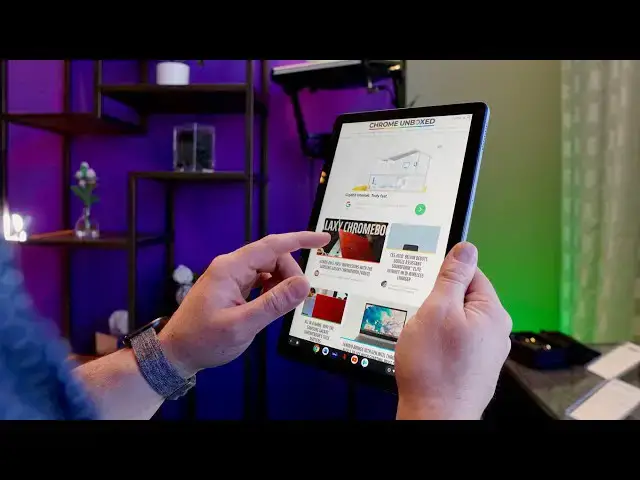
their new Chrome OS tablet
0:06
the Lenovo Chromebook duet and I came
0:10
away just super excited about the idea
0:12
of Chrome OS on tablets again so let's
0:15
go over it and I can tell you why we'll
0:24
get to all the specs and all that kind
0:25
of stuff here in just a second but the
0:27
main pieces of this that Lenovo has
0:29
absolutely nailed are all the pieces
0:31
that make tablets worth using in the
0:33
first place and if you've been around
0:35
our channel for any amount of time or
0:36
you've been over at Chrome on box comm
0:38
you know that I don't think all tablets
0:40
are actually worthwhile like I don't
0:42
like big tablets and tiny tablets have
0:44
kind of been supplanted by phones so for
0:47
me tablet needs to be somewhere in the
0:48
10 inch range it needs to be easy to use
0:50
with one hand and there need to be
0:52
things on it that are actually worth
0:54
using as a tablet and most of my use
0:57
cases for tablets have just kind of gone
0:59
out the window as Chromebooks have
1:00
gotten lighter and thinner so honestly
1:02
I've learned to just operate without a
1:04
tablet for most things and I use a phone
1:06
and a Chromebook but this tablet is a
1:08
little bit different and most of that is
1:10
because it's of a size that makes a lot
1:13
of sense for multiple things and it's
1:15
weight is completely in control whereas
1:18
things like the pixel slate for instance
1:20
we're just too heavy maybe too rounded
1:22
and odd to hold in one hand and use in
1:24
that way this device comes off as
1:26
something that I could hold it feels
1:28
like for like an hour without having to
1:30
deal with any you know hand cramping or
1:31
feeling awkward reading a book with it
1:34
reading magazines watching content that
1:36
kind of stuff that you want to do on a
1:38
tablet this thing is going to really
1:40
excel at it comes in just under a pound
1:42
and in a 10.1 inch form factor it was
1:45
just a delight to pick up and use I
1:48
really liked browsing through websites
1:49
on it reading news I pulled up a book
1:52
and did a couple things with it
1:53
everything I did on it every time I
1:55
picked it up I was just absolutely
1:56
pleased with the way it felt in my hand
1:58
and to be honest when we heard that
2:00
there was going to be a 10-inch
2:02
Chromebook tablet at CES I just kind of
2:06
tempered my expectations expected
2:08
something cheap or flimsy or something
2:10
aimed at the education market and this
2:13
it's put together exceptionally well the
2:15
display is bright and vibrant at 400
2:18
nits it's a full HD panel but it's 16 by
2:21
10 so it's actually 1920 by 1200 I
2:24
believe it's the the resolution on it
2:25
powered by MediaTek snooze chip the P 60
2:28
T it just has a lot of good stuff going
2:31
and on top of that the price on it is
2:33
kind of bonkers it's $279 and it comes
2:36
with the first-party keyboard that pops
2:39
in viet pogo pins and then it's also got
2:40
a back that magnetically attaches with a
2:42
kickstand so you get the entire package
2:44
you get the Chromebook feel you know you
2:46
can use it on your lap or on a table and
2:49
you know orientation or you can pop it
2:51
out of all that stuff and have this nice
2:53
light functional tablet and I just can't
2:57
say that of any other Chrome OS device
2:59
at this point the pixel slate is nice
3:02
and it does a lot of cool things but
3:03
it's too big for a tablet it's too heavy
3:06
this solves all of that and the mediatek
3:09
processor inside is fast enough and it's
3:11
going to be really good at running armed
3:12
applications so all your Android apps
3:14
are gonna run really well on it pop it
3:16
into the keyboard stand and you have a
3:17
fully functional desktop the USB C port
3:20
on the edge is going to give you
3:21
extensions to you know extra monitors
3:24
and stuff like that so I mean this is
3:25
going to be a productive little tablet
3:27
for a lot of people but it's also going
3:29
to be a fun tablet to use as an actual
3:31
tablet and that's just not something
3:33
I've been able to say yet have any
3:34
Chrome OS tablet because the ones that
3:36
have been small enough have been kind of
3:38
cheap and clunky feeling and the
3:40
processor in them was too slow to really
3:42
enjoy so this solves it from a processor
3:44
standpoint it solves it from a price
3:46
standpoint I mean $280 for the keyboard
3:48
and the tablet itself and honestly from
3:51
an aesthetic standpoint the thing looks
3:52
great it feels great to use and I'm just
3:55
as you can probably tell super-excited
3:57
that there's finally a Chrome OS tablet
3:59
coming it's coming out in May that it's
4:01
gonna be so easy to recommend for people
4:03
to pick up for $280 yes go pick this
4:06
thing up it'll have 4 gigs of RAM 128
4:08
gigs of internal storage so plenty of
4:10
space to store all your stuff and again
4:12
it's just an easy recommend and we're so
4:14
excited that there's finally a tablet
4:17
that is going to be worthy of saying hey
4:19
you want a tablet that runs Chrome OS
4:21
and Android apps and all that stuff
4:22
check this one out because it's
4:24
actually a good contender but guys
4:25
that's been it for this one as we get
4:28
more about this tablet and hopefully we
4:30
get a review unit pretty soon we'll
4:32
definitely come back with more and we'll
4:34
have a review of it when it comes out
4:36
later in the year but for now that's it
4:38
if you liked this one give it a thumbs
4:40
up go down there and hit the subscribe
4:41
button and be sure to hit the
4:42
notification bell if you'd like to be
4:43
alerted when we make future videos just
4:45
like this one until next time we'll see