Up next in 10



Sponsored by NordVPN. Try it out and get 70% off a three-year plan + 3 months free! Click here: https://chromeunboxed.com/nordvpn
・・・・・・・
Part of the overall charm that exists when buying or considering a Chromebook for your next computer lies in the ability to get a working laptop that does what you need at a price that comes in far below what you were expecting. Even the "high-end" Chromebooks on the market are far below what you'd pay for top-tier Windows laptops when we compare apples to apples. When you can get something as nice as the ASUS Flip C434 most days for a little over $500, you know you are dealing with a tech category that values low prices.
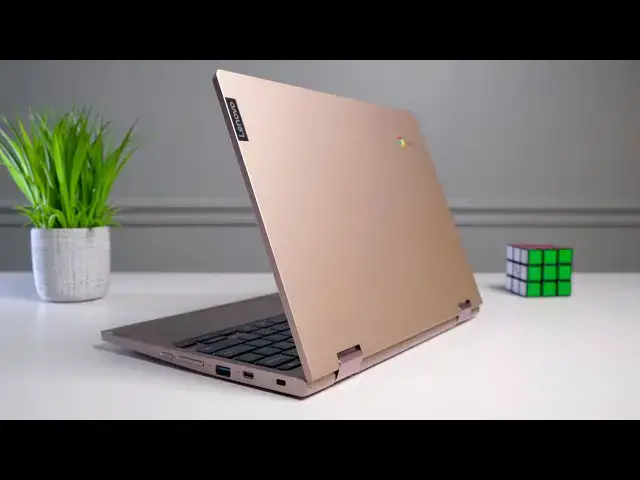
In our Best Chromebooks of 2019, the device we are talking about today took home the #1 prize in the $300 & under category because of the many upsides this Chromebook comes with at a relatively low price point. When spending less than $300, our expectations are quite low for any laptop, so seeing the Lenovo deliver on so many of the core competencies we all value in day-to-day laptop use is encouraging and its the reason this Chromebook shines despite a handful of not-so-great parts.
Shop the Lenovo Chromebook C340 on Chrome Shop: https://chrmshop.com/lenovo-chromebook-c340/
Read more: https://chromeunboxed.com/lenovo-yoga-chromebook-c340-review-best-budget/
Join our newsletter: http://bit.ly/2WjCDm7
・・・・・・・
Shop Chromebooks on Amazon: https://fave.co/2OuedYL
Subscribe to the channel: http://bit.ly/2xFuj6L
The Music We Use - PERFECT for YouTube: http://bit.ly/31W6PYP
Show More Show Less View Video Transcript
0:00
one of the most appealing parts about a
0:01
Chromebook is the possibility of getting
0:03
a decent piece of hardware for a small
0:05
price and if you do it as well as this
0:07
device the Lenovo Chromebook C 340 it's
0:11
the follow up to a very popular
0:12
Chromebook from last year to C 330 and
0:15
it improves in almost every single way
0:17
so let's talk about it today's video is
0:26
brought to you by Nord VPN there the VPN
0:28
of choice for millions of consumers
0:29
including consumers that use Chromebooks
0:31
just like this Allah novo C 340 because
0:34
they are excellent at keeping your
0:35
browsing safe and secure whether you're
0:37
at home or out and about if you'd like
0:39
to learn more about them and their
0:40
services head over to chroma and box
0:41
comm for it slash Nord VPN to learn more
0:44
and get started today
0:45
what makes this device great is a
0:47
combination of all its parts for a low
0:49
price so let's talk through each of
0:51
those pieces as we normally do for any
0:52
other review and we'll start with the
0:54
overall build quality and one of the
0:56
things that lenovo did that improved
0:58
upon last year's model was add an
1:00
aluminum lid on the top and add some
1:02
color choices so you can see the one we
1:03
have here is the kind of like rose gold
1:06
pinkish version there's also a nice
1:08
silver version if you're not kind of
1:09
into this colorway but in general they
1:11
added an aluminum lid which gives the
1:13
whole thing a lot more stable feel and
1:15
they didn't really change too much else
1:17
and other than some things we're going
1:19
to talk about with the screen and some
1:20
of the bezel stuff I don't have any real
1:22
issue with the way that this thing is
1:23
put together it feels nice and firm it's
1:26
not overly thick or chunky but it feels
1:28
like it kind of take a beating and I
1:29
just kind of like the way it looks on a
1:31
table and it feels good in the hand and
1:33
it feels sturdy and substantial without
1:34
feeling super cheap and for a device in
1:37
this kind of price bracket I think that
1:39
hits all the points you're looking for
1:40
the concession we normally expect to see
1:42
in Chromebooks in a sub $300 price
1:44
bracket is a crummy screen in general
1:46
and we've reviewed plenty of them look
1:48
back through our videos you'll see tons
1:50
of Chromebooks where I say hey
1:51
everything's good about this device at
1:53
this price you're just gonna have to
1:54
live with a bad screen but that's not
1:56
the case with the C 340 though this
1:59
device just like its predecessor has an
2:01
IPS panel it's not the brightest thing
2:02
in the world about 180 nits or so so
2:05
don't expect crazy brightness but good
2:07
colors and great viewing angles it's a
2:09
glass panel so when you flip it into
2:10
tablet mode it doesn't feel weird
2:11
plastic or
2:12
and in general again for a device in
2:15
this kind of price bracket it just
2:17
delivers there wasn't any part of me
2:19
that thought oh god I hate looking at
2:21
this screen I don't want to use this
2:22
Chromebook because I can't stand the
2:23
screen in general it just kind of
2:26
delivers the one issue I have with the
2:28
display isn't the display panel itself
2:30
like I said it's colorful and it's got
2:31
good viewing angles and stuff like that
2:33
even the resolution on it at 11.6 inches
2:36
it's 16 by 9 1366 by 768 you know some
2:39
of the most pixel dense display you ever
2:41
gonna see but it looks pretty decent
2:42
but the bezels around it are a little
2:44
bit ridiculous I mean they're huge and I
2:46
get that they probably needed to add
2:48
space in order to make room for a proper
2:50
sized keyboard but the bezel across the
2:52
bottom of this thing is just massive and
2:55
I think you used to have lenovo on there
2:57
and the older version of it and maybe
2:58
that kind of made my eye not see it as
3:00
much but it's just black across the
3:02
bottom there and it's really high up off
3:05
the keyboard deck so it kind of looks a
3:06
little bit awkward but again it doesn't
3:08
take away from the usability of this
3:10
display it just looks a little dated and
3:12
a little bit funny moving on down the
3:14
keyboard and trackpad are both pretty
3:16
decent they're not the best trackpad and
3:18
keyboard you're gonna see but they're
3:19
also not the worst the keyboard is a
3:21
little bit mushy and the click mechanism
3:24
could be better
3:25
I did miss keystrokes from time to time
3:26
and I use this device as my daily device
3:29
for a solid week but I wouldn't say it's
3:31
a reason not to go by this Chromebook
3:32
there are keyboards that are far worse
3:34
than this one but there are a ton of
3:35
them there's a lot better and lenovo
3:37
make some pretty decent keyboards for
3:38
Chromebooks so I kind of expected a
3:40
little bit better here but just don't
3:42
expect this to be a brilliant typing
3:44
experience the trackpad on the other
3:46
hand is surprisingly solid and again
3:48
it's not Gorilla Glass and it's not the
3:49
most exceptional trackpad I've ever used
3:51
but generally when we talk about cheaper
3:53
Chromebooks they have track pads that
3:55
get kind of messy and pick up oils and
3:57
are hard to navigate on and they flop
3:59
around a little bit or they're too firm
4:01
to press had none of those issues
4:03
whatsoever with this trackpad it's
4:04
easily the most enjoyable plastic non
4:07
glass trackpad I've used in a Chromebook
4:10
around the sides of the device you get a
4:11
pretty generous port selection with the
4:13
USB type a on both sides and a USB
4:16
type-c on both sides all those ports do
4:18
exactly what you'd expect the C will
4:20
charge on either side do audio output
4:22
video output all that kind of stuff data
4:24
transfer you also get a headphone
4:25
microphone
4:26
Jack and a microSD card slot so as far
4:28
as connectivity is concerned this
4:30
thing's not lacking in the least the
4:32
other openings on this Chromebook leave
4:34
a lot to be desired though and I'm
4:35
talking about the speakers here usually
4:37
I don't expect too much from speakers I
4:39
really don't like laptop speakers in
4:41
general are pretty bad these might be
4:44
the worst speakers I've ever heard on a
4:46
laptop not just a Chromebook on any
4:48
laptop they are not only tinny sounding
4:50
they're insanely quiet we put them up I
4:53
was trying to figure out how bad they
4:55
were I put him up against the pixel book
4:56
go which maybe is completely unfair
4:58
since those are probably the best
4:59
speakers I've ever heard and it wasn't
5:01
even close which then caused us to go I
5:03
wonder what it sounds like on a phone so
5:04
I got my pixel 4 XL out and turned it up
5:07
and the phone blew it away like cuz my
5:09
initial comment was it sounds like phone
5:11
speakers and no it doesn't even sound
5:13
like phone speakers I don't know what to
5:14
compare it to just don't plan on
5:16
listening to like any audio whatsoever
5:18
on this thing carry some headphones
5:20
these these are bad finally on the
5:22
inside we need to talk about internals
5:24
and this is where things kind of taken
5:25
upswing again in general for Chromebooks
5:27
not just for this Chromebook but the
5:29
latest generation of affordable intel
5:32
chips so the seller on and four thousand
5:35
we called it gemini lake for quite some
5:37
time the chips that are in these
5:39
Chromebooks get the job done in general
5:41
and I've used it for almost an entire
5:44
week as my only device I didn't crack
5:46
open any other Chromebook I did the all
5:48
the stuff that I normally would do
5:50
hooking up an external display running
5:51
virtual desktops all that kind of stuff
5:53
and while there was a animation stutter
5:56
here and there in general this thing
5:58
absolutely delivered I didn't really run
6:00
into any big problems and then run into
6:02
any shutdowns or freeze ups or anything
6:04
like that and the chipset just does its
6:06
job and I've seen other people complain
6:08
that possibly the media tech that they
6:10
used in the last version of this is a
6:12
better processor I would have to argue
6:14
completely different at least for using
6:15
it with Chrome OS and the general things
6:17
you're gonna do with a Chromebook the
6:19
performance of this thing was way better
6:21
than I would have expected paired up
6:23
with that decent performing chip is four
6:25
gigs of ram and 64 gigs of internal
6:26
storage and it's nice to see in a sub
6:29
$300 Chromebook that lenovo decided to
6:31
put 64 gigs of internal storage instead
6:34
of the 32 that a lot of people for their
6:36
entry models put in their Chromebooks
6:37
battery life has also
6:39
been stellar I've had no issue getting
6:41
through a full workday with this thing
6:42
again the low pixel count on there and
6:45
that Gemini Lake processor kind of pair
6:47
up for easily some of the best battery
6:50
life I've seen on a Chromebook as a
6:51
matter of fact right now is just
6:53
checking the battery's almost full like
6:54
96% but it's saying that I could get
6:56
about 13 hours at this point I wouldn't
6:59
count on that once you start using it
7:00
that numbers gonna go down but don't be
7:02
surprised if you get easily 10 hours out
7:04
of this device one final note with this
7:06
thing I actually found myself playing
7:08
stadia on this device more than just
7:10
about any other device and it's for a
7:12
combination of things one it's small and
7:14
so it could almost be a secondary device
7:16
in your bag but when you launch stadia
7:18
stadia it doesn't care what kind of
7:20
device you're running it doesn't care
7:21
what the processor is I didn't care
7:22
about any of those things as long as it
7:24
can stream the media then it can play
7:26
stadia and since it's a 720p display
7:28
it's also gonna stream stadia 720p which
7:32
requires almost no bandwidth whatsoever
7:34
but it looks still nice and sharp on
7:37
here because the display is kind of
7:38
smaller so what I found was pairing up a
7:40
mouse and playing destiny - or playing
7:43
Ghost Recon breakpoint was actually
7:45
really great on this device and it made
7:48
me want to get this thing out to play
7:50
stadia on it more than just about any
7:51
other device I've got
7:55
[Music]
8:00
[Applause]
8:02
so we come to the end of it and as
8:05
always the question becomes is this
8:07
thing worth buying if you're looking for
8:09
a sub $300 Chromebook that can do a lot
8:11
for you yeah absolutely
8:13
as a matter of fact we made our best of
8:15
2019 Chromebooks list and this in the
8:18
300 and under category was our winner
8:20
and for clear reasons for this kind of
8:22
money you just don't expect to have a
8:24
screen that's this decent or performance
8:26
that's this decent or matter-of-fact
8:28
build quality and trackpad that are this
8:29
decent if really the only concession
8:31
you're gonna have to deal with is chunky
8:33
bezels and bad speakers seems like a
8:35
pretty easy decision to make now if
8:37
you're in the market for something
8:39
that's high-end and you want high
8:40
quality and you want better speakers and
8:42
you want a better screen and all that
8:44
kind of stuff no this isn't the
8:45
Chromebook for you but if you're looking
8:47
at something under $300 you're looking
8:49
for a good deal and you're looking for
8:50
the best bang for your buck this one is
8:53
so easy to recommend so if that's you go
8:55
out and snag one there'll be a link in
8:57
the description down below but guys
8:58
that's been it for this one if you liked
9:00
it give it a thumbs up go down there and
9:01
hit that subscribe button and make sure
9:03
and hit the notification bell if you'd
9:04
like to be alerted when we make future
9:06
videos just like this one until next
9:07
time we'll see you
9:14
[Music]
#Consumer Electronics