Up next in 10

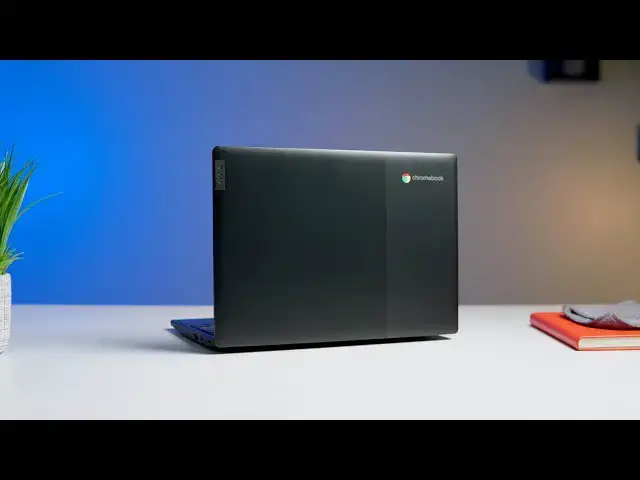
Lenovo Chromebook 3 Review: $169 And Worth It
Jul 1, 2020


Sponsored by NordVPN. For a limited time, grab the 3-year plan with 70% off! Click here: Click here: https://chromeunboxed.com/nordvpn
Shop the Lenovo Chromebook 3: https://chrmshop.com/lenovo-chromebook-3/
・・・・・・・
When you think about Chromebooks under $250, most devices in that price range are either on their way out the updates door or they are simply just garbage. I mean honestly, we've reviewed $350 Apollo Lake Chromebooks that I wouldn't wish on my worst enemy. (HP, I'm looking at you.) So, when I unboxed the $169 Lenovo Chromebook 3, my expectations were well-tempered, to say the least. Man, was I surprised. After using the Lenovo Chromebook 3 as my daily driver for a little over a week, I'm excited to bring you this review and share my thoughts on the first sub-$200 Chromebook I'd gladly recommend.
Read more: https://chromeunboxed.com/lenovo-chromebook-ideapad-3-review-cheap-good-review/
Join our newsletter: http://bit.ly/2WjCDm7
・・・・・・・
Shop Chromebooks on CHROME SHOP: https://chrmshop.com/
Subscribe to the channel: http://bit.ly/2xFuj6L
The Music We Use - PERFECT for YouTube: http://bit.ly/31W6PYP
Become a member of Chrome Unboxed to help us make our channel even better, and for access to exclusive perks: http://bit.ly/CU-join
Show More Show Less View Video Transcript
0:00
hey what is up guys as promised today
0:02
I'm bringing you my review of the $169
0:06
Lenovo Chromebook 3 we picked this thing
0:08
up at Walmart a couple of weeks ago and
0:10
I've been using it as my main device
0:12
here at the office and around the house
0:14
so we're gonna decide today can you get
0:16
a Chromebook for $169 and actually be
0:19
worth it before we dive in this video is
0:26
brought to you by Nord VPN it is the VPN
0:28
of choice for millions of users because
0:30
it works across all devices anywhere you
0:33
go on the go or at home keep you safe
0:35
and secure while browsing online to
0:37
learn more head over to chromevox comm
0:39
forward slash Nord VPN first off we want
0:42
to talk about build quality when you're
0:44
spending $200 or less on a Chromebook or
0:47
any device for that matter you don't
0:48
really expect a whole lot we've seen a
0:50
lot of devices that come out of the box
0:52
with flexible keyboard decks and the
0:54
hinges are bad and they just feel cheap
0:57
the lenovo 3 doesn't it does not feel
0:59
cheap you get it out of the box it looks
1:00
good it has that nice two-tone textured
1:04
lid granted the whole thing is plastic
1:06
but they have a nice texture contour on
1:08
the bottom it feels solid it doesn't
1:10
flex and overall it just feels like a
1:13
way more expensive device I compare it
1:15
kinda to the Acer r11 that just felt
1:18
solid but it's not as chunky as the r11
1:20
either so it doesn't feel like a giant
1:22
brick if you throw in your bag it's 11.6
1:25
inch device and it's relatively light in
1:27
that vein so overall I give this thing a
1:30
really really high rating on the build
1:32
quality it doesn't feel like something
1:33
that you have to worry about breaking
1:35
now it's not milspec rated like a lot of
1:37
nuovo devices and you're not gonna want
1:39
to dump some coffee on the keyboard but
1:41
had a hundred and seventy dollars it
1:43
feels like a device that you can carry
1:44
around with you and you don't have to
1:45
worry about whether or not it's going to
1:47
break my number-one concern when we
1:49
bought this device was the display what
1:51
we've seen with 11 inch devices in the
1:54
200 to $300 price range is usually a TN
1:57
panel at 220 nits which doesn't have to
2:00
be bad but most times it just is the
2:03
viewing angles are usually horrible the
2:05
screens washed out the brightness is
2:07
horrible
2:07
this device I'm not gonna lie it's not
2:10
great this is not a pixel book go it's
2:12
even the Samsung Chromebook plus but it
2:14
is 215 it's it is a TN panel but the
2:18
colors are better than most devices in
2:20
this price range the viewing angles are
2:22
actually good you can actually see the
2:24
screen if you're sitting off angle it's
2:26
plenty bright for a device of this size
2:29
the colors are washed out the color
2:31
gamma it's not great on it but akin when
2:33
you're looking at a hundred and seventy
2:35
dollars you get a lot of passes and this
2:38
screen was honestly a lot better than I
2:40
expected
2:40
and again the screen it's not a touch
2:42
display but this isn't a convertible
2:44
device either so that's not something
2:46
that a lot of consumers expect out of a
2:48
regular clamshell it does fold almost
2:50
flat but this just isn't a device that
2:52
you're gonna want to use in a in that
2:54
type of manner so for the panel that it
2:56
has in it it's not bad and I definitely
2:58
recommend it over a lot of other devices
3:00
in this range alright moving down from
3:02
the display the keyboard on this was
3:04
also better than I expected Lenovo just
3:06
generally does well on their keyboards
3:08
they're not super great like a pixel
3:11
book go but they're not bad either the
3:13
keys are firm they have a good travel to
3:16
them and a good click and it's
3:17
comfortable typing on I found myself
3:19
with it extended to my external monitor
3:22
and working on this keyboard many times
3:24
I forgot that I was working on 170
3:26
dollar device so it's not backlit but
3:29
again it's a cheap device this is a
3:31
budget Chromebook and you don't see a
3:33
lot of devices in the 200 to 250 dollar
3:35
range that have a keyboard that's
3:37
actually comfortable to type on again
3:39
it's not a pixel book or a pixel book go
3:41
but I would be comfortable I have been
3:44
comfortable writing on this device for
3:45
two weeks straight and never once
3:47
thought man this is bad the trackpad
3:50
it's plastic but it has a good click the
3:53
mechanism is good it's not like we've
3:55
seen some where the the trackpad its
3:57
floppy and you have to get in there and
3:59
mess with it it just it feels good when
4:01
you're using it but again it's plastic
4:02
and if you live in an area that any type
4:05
of humidity you're gonna find your your
4:07
finger stick from time to time so I
4:08
found myself wiping it down or or having
4:11
to dry my hands off a couple times
4:12
during the day but overall I found the
4:14
experience to be great and way better
4:16
than I anticipated out of a device at
4:18
this price another thing that's pretty
4:19
impressive for this device is port
4:21
selection a lot of devices in this range
4:23
will give you one of
4:24
this has two USB see two USB a a micro
4:28
SD card slot and of course the
4:29
Kensington lock that only Best Buy uses
4:31
but for a device that this cheap and
4:33
this small that's a lot of port
4:35
selections so you're not going to have
4:37
any problem adding peripherals and
4:39
things of that nature and then with the
4:40
expanded storage of an SD card slot you
4:43
can use it for transferring photos or
4:44
doing whatever so it's pretty impressed
4:46
by that one area that I didn't even
4:48
realize was as good as it is until today
4:51
is the speakers they don't have a lot of
4:54
base but again we talk about this all
4:56
the time laptops don't have great
4:57
speakers they just don't with the
4:59
exception of some devices like the pixel
5:01
bug oh you're just not going to sit and
5:03
listen to music for any length of time
5:05
on a laptop but this has downward firing
5:09
speakers right at the front and they're
5:11
slightly angled up there's no base but
5:14
they are super loud and very clear so if
5:17
you needed a cheap device to have at
5:18
home to use for zoom meetings google
5:21
meet conferences things of that nature
5:22
this device would actually be great it
5:25
has a regular 720p camera so that's not
5:27
going to be awesome but what laptop has
5:29
a great camera but the speakers on it
5:31
are going to make for a really great
5:33
experience if you're having to use video
5:34
conferencing on a regular basis
5:36
so overall ports speakers again out of
5:39
the box way better than I could have
5:41
ever expected out of a device that cost
5:43
less than $200 the reason this device
5:45
caught our eye to begin with is because
5:47
it has a newer gem and I like our
5:48
processor and that's an N for T 20 most
5:52
people aren't familiar with what all
5:53
that stuff means it's a Celeron
5:54
processor now a couple of years ago
5:56
Intel came out with the Apollo Lake
5:58
chipsets which a lot of manufacturers
6:00
are still using and honestly they're not
6:02
great I wouldn't recommend them to even
6:04
a student of elementary school student
6:07
the Gemini Lake R is different
6:09
it puts up really good octane scores and
6:11
it's powerful enough for even the
6:13
moderate user people who have a lot of
6:14
tabs open watching videos things in that
6:17
nature it has four gigs of RAM and 32
6:19
gigs of storage and though those
6:21
combined working in my desktop for two
6:24
weeks I rarely ever had an instance
6:26
where I thought man the sink struggling
6:29
had to have Linux apps open and media
6:32
playing and a bunch of tabs before I
6:33
realized that it was starting to slow
6:36
down a little bit and I remember sitting
6:37
at the desk one day and looking at Robby
6:39
and thinking man my pixel book go is
6:40
acting weird today and then I looked
6:42
down and realized I wasn't on the pixel
6:44
but go I was on this so if you're
6:46
worried about a cheap Chromebook not
6:47
having enough power I can tell you this
6:49
device has enough for the average user
6:52
and when I say the average user I mean
6:54
the fat middle people that are doing
6:55
social media schoolwork at home
6:59
videoconferencing for work if you're
7:00
doing spreadsheets finances things like
7:02
that this device is not going to have a
7:04
problem with it it'll run Android apps
7:06
just fine there's not a lot that your
7:09
average consumer is not going to be able
7:10
to do with this so if you just want
7:12
something that's inexpensive but will do
7:14
the job and do it well this device is
7:17
definitely a good recommend it's not
7:19
just like oh it's cheap so let's buy it
7:22
it's cheap and it's actually really good
7:24
and as I mentioned we picked this one up
7:26
at Walmart and it seems for now at least
7:28
to be an exclusive to that store lenovo
7:31
has a 64 gig model that retails for $229
7:34
this one is 169 and that's not a sale
7:37
price that is the price that they have
7:38
it at Walmart it's 32 gigs of storage
7:40
you can pick it up online or in-store
7:43
but if you're wondering if this device
7:46
will work for you I think the answer is
7:48
yes and I definitely do recommend it but
7:50
that's it for this one guys if you liked
7:52
this video make sure to hit the
7:53
subscribe button below and don't forget
7:54
to give us a like and hit that
7:56
notification bell if you like the video
7:58
and would like to hear more stuff like
7:59
this because there's ton more
8:00
Chromebooks coming in 2020 so we're
8:02
gonna have a lot more content to bring
8:04
you so until next time we'll see you
8:09
you
#Laptops & Notebooks
#Product Reviews & Price Comparisons