0:00
so just this morning the fedex guy
0:01
showed up and dropped this off the
0:03
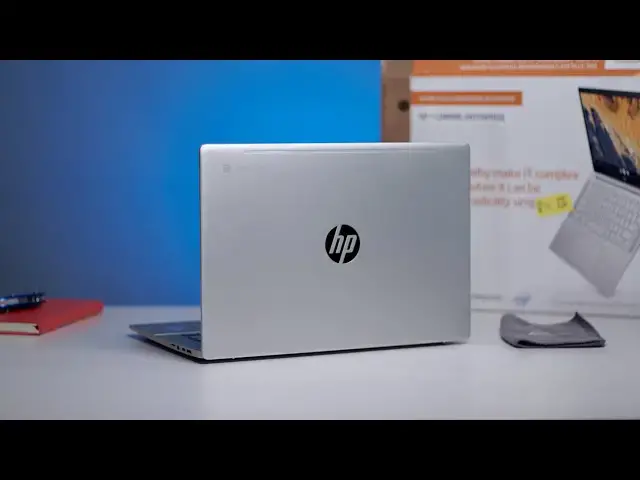
hp pro c640 chromebook enterprise
0:06
and while the name is a crazy long
0:08
honestly it shares a lot
0:10
in common with a chromebook we've just
0:11
recently reviewed in the chromebook x360
0:15
from hp and for a lot of consumers
0:17
that's going to be the chromebook you'd
0:18
want to go get if you're interested in
0:20
what this device has to offer this one
0:22
is geared completely towards enterprise
0:24
hard to even buy in consumer channels
0:26
and so if you're an i.t
0:28
person and you're looking at rolling out
0:29
a ton of chromebooks this one might be
0:31
of interest to you it brings a lot of
0:32
premium features to the table and so
0:34
we just want to jump in the box get some
0:36
first impressions right along with you
0:38
we have not had any hands on time with
0:40
this device up to this point
0:41
and we're excited to see how it performs
0:48
first up we have to talk about this
0:51
um i'm hoping this isn't how this thing
0:53
shows up when people order these from
0:55
hp.com which is the only place you can
0:58
it almost looks like they cut off a box
1:01
and then put it around a box
1:03
so i didn't want you to see this on
1:05
camera and think that we thought that
1:08
not really sure what's going on here but
1:11
there's a lot of info on the outside of
1:12
this that make it kind of interesting so
1:15
uh we don't have the spec yet on this as
1:19
because it doesn't say so anywhere on
1:21
the outside this one comes with a
1:24
variations of the core i processors 10th
1:27
gen corey processor so
1:29
a lot of what you've seen us review
1:30
lately is going to be at play here wi-fi
1:33
again it could be an i3 or an i5 they
1:37
8 gigs of ram 16 gigs of ram we're not
1:39
exactly sure at this point but you get a
1:42
around here that's kind of cool uh you
1:44
do get the fingerprint scanner upward
1:46
firing speakers and then the switch
1:48
for the webcam and all of this should
1:50
sound pretty familiar again if you
1:55
and reviews because these two share a
1:58
lot in common and to be fair the x360
2:00
actually brings some things to the table
2:03
does not it is not a 360 device this is
2:05
just a clamshell chromebook so i got to
2:09
cut into this thing i'm just going to
2:11
shop right through this
2:14
and again we have not laid hands on this
2:16
they announced these i think back in may
2:20
with the elite as well and then there's
2:23
an entry-level 14-inch chromebook
2:25
that came with this so uh we have not
2:28
or touched these devices yet
2:32
and one thing i would say it's probably
2:33
going to be different about this one
2:36
is the fact that this one uh i think is
2:38
all aluminum the x360 14 out of
2:41
had a plastic base to it i don't know
2:46
that may be the same plastic base so
2:48
there could be a whole lot of the
2:49
same things going on here and we saw
2:51
this from hp last time around
2:53
they had the x360 14 that we all knew
2:57
and then they did the x360 14 g1 for
3:01
and it literally was the same chromebook
3:02
it was just all aluminum
3:04
it doesn't seem like that's the case
3:05
this time around uh we'll
3:07
inspect that further nothing too fancy
3:13
get all this stuff out here all right so
3:16
here's the chromebook this is odd too
3:20
um they've got the regular hp logo on
3:26
it was pretty cool had that new hp logo
3:28
which is literally just four lines
3:31
this one does not come with that so
3:35
fan ports are much better concealed here
3:39
across here is for fans and you know
3:43
and i can see it'd probably be
3:45
impossible for me to show you on camera
3:47
uh up underneath the hinge there's some
3:51
fans are hidden a little bit better in
3:54
so let's see walk it around the sides
3:56
here this one does come with a full hdmi
3:58
access so we haven't seen that in any
4:01
chromebook for a long time
4:02
other than the spin 713 from
4:05
acer so it's kind of cool to see that
4:07
especially again we're talking about
4:10
these people are going to be going in
4:12
you know doing meetings all that kind of
4:13
stuff being able to plug in an hdmi
4:15
directly to a display is very handy it
4:18
looks like a kensington lock port usb
4:21
and that little jaw drop thing so your
4:23
chromebook can talk i guess
4:24
um this one again this is not super thin
4:28
really know the reason for these little
4:29
jaw drop things but whatever
4:31
they're kind of cool looking another one
4:32
of those over here another usb type-c
4:34
micro sd card headphone microphone jack
4:37
you would like to see in a chromebook is
4:39
here let's see if we get a one finger
4:43
pretty close i bet after a couple times
4:47
oh wow so they sent us the core i7
4:50
there's a nice little sticker right
4:54
uh and yeah this is a matte finish
4:55
display so some some different things
4:57
going on here uh right off the jump from
5:01
uh a we have a kind of a matte finish
5:03
screen so that screen is going to
5:05
resist you know sunlight and all that
5:07
kind of stuff and so what that does is
5:09
that helps a screen that maybe not as
5:10
bright as a glossy screen
5:13
perform in a way that's similar because
5:15
it can kind of deflect some of those and
5:18
harsh lights from whether it be overhead
5:21
or whatever and it helps you to be able
5:23
to see that screen from multiple angles
5:25
and in harsher lighting conditions and
5:28
it looks decently bright
5:30
i don't i don't know exactly how bright
5:32
it is but under our studio lights a lot
5:34
displays look pretty dim this one
5:36
doesn't look too bad let's see
5:39
yep touch screen um very similar
5:43
keyboard deck feels really really firm
5:46
uh you get the bno speakers up top it
5:48
doesn't have the same curvature that the
5:52
14c has around the chassis this one's
5:54
way more boxy and just kind of squared
5:56
nice glass trackpad for sure great click
6:00
mechanism none of these things are
6:01
surprises hp does a great job with
6:04
a lot of times my biggest gripe is with
6:07
and it looks like this is going to be a
6:08
pretty decent one decently small bezels
6:11
and um i thought we got a webcam switch
6:15
let me look around here i actually don't
6:23
oh yep it's very very hard to see
6:25
impossible probably for me to show you
6:26
on camera but there's a physical
6:28
webcam switch up here so uh that
6:30
actually slides over so it's just a
6:33
the webcam i'm i'm a big fan of having
6:36
those so that people aren't sticking
6:37
stickers and stuff like that to the top
6:39
i think the uh the 14c handled this a
6:41
little more elegantly
6:42
there's actually a physical switch on
6:44
the side of the device that allows you
6:45
to just flip the switch and it turned
6:48
um yeah other than that i mean
6:51
there's not a whole lot else to talk
6:55
yeah the hinge feels good nice and
6:56
sturdy again so it's a full flat so you
6:58
can do the 180 degree thing
7:00
uh we'll have to check to see if usi
7:02
stylus input works here
7:04
it would be the first matte finish
7:05
display with usi stylus support if it
7:08
in fact support that and again this
7:10
comes in lots of configurations and you
7:12
can change those configurations at
7:14
at will on hp site so impossible for me
7:16
to tell you exactly at this point
7:18
how much of this particular chromebook
7:20
will run other than i can tell you it's
7:23
um i want to say even the lower end of
7:25
this thing if you just take all the
7:27
still runs about 900 bucks or something
7:29
so it's definitely going to be a bulk
7:31
pricing scenario where an it
7:33
group is going to go in and say hey we
7:34
need 15 or 20 or 50 of these things
7:38
but what i can tell you so far is that
7:42
backlit keys here uh fingerprint scanner
7:44
the trackpad again keyboard feel
7:46
really good and the screen looks pretty
7:47
good uh we'll have to test it under
7:50
um i just don't know for consumers where
7:54
this thing would make any sense
7:55
versus the x360 14c or some
7:59
other chromebooks that are made by other
8:02
all of that stuff is for the review we
8:04
just wanted to get this thing out of the
8:05
box kind of see what it felt like see
8:07
and see if it made sense in hp's lineup
8:10
as a as an enterprise only chromebook i
8:13
can tell you that if they put this out
8:15
like at best buy or something that
8:17
wouldn't make any sense whatsoever but
8:19
as an enterprise device as we start
8:21
thinking through what it looks like to
8:22
deploy these things in fleets
8:24
i could see this thing maybe making
8:25
sense so we're going to be driving this
8:27
for the next couple weeks
8:29
get some impressions together and
8:30
definitely put a review together for you
8:33
but that's it for this one if you liked
8:34
it give it a thumbs up go down there and
8:36
hit that subscribe button
8:37
hit the notification bell as well if
8:39
you'd like to be alerted when we make
8:40
future videos like this one
8:42
including the review of this device and
8:44
be sure to hit the join button too if
8:45
you'd like to see all the cool stuff
8:46
that our members get like behind the
8:48
scenes footage and custom emoji
8:49
until next time we'll see