Up next in 10



Sponsored by NordVPN. For a limited time, grab the 3-year plan with 70% off! Click here: Click here: https://chromeunboxed.com/nordvpn
・・・・・・・
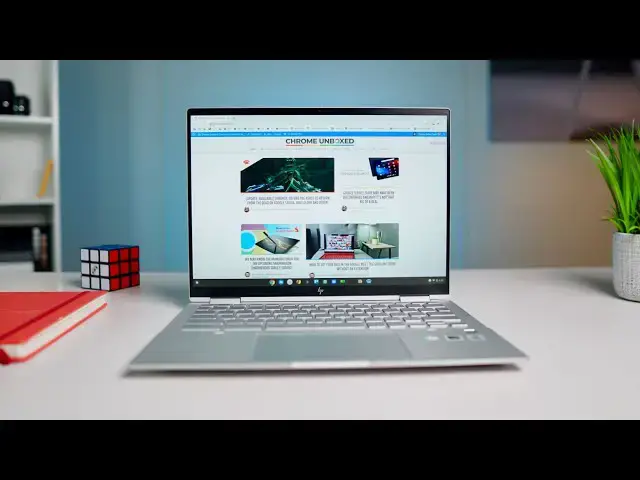
We have the HP Elite c1030 Chromebook in the house and it is the triumphant return of the high-end Chromebook in 2020. This device was announced in May and went up for order in August, but the road to getting it has been long. Now that it has arrived, we can confidently say that this Chromebook plays the flagship role quite well, delivering a well-crafted build quality, all-aluminum body, tiny bezels, and a fantastic keyboard/trackpad experience.
Read more: https://chromeunboxed.com/hp-chromebook-elite-c1030-unboxing-and-hands-on/
Shop HP Elite c1030 Chromebook from HP: https://fave.co/3g4jWON
Join our Patreon community for exclusive extras, an ad-free website experience, access to our private Discord server, and more: https://www.patreon.com/chromeunboxed
Join our newsletter: http://bit.ly/2WjCDm7
・・・・・・・
Shop Chromebooks on CHROME SHOP: https://chrmshop.com/
Subscribe to the channel: http://bit.ly/2xFuj6L
The Music We Use - PERFECT for YouTube: http://bit.ly/31W6PYP
Show More Show Less View Video Transcript
0:00
today here in the office we have hp's
0:02
new top dog chromebook the
0:04
elite c1030 and this device
0:07
is important for a few reasons mainly
0:09
because
0:10
it helps us have another high-end
0:13
chromebook to actually care about
0:15
2020 has been kind of tough on this
0:17
segment and if you go back
0:18
and watch our best chromebooks of 2020
0:20
you'll hear me talk about that exact
0:22
thing that
0:23
since mid-tier chromebooks have gotten
0:25
so good the high-end chromebooks have
0:26
kind of gotten forgotten
0:28
and this new elite c1030 device brings a
0:31
lot of good stuff to the table a premium
0:33
build
0:34
and some cool functionality that we
0:36
haven't seen in other chromebooks so
0:37
we're excited to have this thing in the
0:39
office
0:40
and to see what it's all about
0:44
[Music]
0:45
today's video is brought to you by
0:47
nordvpn they're the vpn of choice for
0:49
millions of consumers because they're
0:50
awesome at what they do and that is
0:52
keeping your browsing safe and secure
0:53
whether you're at home or out and about
0:55
if you'd like to learn more about them
0:57
and their services head over to
0:58
chromeunbox.com forward slash nordvpn
1:01
where you can learn more and get started
1:03
today
1:03
all right so let's jump in the box hp
1:06
has
1:06
already set some stuff up on this for us
1:09
because it did come from them
1:12
with parallels installed so this is
1:15
probably going to be a managed setup
1:16
situation so we'll
1:17
we'll take a look at it in guest mode um
1:21
charger wise nothing out of the ordinary
1:23
there
1:24
just a block and some return stuff
1:27
basic paperwork as we always expect but
1:31
this is what we're here for
1:35
and i'll be honest this thing was
1:37
announced back i think in august
1:39
i believe if i'm correct there and
1:42
we were excited about it back then there
1:44
were some delays you know
1:46
good old 2020 stuff and we've had to
1:49
wait on this thing
1:50
and i i've really thought the whole time
1:53
that this thing brings so many good
1:55
things to the table as long as it feels
1:56
nice in the hand
1:58
it's going to kind of deliver on the
1:59
promise of kind of the next
2:01
really great high-end chromebook because
2:03
ultimately with devices like the spin
2:06
713 for instance it's got a high-res
2:08
display it's a
2:09
aluminum build that's mil-spec rated and
2:11
a core i5 128 gig
2:13
ssd and you know eight gigs of ram for
2:16
630 bucks msrp and then it drops to like
2:18
530
2:20
a lot and so when you've got that much
2:22
horsepower and those kind of specs
2:24
for that kind of price thousand dollar
2:26
chromebooks become a really
2:28
really tough sell unless they deliver on
2:30
all that stuff
2:31
and give you some sort of better tactile
2:34
feel and better look and i can already
2:36
tell you just handling this thing for a
2:37
second that the feel of this thing
2:40
is pretty on point so think something
2:42
more like
2:43
the hp chromebook uh 14 x360 14c
2:47
if you've handled one of those just it
2:49
just has a nice feel to it
2:51
this thing kind of takes that up a notch
2:52
it just feels fantastic and it's got
2:55
these nice chamfered edges around the
2:57
sides
2:57
hopefully that's picking up on camera a
2:59
little bit but so it's all aluminum
3:01
the top and the bottom feel like the
3:03
same material which for chromebooks
3:05
is kind of a cool thing we usually end
3:07
up getting like plastic bottoms and all
3:08
this weird stuff
3:09
so it feels really good it's under three
3:11
pounds hp did send us the
3:13
like really tricked out version of this
3:15
thing so core i7 256 gigs of nvme
3:18
storage 16 gigs of ram
3:20
the one that's available for consumers
3:21
generally across the board is the 999
3:23
version
3:24
and it comes with the core i3 so 10th
3:27
gen core i3
3:28
uh 8 gigs of ram and 128 gigs of nvme
3:33
gonna be plenty of of power for just
3:35
about any user and you'll see as we kind
3:37
of get into this all the other cool
3:38
stuff that comes along for the ride but
3:39
you'll get the same
3:40
chassis here the same port selection all
3:42
that kind of stuff so let's talk about
3:43
those real quick
3:44
on the side we have usba here a usbc
3:49
micro sd card slot and then around the
3:51
other side another usb type c
3:53
uh kensington lock your power volume
3:56
rocker
3:56
and then it looks like the camera
3:59
privacy switch
4:00
is on there too so that's a nice touch
4:02
it's uh you know
4:03
it's no different than the shade that
4:05
slides over on top but
4:07
it's nice to have it there and then
4:08
headphone microphone jack but again
4:10
these nice like squared off edges just
4:12
make this thing feel great and i can
4:13
tell you because i've been using the
4:15
acer spin 713 for most of 2020 at this
4:18
point this one comes with the same 13.5
4:21
inch 3x2 screen it's the resolution is
4:24
different
4:24
but this thing is a way tighter package
4:26
i don't have the the spin 713 here to to
4:29
put it against we'll do that kind of
4:30
stuff for the review
4:31
but this thing just feels like a tight
4:33
tight package like a
4:35
13 or 12 inch chromebook should feel and
4:38
that's because as you'll see here in
4:39
just a second it's got super tiny bezels
4:41
oh and it's got that sweet hp logo that
4:44
new logo that i think is just
4:45
brilliant honestly uh it's four lines it
4:48
makes hp out of four lines it's awesome
4:50
so let's open this thing up and i'm
4:52
fully expecting
4:55
um yep so
4:59
uh we're i don't have the password for
5:01
this thing yet um
5:02
we're waiting on on that to show up but
5:05
um
5:05
let me actually go into guest mode so
5:07
that we can
5:08
kind of see a few things here there we
5:10
go that's good i'll try to turn the
5:11
brightness down a little bit so
5:12
this thing comes with 400 nits of
5:14
brightness on the screen
5:16
which is pretty sweet there is a model
5:19
that you can get they don't ship it just
5:21
yet
5:21
that's going to have a thousand knit
5:23
screen
5:24
this is not that i don't even think you
5:26
can get that yet and it's the one that
5:27
has the digital privacy screen
5:29
uh they're not shipping that one yet
5:31
from the looks of it it's just not even
5:33
available to order yet so
5:34
my guess is sometime in 2021 you'll be
5:36
able to upgrade to that thing
5:38
but crazy bright screen with again a
5:40
digital privacy screen so you'd only be
5:42
able to see
5:43
if you're looking at it on angle
5:44
everything else off angle would turn
5:45
kind of a dark gray or black so that if
5:47
you're on a plane or something you have
5:48
sensitive information
5:50
you can look at that stuff and not have
5:51
to worry about it this model does not
5:53
have that however this one does have
5:55
uh what hp is saying is an upgraded
5:57
screen basically so this one is an
5:59
anti-glare
6:00
400 nit touch screen and and you can
6:03
probably see it probably catch that a
6:05
little bit on camera
6:06
because it's anti-glare some of the
6:08
off-angle stuff is going to look a
6:09
little bit dimmer
6:10
until you're exactly on angle with this
6:12
thing but
6:14
you can already tell around the edges
6:16
just this super narrow bezel and
6:17
probably most notably a super narrow
6:19
bezel
6:20
at the bottom across the bottom you have
6:22
to have room for hinges that's just the
6:23
way
6:24
convertibles work so you're never going
6:25
to get this narrow of a hinge on the
6:27
very bottom
6:28
of a convertible device just not going
6:30
to work out that way but because this
6:32
one is
6:33
by two uh whenever you convert into
6:35
tablet mode
6:36
you get a nicer kind of taller screen
6:39
aspect ratio and then if you flip this
6:40
way
6:41
um you'll get a more tablet-like feel
6:44
and again at three pounds of the
6:46
keyboard on the back and all that kind
6:47
of stuff
6:48
you're not going to wield this thing as
6:49
a tablet all the time but i can tell you
6:50
right now just holding it like this
6:52
in my hands this isn't a terrible tablet
6:54
feel now
6:55
again i think something like the samsung
6:58
galaxy chromebook or
6:59
the original pixel book did tablet mode
7:02
in a convertible
7:03
better than this does because there's a
7:05
gap here you know this is a rounded edge
7:07
chromebook so
7:08
there's a gap right here that kind of
7:09
feels odd that's just kind of part of
7:11
the
7:11
experience that ooh there's a nice
7:13
little magnet that holds it closed so
7:14
that's a nice touch
7:16
we don't have a usi stylus in here with
7:18
us but usi compatible
7:20
as well let's see we've got backlit keys
7:23
and across the top you have some unique
7:25
keys too because
7:27
ultimately this is an enterprise uh
7:30
ready chromebook so there's gonna have
7:32
you know some different keyboard layouts
7:33
that that we're starting to see on these
7:35
chromebooks
7:36
so this one actually has keyboard
7:37
brightness right here so there's buttons
7:39
for keyboard brightness
7:40
and buttons for screen brightness so
7:42
there's four buttons up there instead of
7:43
the two we normally get uh looks like
7:45
you have a screenshot button we've
7:46
talked about that i didn't realize that
7:48
was coming in this chromebook but
7:49
screenshot button uh yeah so there boom
7:52
took a screenshot
7:53
and then your basic other buttons are
7:55
there again you have multi-stage
7:56
backlighting
7:58
we have a fingerprint scanner up here so
8:00
we'll be able to set that up
8:01
this nice large wide track pad that
8:05
feels
8:05
i not surprisingly great hp has been
8:08
making really great track pads
8:10
for the last few years this thing feels
8:12
great
8:14
click feels very even nice smooth
8:18
stable again same exact aluminum on the
8:22
keyboard deck here so we've got all the
8:24
same aluminum around this thing
8:26
a very nice firm build like there's no
8:28
creaking going on here
8:31
and again not surprising a very nice
8:34
keyboard
8:34
let me get my eyes on this screen real
8:36
quick
8:38
and tell you that yeah cranked up
8:41
full brightness that's that's definitely
8:44
has what looks like a 400 minute screen
8:45
on it
8:46
uh that's what they're advertising on
8:48
this again i don't i don't love
8:49
anti-glare screens but if you're about
8:50
that
8:51
uh it is anti-glare it looks like it's
8:53
polarized in some in some fashion but
8:55
ultimately the the standout feature here
8:57
is the fact that this is a three by two
8:58
screen so again you're getting a 13.5
9:01
diagonal measure
9:02
three by two aspect ratio so just like
9:05
the spin 713 this gives you the height
9:07
of a 1080p
9:08
screen just kind of cut off the or a
9:11
1080p
9:12
15.6 inch screen i'm sorry just cut off
9:14
some of the sides so when
9:15
you set this up next to a 15.6 inch
9:18
chromebook you're getting the same
9:19
height on your screen
9:20
now this one is not as high res as the
9:22
713 this is a 1080p
9:24
ish screen so it's 1920 by 1280 i
9:27
believe
9:27
uh is what makes a three by two measure
9:30
and
9:30
honestly i mean again let me look at it
9:35
yeah it's hard to pick out pixels in
9:36
that um and so that's
9:38
that's pretty impressive too and i can
9:40
just tell you picking this thing up
9:41
holding it
9:42
in my hands the the thinness the
9:45
lightness of it
9:46
uh just the overall build quality this
9:48
is
9:49
pixelbook level build this is macbook
9:52
type build this
9:53
is galaxy chromebook type build and
9:56
that's
9:57
ultimately kind of what you pay for when
9:58
you decide to go and get a premium
10:00
device instead of the mid-tier device
10:02
is it going to be like wildly faster
10:04
than the
10:05
the x360 14 or the 713
10:08
from acer and not really no it's there's
10:11
nothing else they can do internally to
10:13
make these things like
10:14
crazy faster than those mid-range
10:16
chromebooks
10:17
what they can do is add a better overall
10:20
experience
10:21
to the way it feels when you hold it
10:23
when it when you use it when you open it
10:24
up
10:25
and just making the external experience
10:28
of using the chromebook
10:29
a better one and clearly they've done
10:31
that with this thing
10:33
obviously we've got to review it we've
10:34
got to spend time with this device we
10:36
got to
10:37
put it through its paces obviously we're
10:39
going to try parallels out on it
10:41
and just see how the screen holds up in
10:42
real world conditions but i can tell you
10:45
uh first blush with this thing that it
10:47
feels fantastic it feels premium so it
10:50
doesn't
10:50
have all the pieces that are like
10:52
misaligned or a little a little rough
10:54
around the edges it just feels
10:56
really really well put together and i'm
10:58
looking forward to spending time with it
11:00
to get the full review done but that's
11:02
it for this one
11:03
guys if you like this video go down
11:05
there and give us a thumbs up
11:06
hit that subscribe button and ring the
11:08
notification bell as well if you'd like
11:10
to be alerted when we make future videos
11:12
like this one including the full review
11:14
of this device
11:16
until next time we'll see
11:30
you
#Consumer Electronics